97
c)HeatingtoPrintingTemperature
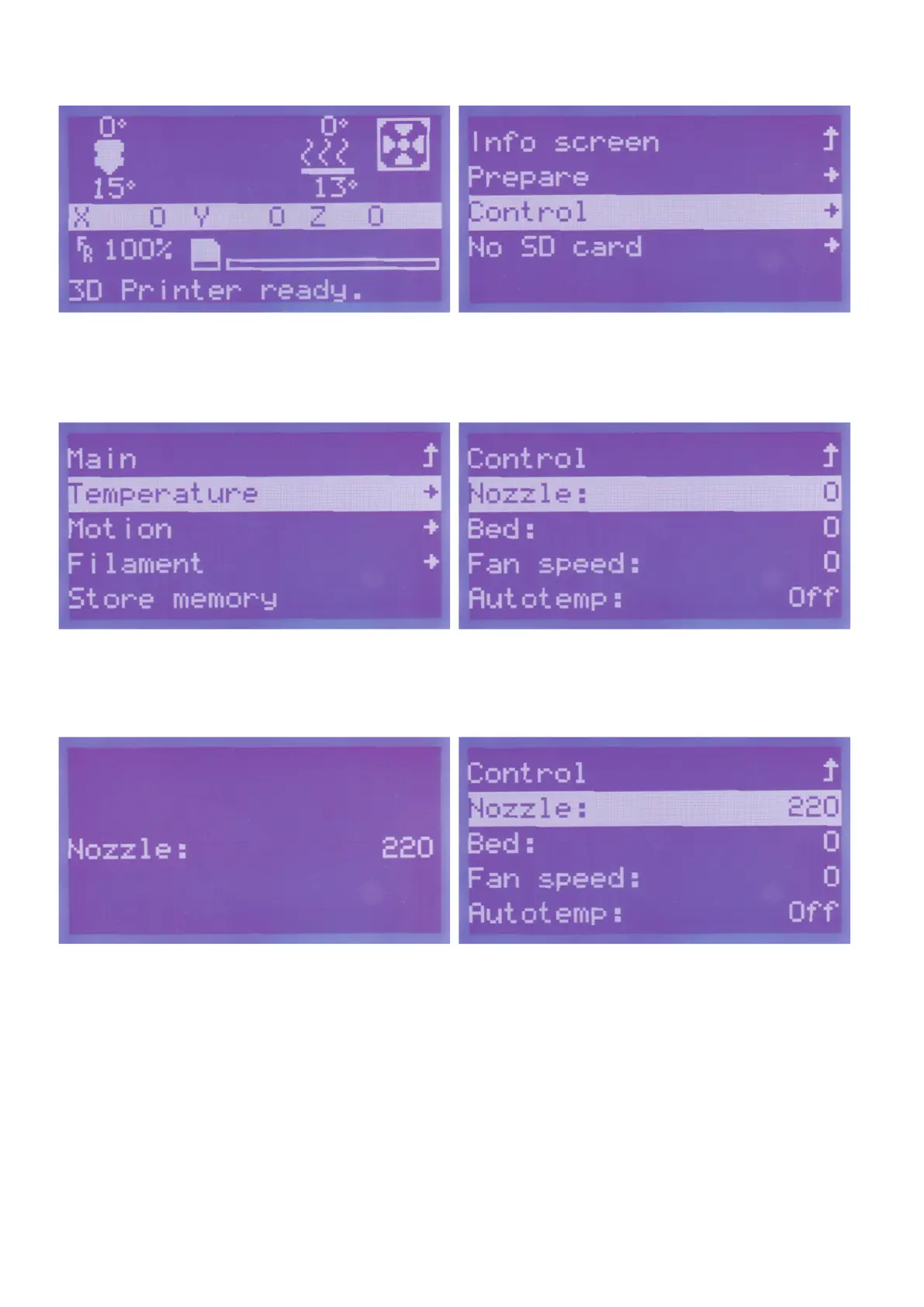
Pushbuttonfortheoperatingknob(10)inthemainmenu. Turntheoperatingknob(10)untilyouhaveselectedthemenuitem
"Control"andpushthebuttonoftheoperatingknob(10).
Turntheoperatingknob(10)untilyouhaveselectedthemenuitem
"Temperature"andpushthebuttonoftheoperatingknob(10).
Turntheoperatingknob(10)untilthemenuitem"Nozzle:0" is se-
lectedandpushthebuttonoftheoperatingknob(10).
Turntheoperatingknob(10)totherightuntilthedesiredvalue"220"
(here:220°C)isdisplayed.Theextruderisheatedupatonceafter
turning.
Toreturntothemenu,pushtheoperatingknob(10).
Now the same value as set before should be shown here.
In our example, we have preselected the maximum temperature of
thelamentused.Youcanadjustthevalueaccordingtoyourla-
ment.



 To Next Page