64
4.2.3 Switching functions
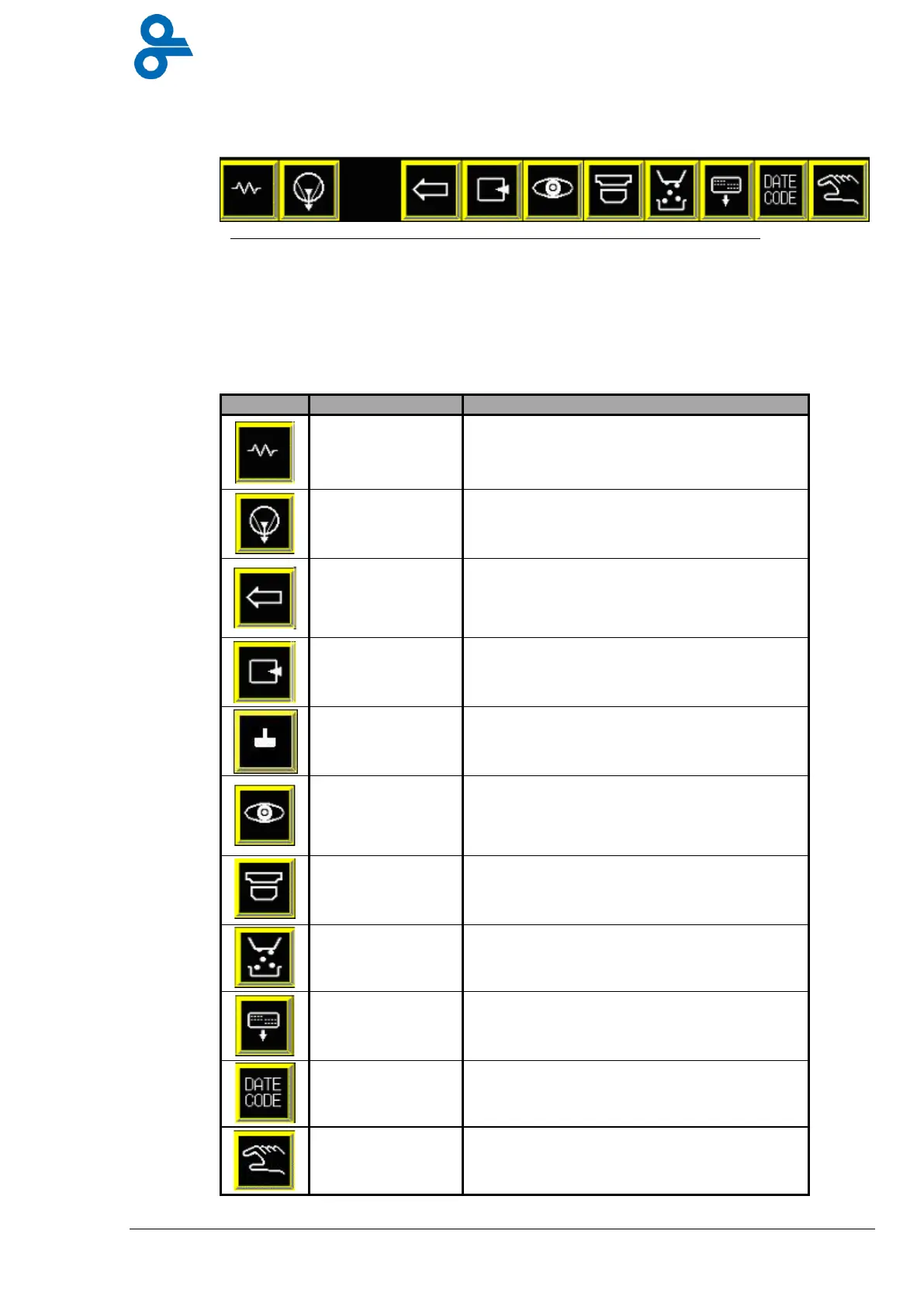
The buttons in group D (see Figure 4.8.) are similar to main switches.
A number of functions such as adding gas to a package or automatic filling can be turned on
and off centrally here. Some functions can only be switched on if the packaging program
chosen permits this, so that a function cannot be switched on unintentionally. The functions of
the buttons are shown in table 3:
Table 3 Button functions
Switches the heating elements in the
forming and sealing stations.
Starts and stops the internal vacuum pump.
Transports the film one stroke length
further. All other systems are deactivated.
This function can be applied only if the
Automatic function is switched off.
Switches on or off the insertion of gas into
the packaging. (This only functions if the
packaging program chosen supports it.)
Plug assist in forming station can be turned
on and off with this button.
Here the photocell has to be switched on for
packaging with printed top film. This only
functions on a machine fitted with a
photocell and a film brake.
This button is used to turn the cross cutter
on and off for all programs.
If the machine is connected up to an
automatic filler, the filler can be turned on
and off with this button.
External labellers on the machine can be
turned on and off with this button.
External coder on the machine can be
turned on and off with this button
This button is turned on when the machine
is being manually operated, such as during
washing or lubricating the chain.
Figure 4.8 Switching functions


 To Next Page