94
4.4.16 In-liner*
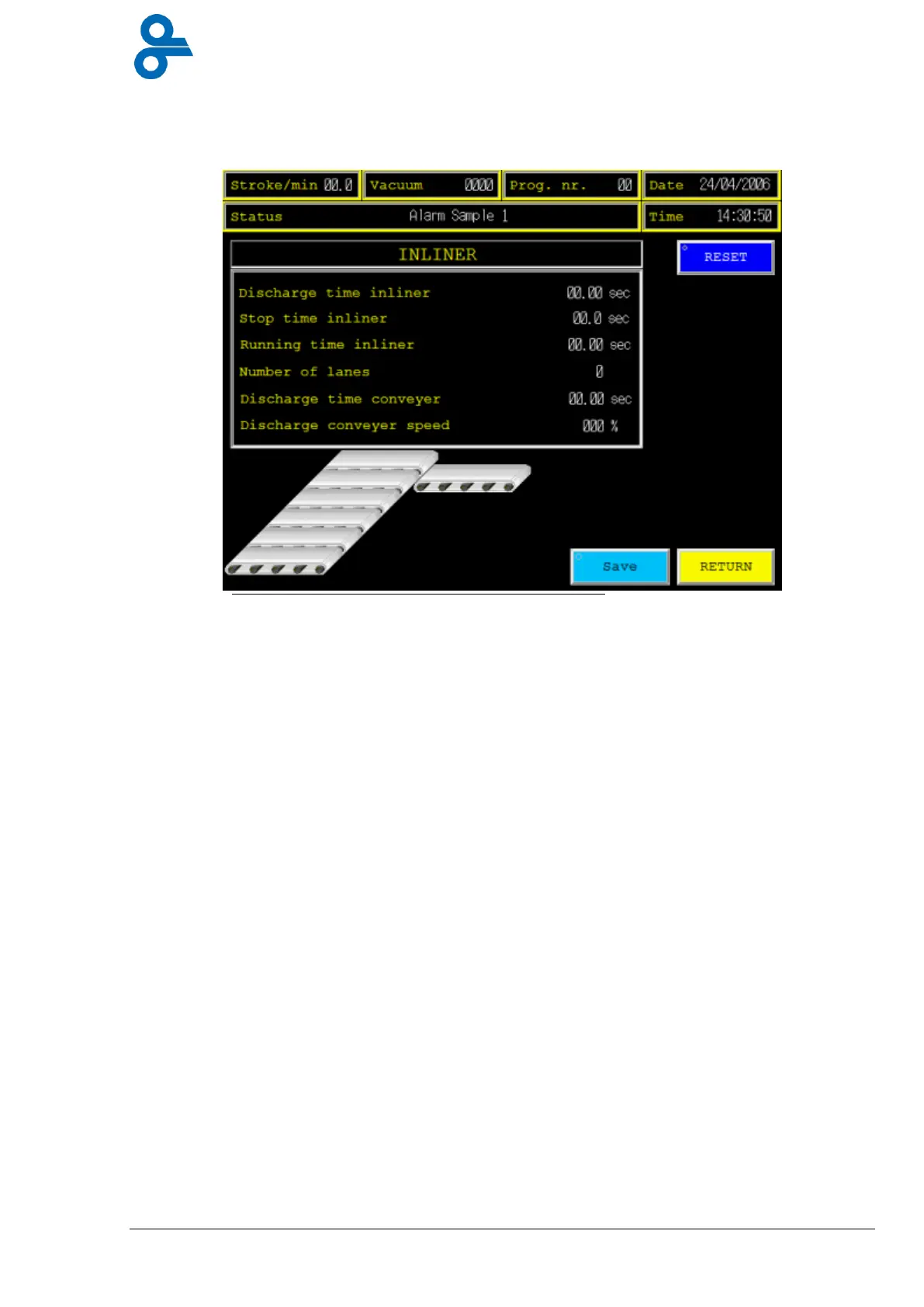
This menu is accessed by pressing the ‘INLINER’ button in the main menu (see Figure 4.37)
This screen shows you all time settings needed for the in-liner process.
Discharge time in-liner: = Running time overall When there are no packages to detect or
photocell is out of order, the lanes will run for this set time.
Stop time in-liner: = Pause time between each lane.
Running time in-liner: = Lane running time after packaging detection by the photocell
mounted at the end of the lanes.
Number of lanes: = Number of lanes mounted in the machine.
Discharge time conveyor: = Running time that discharge conveyor will run.
Discharge conveyor speed: = Running speed for the discharge conveyor.
You can change the value of the
set points
by pressing the numbers for change, a numeric
keypad (Figure 4.6) will appear, fill in the desired settings, press enter, now the numeric
keypad will disappear and the value for the SP has changed.
Press
Save
to store the settings in the current program.
Press
return
and the screen goes back to the previous menu.
*
Optional function!


 To Next Page