Getting to Know the Monitor
16
Front Panel Features
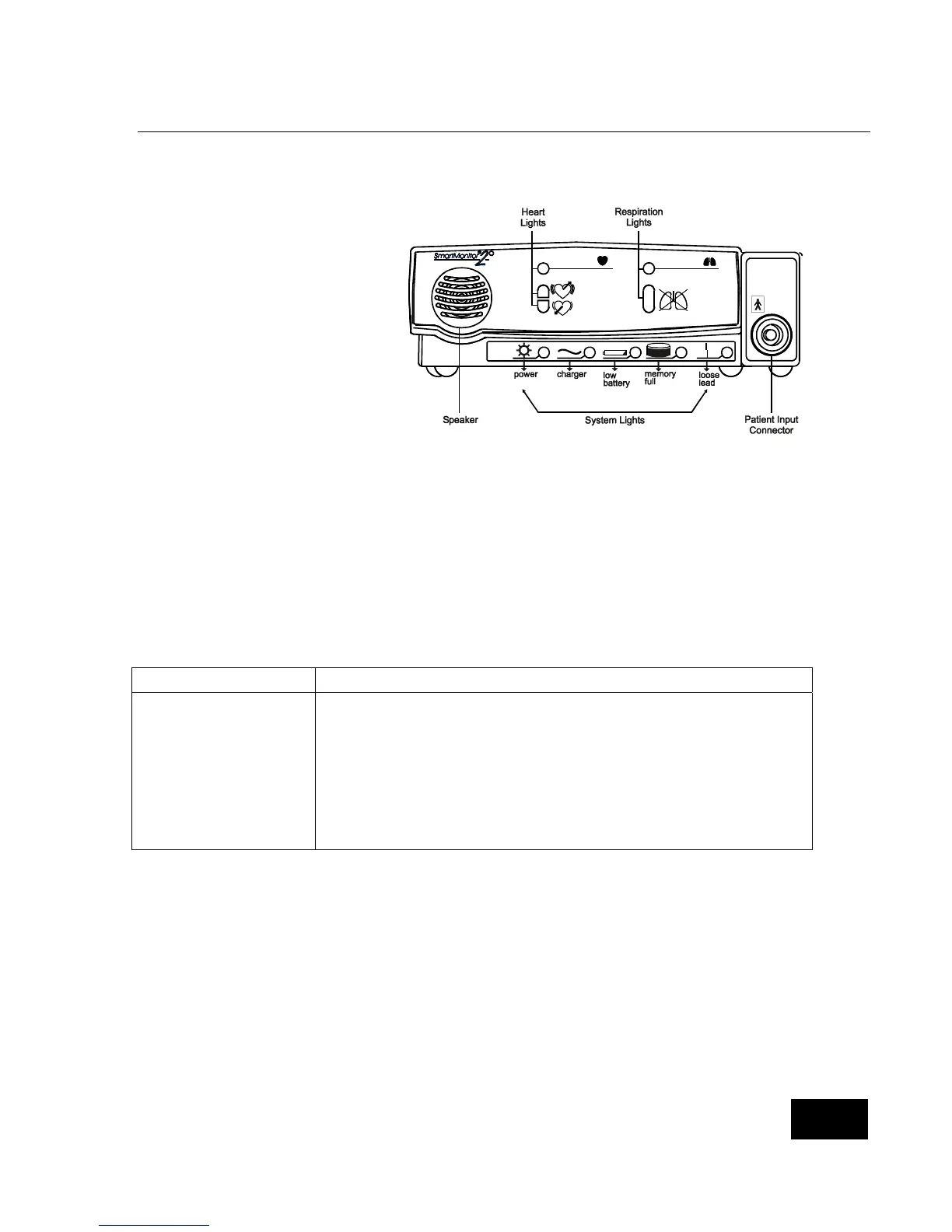
Patient Input Connector
The Patient Input connector is for
the Patient Cable.
Respiration Lights
The green respiration light blinks
with each breath the SmartMonitor
2 detects. The red apnea light will
come on if the SmartMonitor 2
detects a pause in breathing that is
longer than the limit set by the
physician.
Heart Lights
The green heart light blinks with each heartbeat the SmartMonitor 2 detects. The red high light comes on
when the SmartMonitor 2 detects a heart rate higher than the limit set by the physician. The red low light
comes on when SmartMonitor 2 detects a heart rate lower than the limit set by the physician.
Speaker
The SmartMonitor 2 speaker allows you to hear any alarm that sounds during monitoring.
System Lights
The lights across the bottom of the front panel indicate if the SmartMonitor 2 is working properly:
Light Indicates
Power
The power to the SmartMonitor 2 is on.
Charger
The battery charger is on and plugged into the SmartMonitor 2.
Low battery
The battery power is low and needs to be charged.
Memory Full
The SmartMonitor 2 memory is full or almost full.
Loose lead
An electrode, cable, or lead wire connection is loose at one of the
plug-in-ports or the electrodes are not making good contact with the
patient’s skin.















 To Next Page