31
GA--A 202
6.5 Controlling the devices using the RIWO--NET menu
6.5.1 Controlling the devices via the different input media
Via Touch--Screen Monitor:
-- The function is selected and executed by gently touching the desired
menu function (button) directly on the Touch--Screen Monitor.
Via voice control:
-- The same instructions/commands must be used as displayed on the
Touch--Screen Monitor.
-- If an instruction/command consists of a “Function” and an “Action”,
both terms must be pronounced one after the other without pausing.
Example: “SPEED” -- “MINUS” or “SPEED” -- “ PLUS”.
-- Before and after each instruction/command, a short pause of
approx. 0.5 seconds is required.
Via remote control unit:
-- The arrow buttons serve to select the corresponding device in the main
menu and the corresponding function in the submenu.
-- The yellow buttons serve to execute the corresponding action.
-- The blue buttons serves to return to the main menu.
Fromthemainmenu,theRIWONETSYSTEMcanbeexited,
in which case the computer is shut down automatically.
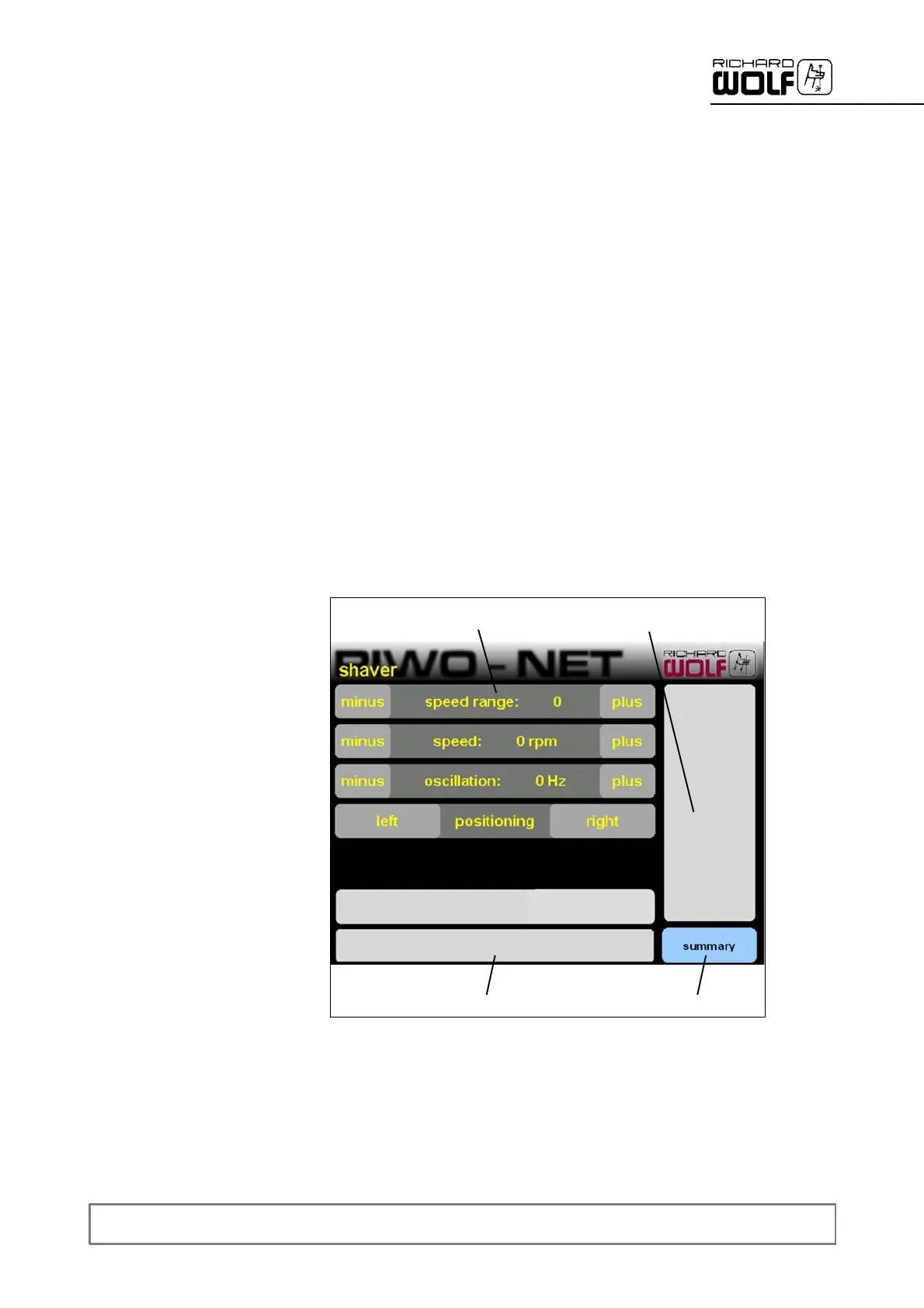
6.5.2 Illustration of menu
1
2
3
4
Legend
1 Control menu 3 System messages
2 Status display 4 Back to main menu


 To Next Page