4.5.3 Installaon chain (for A–D)
This secon shows, for installaon opons A–D (if applicable), the installaon of chains onto
sprockets.
Preparing components
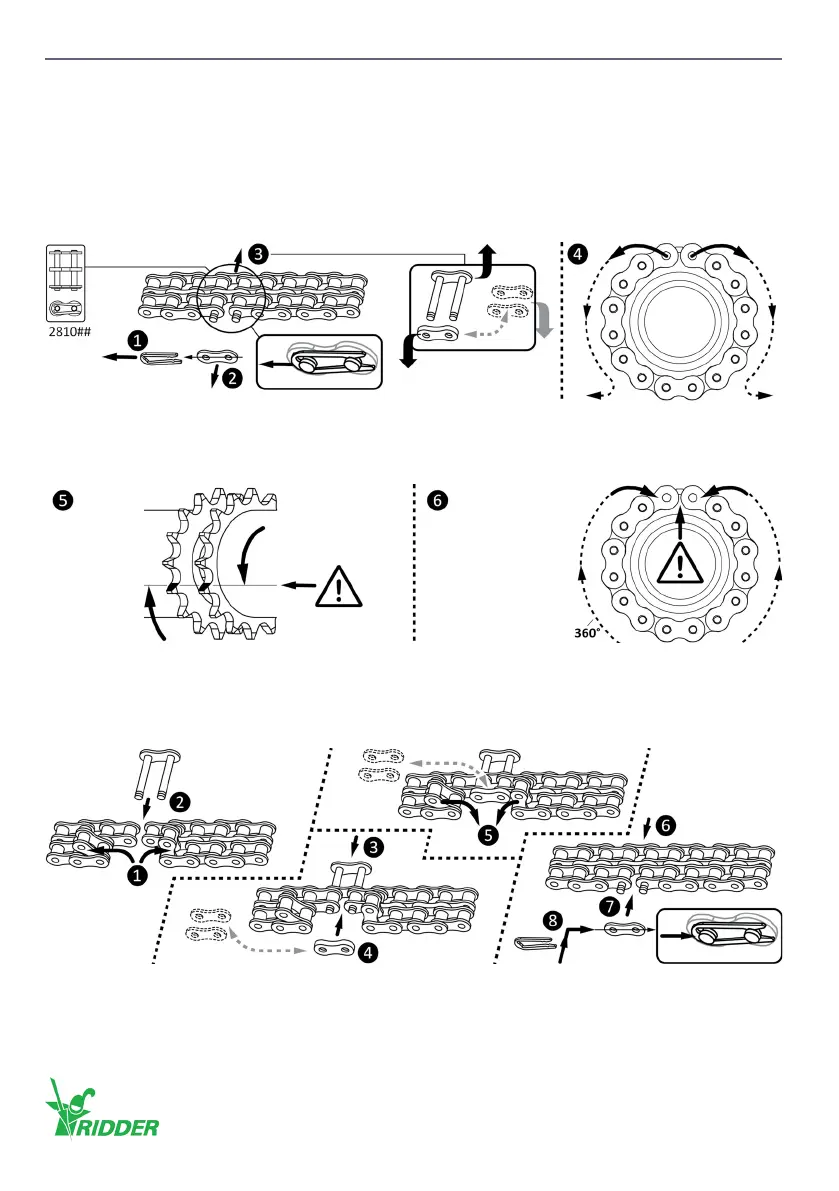
• Remove the chain connector (2810##) from the (installed) chain (❶–❸).
• If installed, remove the chain from the sprocket of the chain coupling (❹).
❶–❹ Remove the chain connector (and the chain from the sprocket).
❺ Turn the sprockets and make sure that the teeth are aligned.
❻ Put the chain onto the sprockets with the chain ends at the top.
Install the chain
❶–❽ Install the chain connector and chain (on the sprockets).
Ridder Drive Systems B.V.
T +31 (0)341 416 854 - F +31 (0)341 416 611 - I ridder.com
24


 To Next Page