8. Run the W200 Ethernet cable from the URcontrol box bay to the URcontrol box.
9. Connect the W200 Ethernet cable to the USB / Ethernet adapter.
10. Run the W103 cable from the Robotiq control box to the URcontrol box.
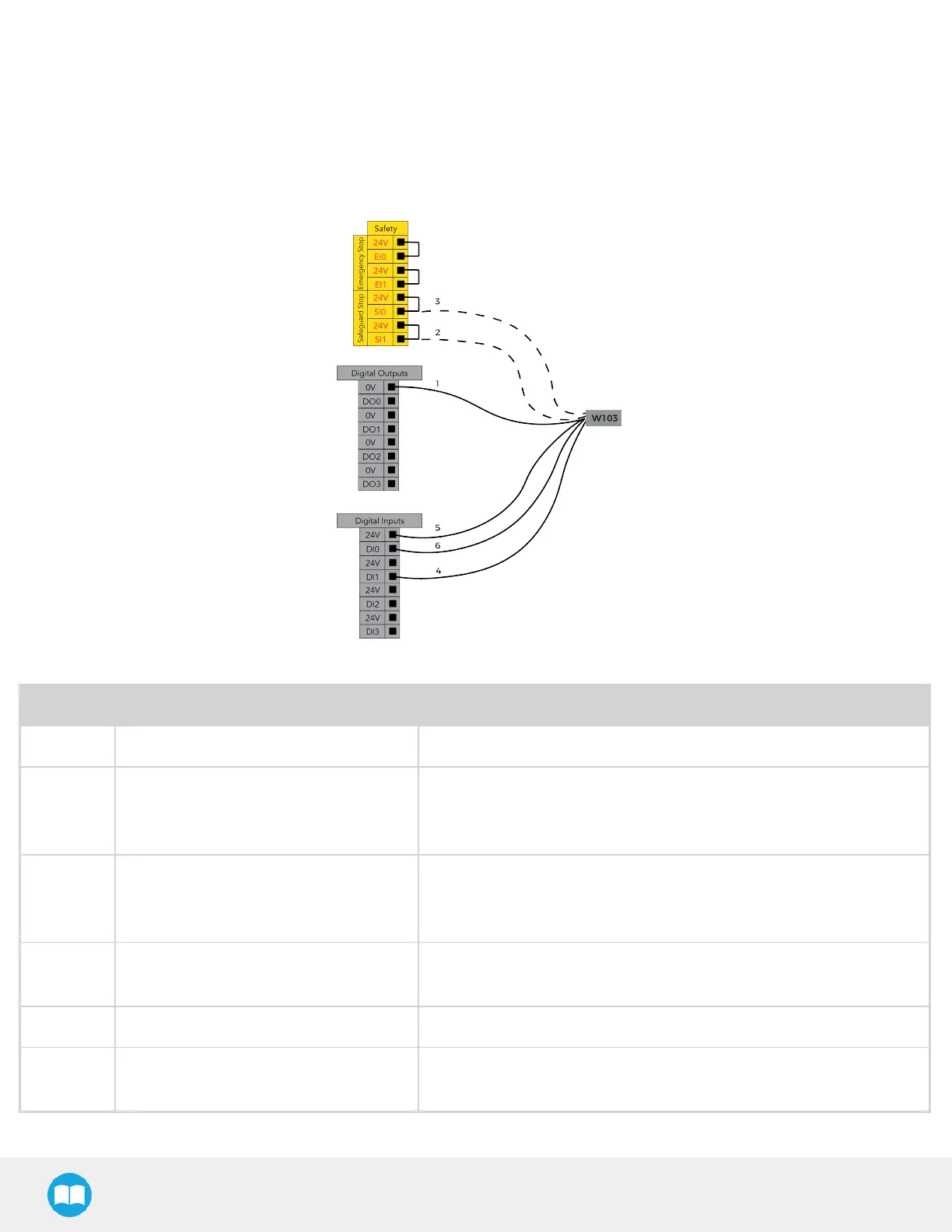
11. Wire the W103 cable in the URcontrol box based on the figure below.
Wire # Function Description
1 0 VDC 0 VDC supply
2 UR Safeguard input 2 Emits a safeguard status signal when a safeguard device is
connected to safeguard input SI1. To be connected only
when Optional safety kit is used.
3 UR Safeguard input 1 Emits a safeguard status signal when a safeguard device is
connected to safeguard input SI0. To be connected only
when Optional safety kit is used.
4 Stop Button Input Emits a stop signal from the stop button in the push button
enclosure. Connected to a digital input (DI1 in the example).
5 24 VDC 24 VDC supply
6 Start Button Input Emits a start signal from the start button in the push button
enclosure. Connected to a digital input (DI0 in the example).
37



 To Next Page