For more instructionson how to install the PowerPick20 Vacuum Gripper, please refer to section Mechanical Installation of the
PowerPick20 user manual available at support.robotiq.com.
PowerPick20 Vacuum Generation Unit (optional)
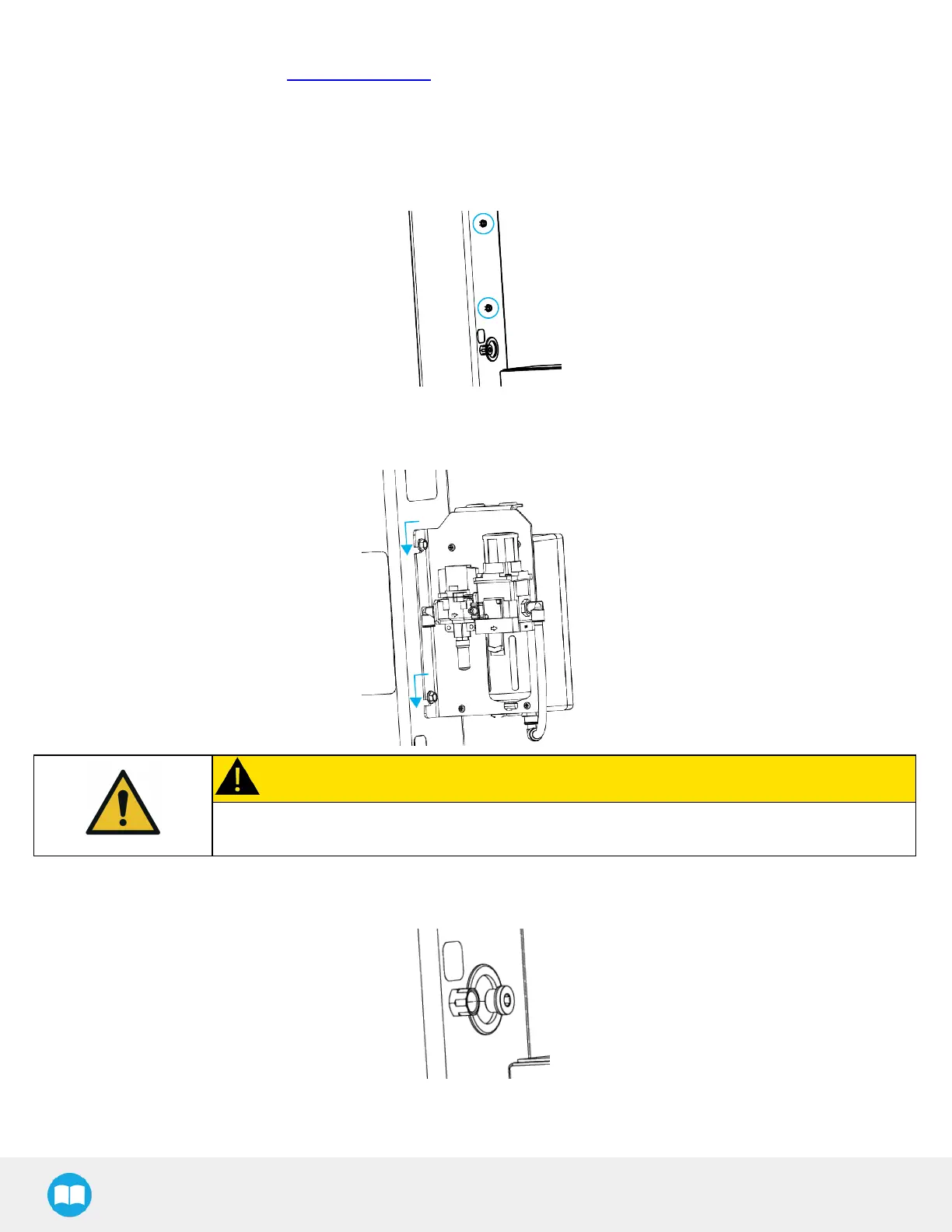
1. Loosen the two (2)M8 x 20 hex head cap screwsintended to hold the vacuum generation unit until their head is at a distance
of approximately 4 mm (3/16 in)from the surface.
2. Slide the vacuum generation unit onto the two (2) M8 x 20 hex head cap screws.
3. Tighten the screwsusing the provided 13 mm socket.
CAUTION
Make sure that there isno pneumatic power present on the bulkhead fitting located at the base
(conveyor side).
4. Remove the pneumatic plug from the bulkhead fitting located on the pedestal using the provided 10 mm hex key.
5. On the bulkhead fitting, install the 1/2 BSPPto 12 mm tube pneumatic elbow fitting provided using the 21 mm / 24 mm
double-ended wrench. Tighten to 26 Nm (19 lb-ft).
45



 To Next Page