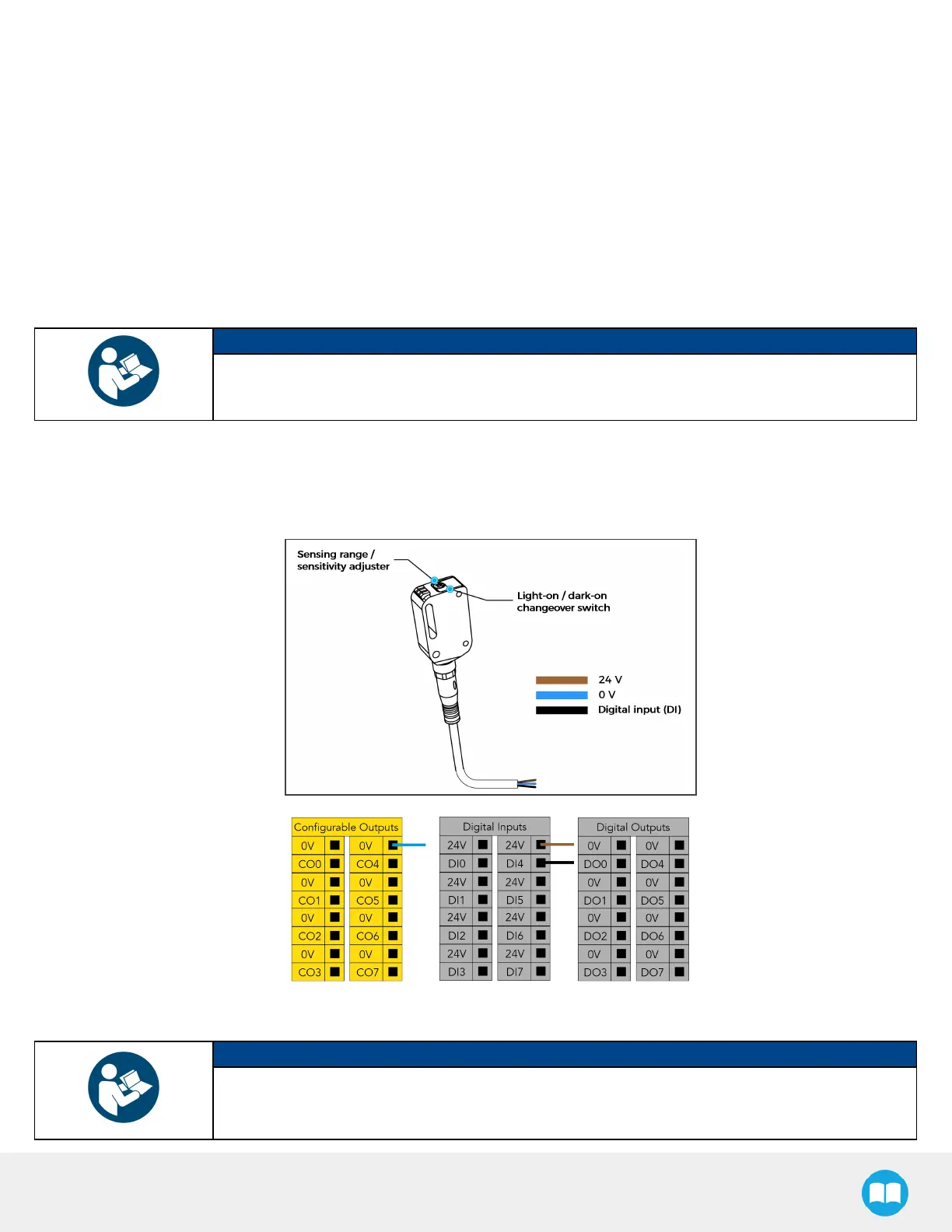
BoxSensor(Single BoxType)
1. Run the box sensor cable through a hole under the robot control box.
2. Connect the wires to the terminal blocksof the robot control box:
l
Connect the brown wire to a 24 Vterminal in a Digital Inputsblock
l
Connect the blue wire to a 0 V terminal in a Configurable Outputsblock
l
Connect the black wire to a digital input (DI)terminal (e.g. DI4, asshown in the figure below)
3. Secure each connection using a 2 mm flat head screwdriver (not provided).
NOTICE
Follow good cable management practices.
Use the plate under the control box, and use a grommet if needed (not included).
4. Install each box sensor on a bracket using the provided screws.
5. Position each box sensor bracket so it can detect the box to be picked.
6. Connect each box sensor's M8 connector cable to the corresponding sensor.
7. Once the system isrunning, adjust the detection distance of each box sensor using the sensitivity adjuster.
NOTICE
In order for the sensor to provide a high state when detecting a box, set the sensor to the light-on
switching mode (green light beside “ L” ). To do so, pressthe light-on / dark-on changeover switch
and hold for one to four seconds.
50



 To Next Page