BoxSensor(Multiple BoxTypes- Multi-PickFeature)
NOTICE
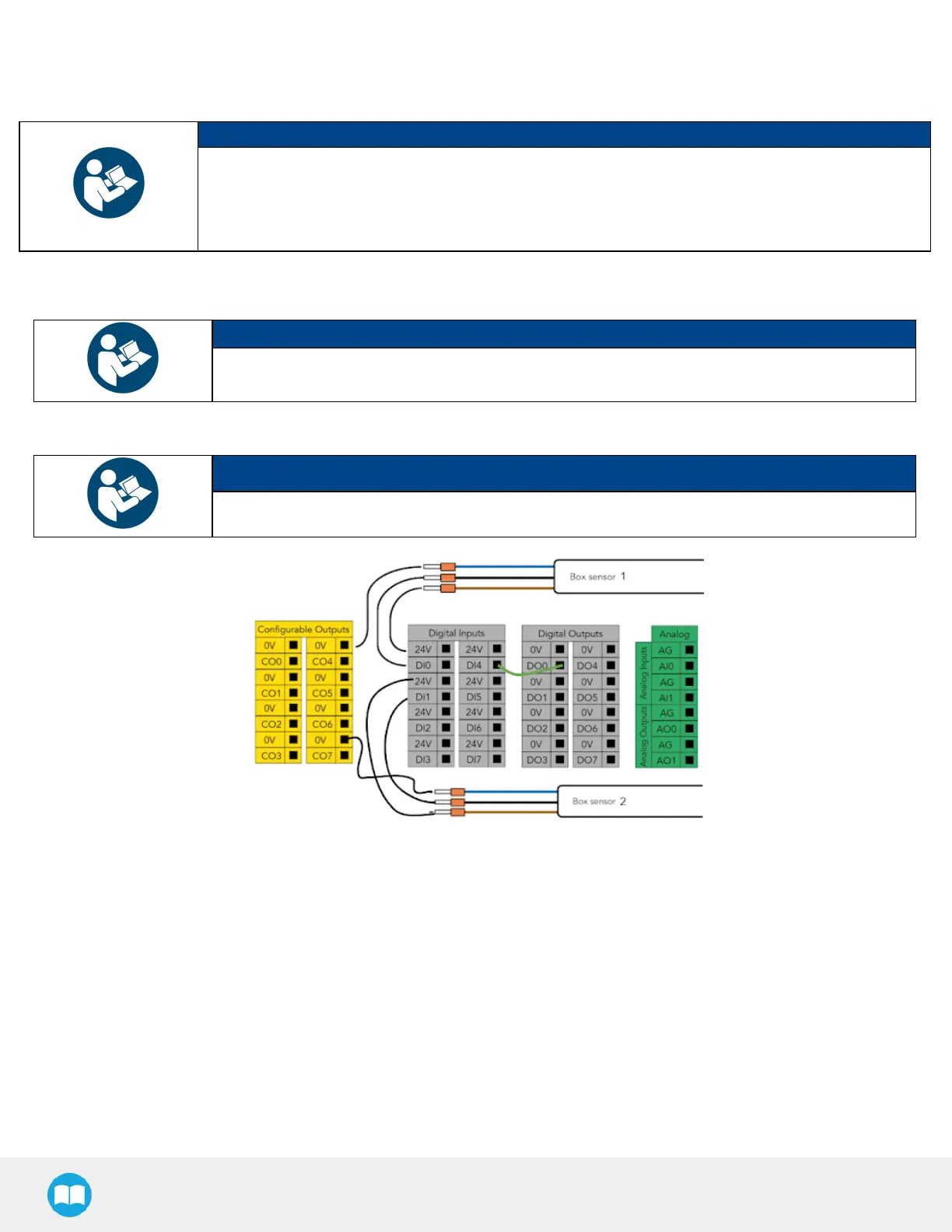
The example below presentsa configuration with two box types and two box sensors. Should the user
need to pick more than two boxes, add a sensor for each additional box type to be picked.
The scope of delivery includes one (1)box sensor. Additional sensors can be ordered; refer to the Spare
Parts, Kitsand Accessoriessection for more information.
1. Connect each box sensor asdescribed in the BoxSensor (Single BoxType) section.
2. Take note of the digital input terminal to which each box sensor isconnected.
NOTICE
The figure below showsan example in which the digital input terminal for box sensor #1 isDI0, and
the digital input terminal for box sensor #2 isDI1.
3. Lay a wire between an unused digital input terminal and an unused digital output terminal (thisisdepicted by the green wire
in the figure below).
NOTICE
In the figure below, digital output DO0 will activate digital input DI4.
Fig. 3-2: Wiring Box Sensors for Multiple Box Types
51



 To Next Page