Pallet Block
Single Recipe
By default (single recipe), the home view of the Palletizer node displaysthe Box, Pallet, Pattern and Settings blocks of the only
recipe available.
Tap the Edit button of the Pallet block to open the Pallet menu.
Multi-Recipe
When the multi-recipe feature is enabled, the home view of the Palletizer node displaysthe list of recipes created. Tap the Edit
button under the name of a recipe to bring up the Box, Pallet, Pattern and Settings blocksspecific to the recipe to edit.
Tap the Edit button of the Pallet block to open the Pallet menu.
Pallet Menu
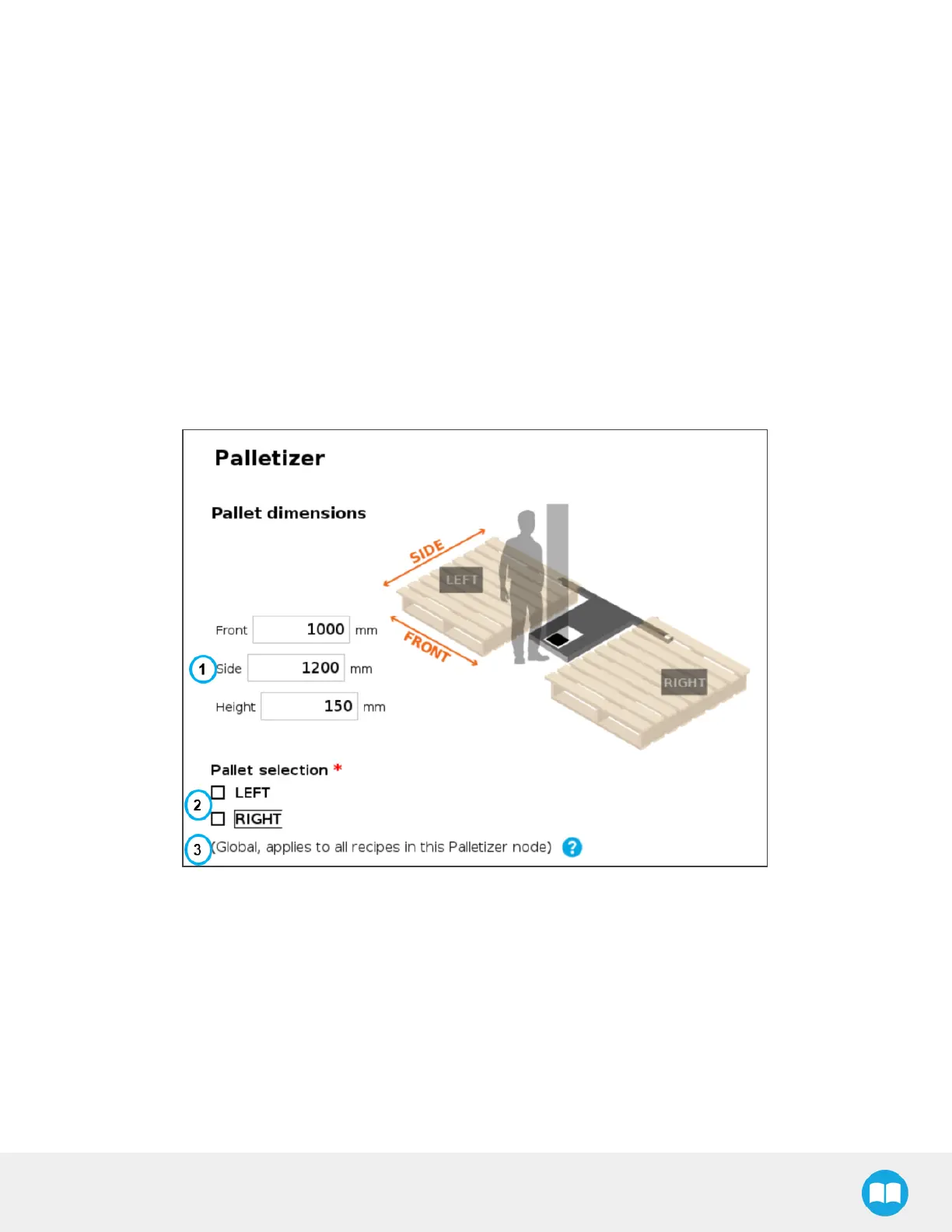
Fig. 5-20: Pallet Menu
1. Pallet dimensions
Refer to the diagram and enter the front, side and height dimensions of the pallet.
2. Pallet selection
Both boxesare unticked by default.
It is the responsibility of the user to select the pallet(s)to process based on the application and layout of the palletizing cell.
Refer to the diagram and select which pallet (left and/or right) you want to palletize or depalletize. Tick both boxesto process
both the left and right pallets.
91



 To Next Page