EasyManua.ls Logo

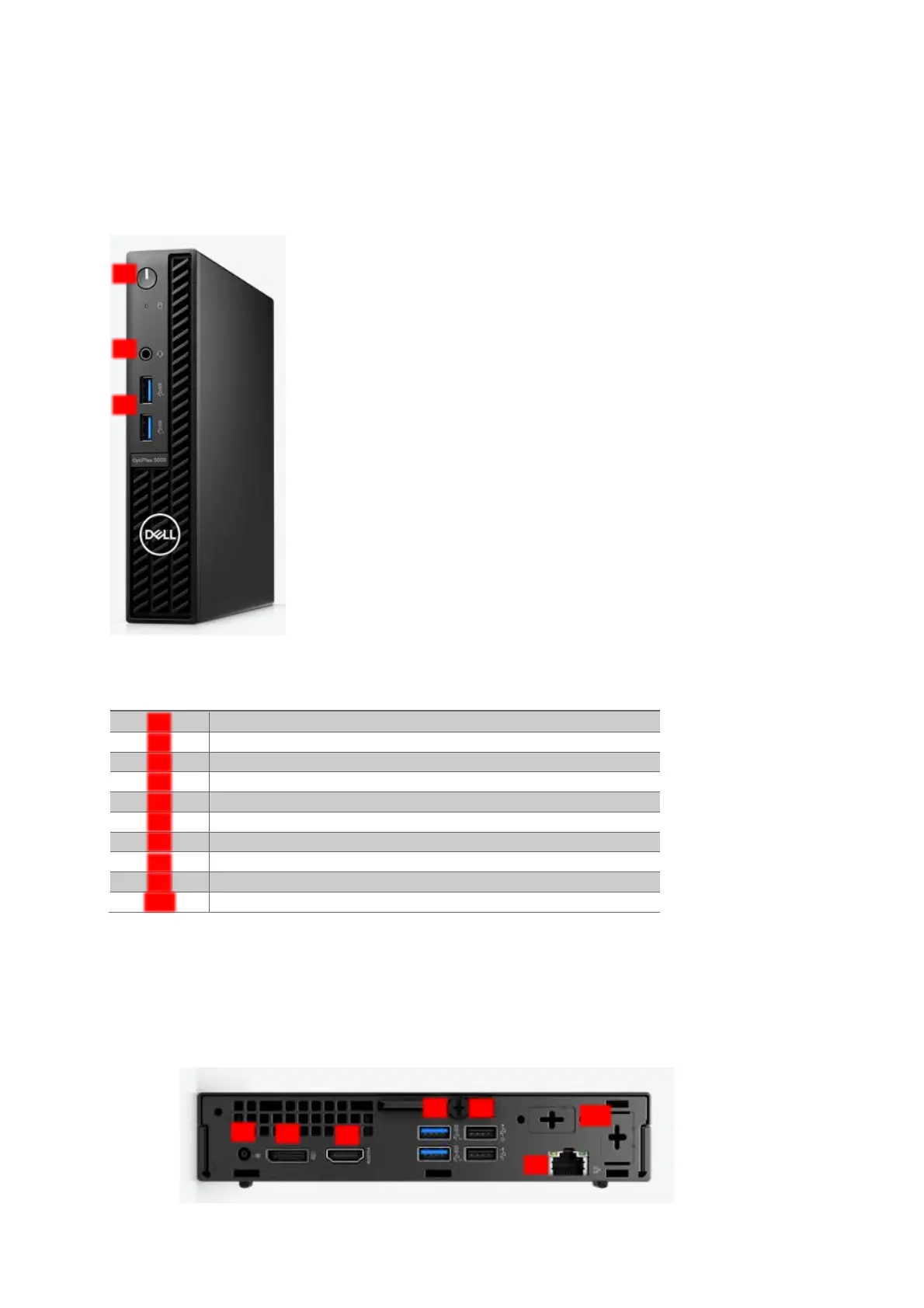
Rodenstock ImpressionIST 4+ - Figure 3-4: Top & Bottom of the Control Unit (PC)

Default Icon
47 pages
Print Icon
To Next Page IconTo Next Page
To Previous Page IconTo Previous Page
Loading...
14
© Rodenstock GmbH
Status: September 2023
Top & bottom of the control unit (PC)
Please make sure that the measuring unit (camera system) is connected to the control unit exclusively via a
USB 3.0 port. Due to the high-resolution images, a USB 2.0 interface is not suitable for this data transfer.
Bezeichnung
Power Button*
AUX
USB 3.0 connection (bl)
Power cable connection
HDMI 1.4 port
DisplayPort 1.4 port
Kensington lock
USB 2.0 port (2x)
Ethernet port
Slots with cutouts for wireless antenna
* Please switch the device on or off exclusively with the LED touch button, the PC will then start automatically.
Note: Figure 3-4 shows an exemplary representation of the control unit. Depending on availability, successor
generations can also be used. The position of the individual connections may differ slightly.
2
3
4
5
6
7
8
9
1
3
2
1
5
6
3
7
8
9
Figure 3-4: Top & bottom of the
control unit (PC)

Table of Contents