43
© Rodenstock GmbH
Status: September 2023
▪ Individual head posture
The 3D video centration system automatically corrects head tilt and rotation of the customer. The icons Fehler!
Verweisquelle konnte nicht gefunden werden.and Fehler! Verweisquelle konnte nicht gefunden
werden.describe the tilted and rotated head posture of the customer in the exposure (). Please deactivate the
option Head rotation in case of a chronic head rotation of your client in the "Preview" screen.
• Head tilt: Head tilt describes by how many degrees the head is tilted to the right or left.
• Head rotation: Head rotation is the angle created when the head is turned, as in a negating motion.
Figure 6-11: Head tilt and head rotation
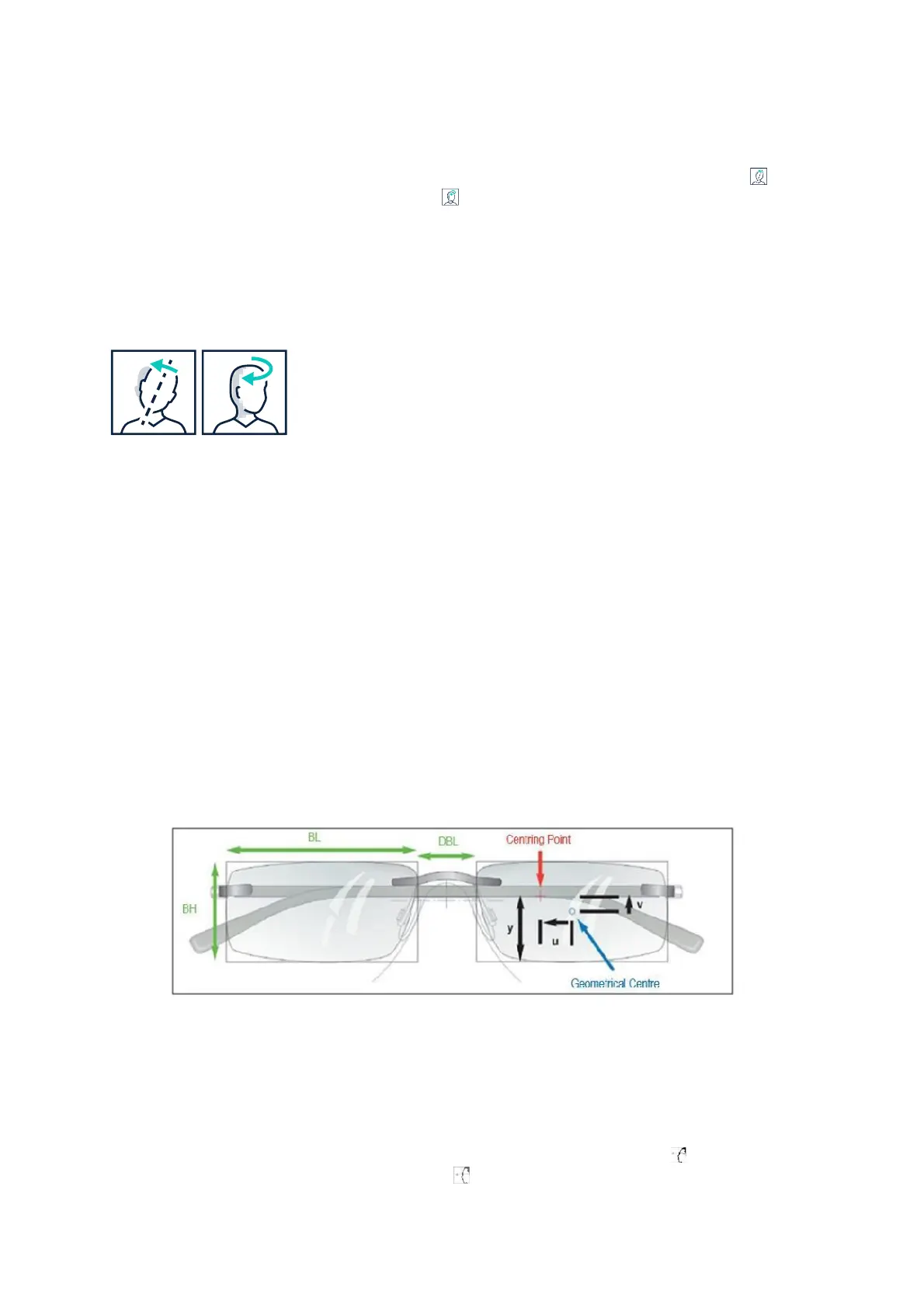
▪ Centering data
Figure 424 defines the centering data of the holder according to DIN EN ISO 8624. (All dimensions refer to the
slice plane)
• Box length (BL): distance between the vertical frame edges
• Box height (BH): distance between the horizontal frame edges
• Distance between the lenses (DBL)
• Decentration of the centering point, horizontal (h): horizontal distance of the centering point from the
geometrical center of the pane
• Decentration of the centering point, vertical (v): vertical distance of the centering point from the
geometric center of the lens
• Centering height (y): Distance from the reference point to the lower box dimension
Figure 6-12: Centering data
▪ Fitting recommendation
With this function, you calculate the centering height (y) and the decentering distance (v) either according to the
eye’s rotation center requirement or the reference point requirement. In the "Results" screen, simply select the
corresponding output mode for the type of glass to be centered. To do this, select the icon for output
according to eye rotation point requirement, or the icon for reference point requirement.



 To Next Page