Performing
Performing
23
Controlling the Master Eect in Real Time
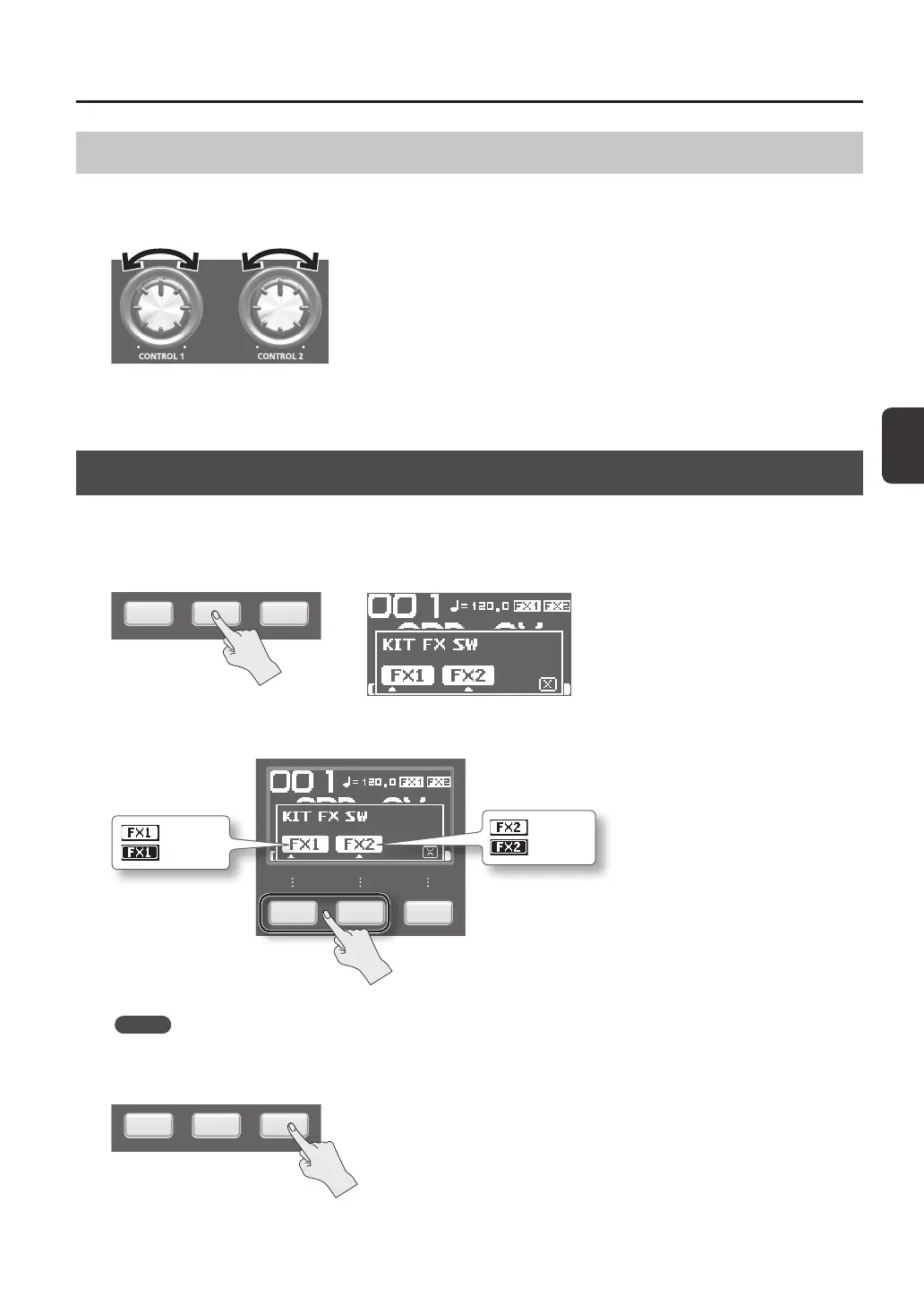
Use the [CONTROL 1] knob or [CONTROL 2] knob as follows.
1. While you perform, turn the [CONTROL 1] knob or [CONTROL 2] knob.
When you turn a knob, a change will occur depending on the master eect that’s selected.
For example, if a lter is selected, turning a knob would change the frequency response or vary the eect’s depth.
Applying a Kit Eect (KIT FX SW)
Try applying a kit eect (p. 6) to your performance.
* If you want to output the sound processed by the kit eect, set OUTPUT (p. 43) to “KIT FX1” or “KIT FX2.”
1. In the top screen, press the [F2] (KIT FX) button.
2. Press the [F1] (FX1) button or the [F2] (FX2) button to turn the kit eect on.
: FX1 is on
: FX1 is o
: FX2 is on
: FX2 is o
MEMO
In KIT FX (p. 46) you can turn the kit eects on/o and edit their settings.
3. Press the [F3] (X) button to return to the top screen.



 To Next Page