49
RootWave Pro User Guide
4. Insert the Treatment Return and
Safety Earth into the ground
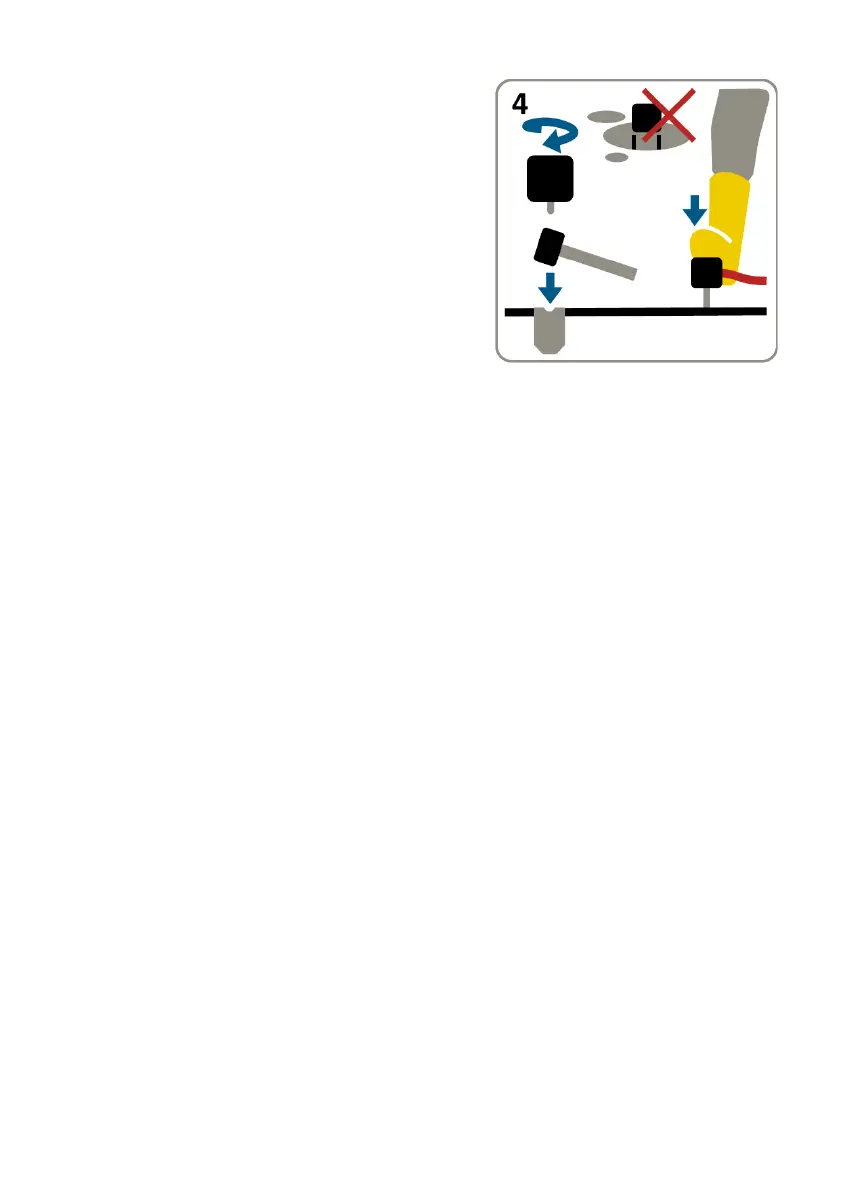
To install the Treatment Return:
• Do not yet connect the Long
Treatment Cable, the Short
Treatment Cable and the Treatment
Return. Instead, lay them out on dry
ground.
• Remove any vegetation from
Treatment Return site as the
Treatment Return should sit directly onto soil surface.
• Gripping the Treatment Return Blade firmly in one hand place the
sharp end on the soil surface and use the rubber mallet to drive it
into the ground until it is submerged with the top level with the
soil surface.
Do not prepare the ground for the Treatment Return Blade by
making a hole or incision into which you insert the blade. The
Blade needs pressure from the soil over its entire surface to
ensure good electrical contact is made to minimise underground
arcing which can lead to accelerated heating. Forcing the blade
into unprepared ground with the mallet ensures this.
• Take the Treatment Return, position it over the Treatment Return
Blade lining up the threaded spigot with the threaded hole, then
lower the Treatment Return onto the Treatment Return Blade.
Screw the Treatment Return firmly in a clockwise direction onto
the Treatment Return Blade until it comes to a stop.
• Once the Treatment Return has been full assembled onto the
Treatment Return Blade the cables can then be connected to the
Treatment Return.
If the rubber mallet becomes damaged replacements are
available from your RootWave Pro supplier.



 To Next Page