Section 5 Operating Instructions HP7A Manual
www.rottlermfg.com
5-16
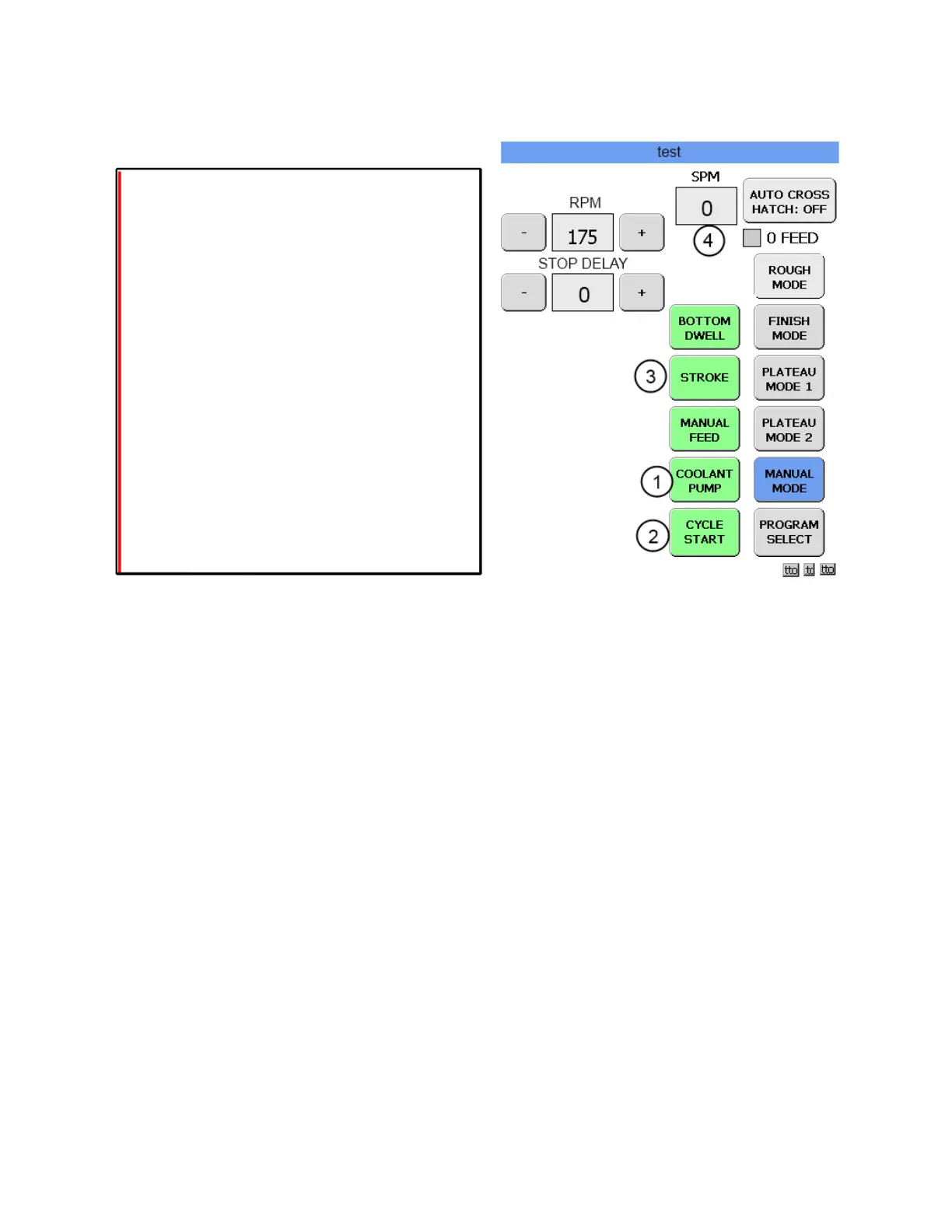
MANUAL MODE SCREEN
In this mode all the functions are available but must be activated manually.
Touch the COOLANT PUMP button (1) and the pump will turn on. Aim the nozzle toward the top of the
bore so that the coolant oods the hone head.
Touch the CYCLE START button (2) and the motor will turn on causing the hone head to rotate.
Use the handwheel to feed out the stones until they just begin to touch the cylinder wall.
Grab hold of the rocker arm handle, press the upper clamp button and slowly pull the rocker arm down.
Once the rocker arm reaches the bottom stop pull the rocker arm down with enough force to collapse
the bumper spring in the pivot block. If at anytime during this process you hear the stones contacting the
block stop immediately and recheck the lower stop setting. After verifying lower limit clearance shut off the
motor and return the rocker arm to the upper setting.
Touch the CYCLE START button (2) to restart the motor and then touch the STROKE button (3) and the
rocker arm will begin to stroke up and down. Adjust the speed control handle until the desired stroking
speed is achieved. The stroke rate is displayed in SPM box.(4) Make note of this setting.
Touching CYCLE START button will shut off the stroke and motor. Touch the COOLANT PUMP button to
shut off the coolant pump.
Now that the hone is all set up and ready to run we can start to build a program for the block in the xture.



 To Next Page