Section 5 Operating Instructions HP7A Manual
www.rottlermfg.com
5-17
ROUGH MODE SCREEN
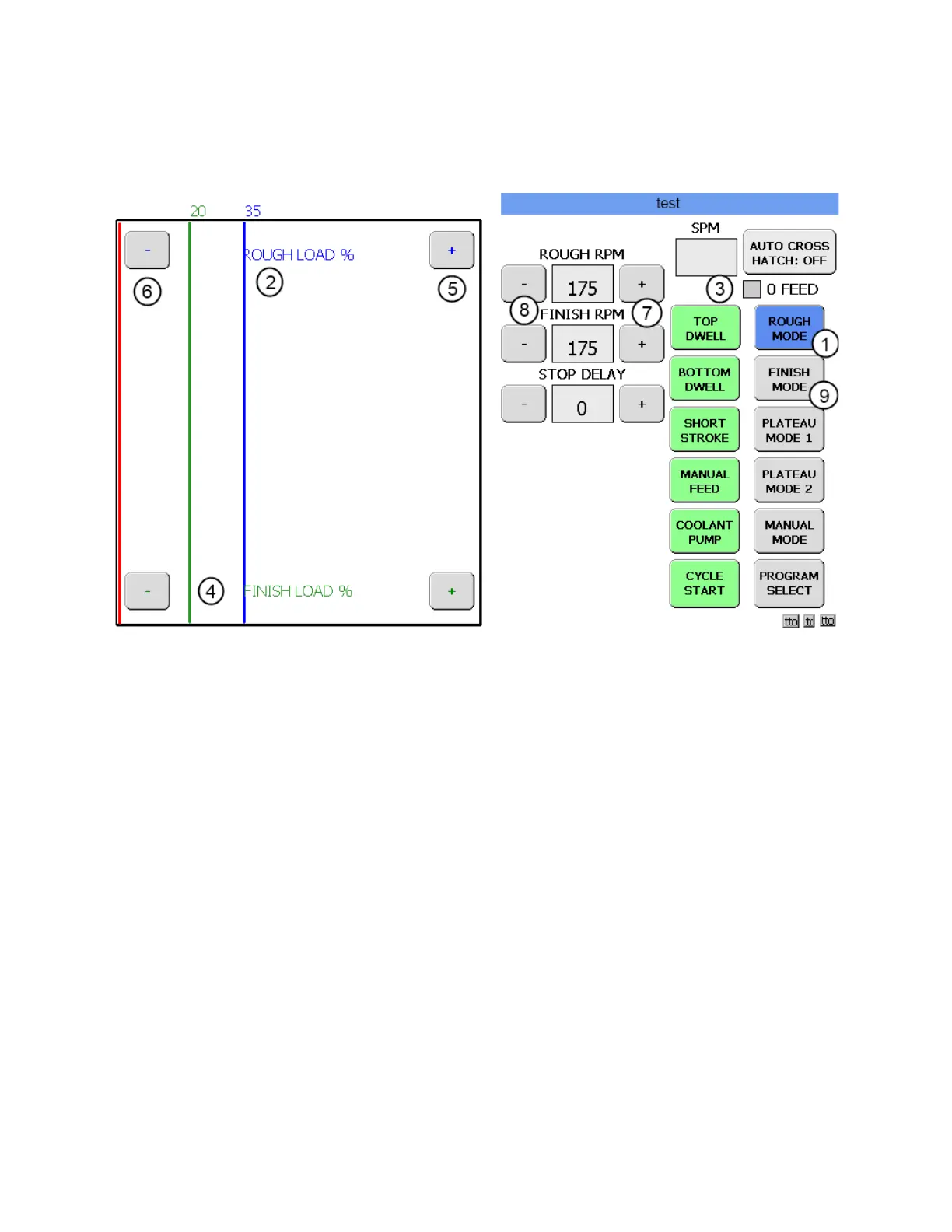
Touch the ROUGH MODE button (1) and the Operation screen will appear.
The ROUGH MODE button is blue in color to indicate that ROUGH MODE is the operation that is active.
The left side of the screen contains the active stone load graph. The blue line (2) indicates the ROUGH
LOAD setting. This is the load that the hone will operate at while it is removing material from the cylinder.
The hone will continue to feed (3) out to maintain that load until zero is reached on the feed ring. When
zero is reached the 0 FEED box will turn red and the hone will stop feeding out the stones. The hone will
continue to cycle until the load reaches the FINISH LOAD. The green line (4) on the graph shows what
the FINISH LOAD is. When this setting is achieved the hone will automatically shut off. The load settings
can be changed by touching either the + box (5) or the – box (6) on either side of the ROUGH LOAD % or
the FINISH LOAD % titles. In this instance change the ROUGH LOAD setting to 50 and the FINISH LOAD
setting to 35.
The center section of the screen contains the setting boxes for motor RPM. The ROUGH RPM and the
FINISH RPM can be changed by pressing the + (7) or – (8) buttons next to each setting. In this instance
change the ROUGH RPM to 195 and the FINISH RPM to 180.
Now touch the FINISH MODE button.(9) The following screen will appear.



 To Next Page