Section 5 Operating Instructions HP7A Manual
www.rottlermfg.com
5-21
MACHINE OPERATION
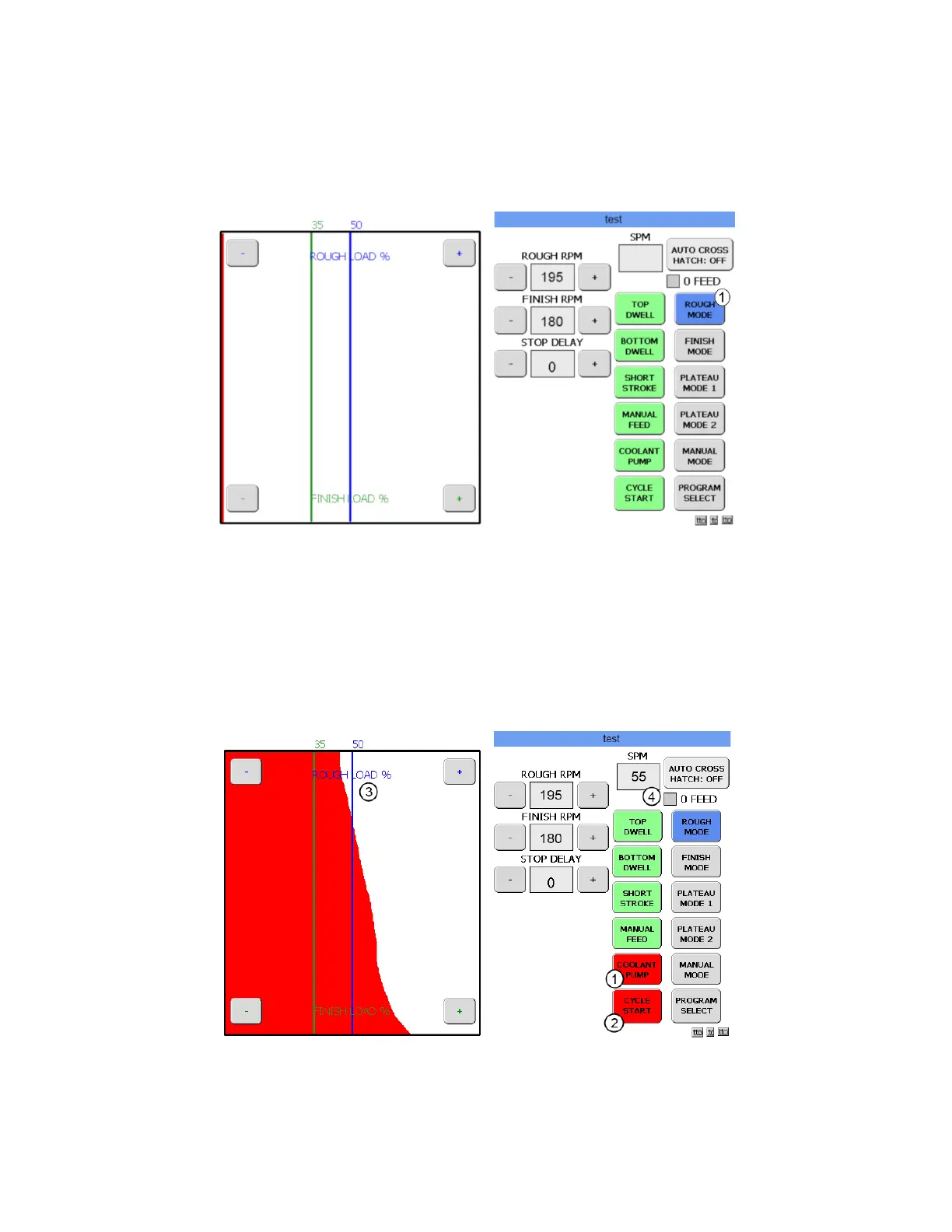
The machine now has a saved program for the test block. Touch the ROUGH MODE button (1) and the
Operation screen will appear with the ROUGH MODE button highlighted.
Conrm that the upper limit setting is correct and the stones have been expanded until the stones touch
the cylinder wall. Set the feed ring so that the pointer is at 4 on the feed ring.
Touch the COOLANT PUMP button (1) to turn on the coolant pump. The button will become red when it
is active and the pump is running. Now touch the CYCLE START button.(2) The motor will start, the hone
head will start turning, and the rocker arm will begin stroking. The hone head will start to feed out the
stones until the preset ROUGH LOAD is reached. The red line on the load graph will move towards the
ROUGH LOAD setting until the preset load is reached.
The machine will continue to hone and feed out in the ROUGH LOAD process (3) until the zero point is
reached. When the zero point is reached the 0 FEED box (4) will become red and the machine will start
the FINISH LOAD process.



 To Next Page