CTCSS
O
PERATION
Many repeater systems require that a very-low-frequency audio tone be superimposed
on your FM carrier in order to activate the repeater. This helps prevent false activation of
the repeater by radar or spurious signals from other transmitters. This tone system, called
“CTCSS” (Continuous Tone Coded Squelch System), is included in your transceiver, and
is very easy to activate.
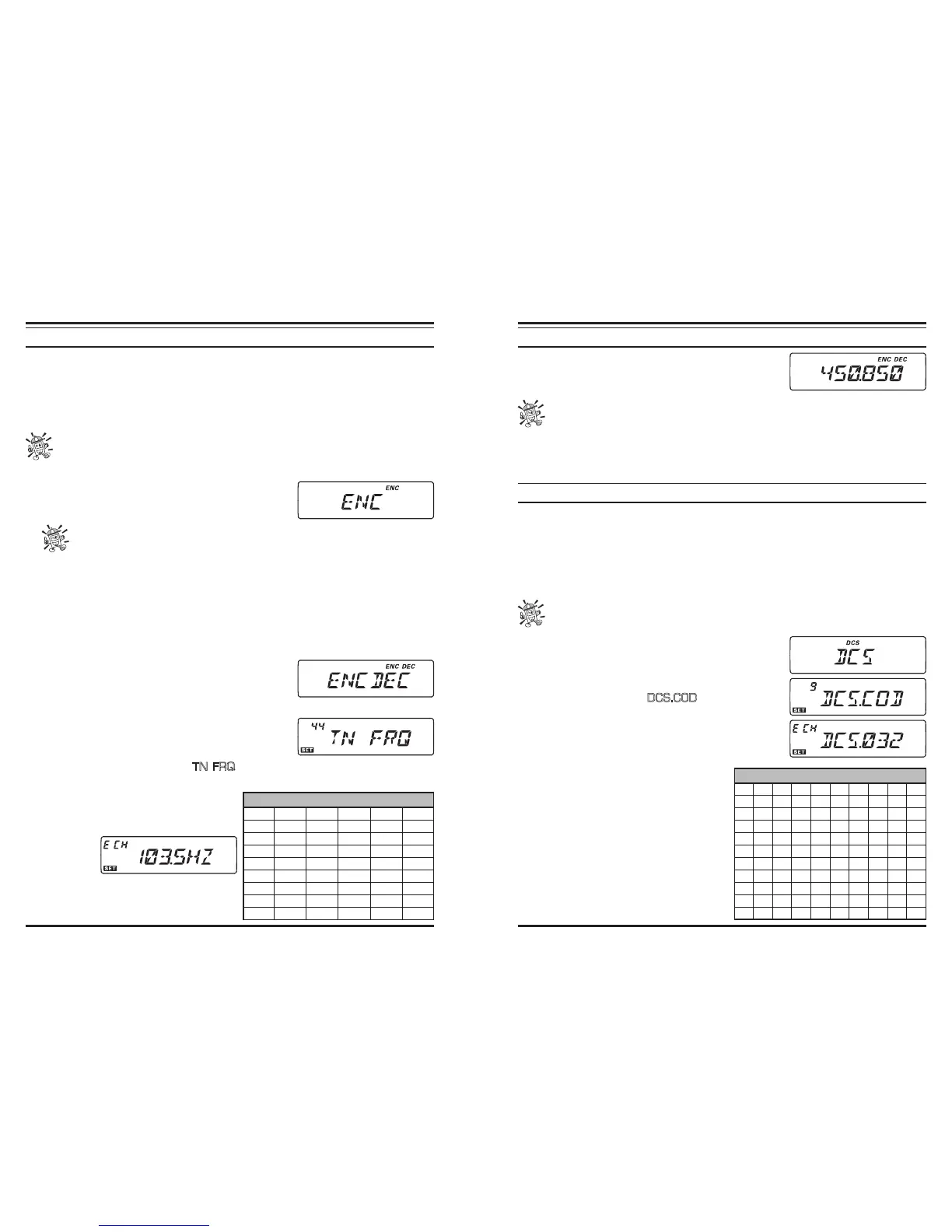
CTCSS setup involves two actions: setting the Tone Mode and then setting of the
Tone Frequency. These actions are set up by using the [TONE(REV)] key and
Set mode #44 (TN FRQ).
1. Press the [
TONE
(
REV
)] key several times, so that
“
ENC
” appears on the display; this activates the
CTCSS Encoder, which allows repeater access.
1) You may notice an additional “
DCS
” icon appearing while you press the
[TONE(REV)] key in this step. We’ll discuss the Digital Code Squelch system
shortly.
2) You may notice the “
REV TN
” indication on the display; this means that the Re-
verse Tone Squelch system is active, which mutes your transceiver’s receiver when it
receives a call from the radio sending a matched CTCSS tone. The “
DEC
” icon will
blink on the display when the Reverse Tone Squelch system is activated.
2. Pressing the [
TONE
(
REV
)] key once more in above step will cause “
ENC DEC
” to
appear. When “
ENC DEC
” appears, this means that the Tone Squelch system is active,
which mutes your transceiver’s receiver until it re-
ceives a call from another radio sending out a matching
CTCSS tone. This can help keep your radio quiet until
a specic call is received, which may be helpful while operating in congested areas.
3. When you have made your selection of the CTCSS
tone mode, press and hold in the [
BAND
(
SET
)] key
for 1/2 second to enter the Set mode, then rotate the
DIAL
knob to select Menu #44 (
TN FRQ
). This Menu selection allows setting of the
CTCSS tone frequency to be used.
4. Press the [
BAND
(
SET
)] key momentari-
ly to enable adjustment of the CTCSS fre-
quency.
5. Rotate the
DIAL
knob
until the
display indicates the Tone Frequency you
need to be using.
6. When you have made your selection, press
CTCSS TONE FREQUENCY
(
Hz
)
67.0 69.3 71.9 74.4 77.0 79.7
82.5 85.4 88.5 91.5 94.8 97.4
100.0 103.5 107.2 110.9 114.8 118.8
123.0 127.3 131.8 136.5 141.3 146.2
151.4 156.7 159.8 162.2 165.5 167.9
171.3 173.8 177.3 179.9 183.5 186.2
189.9 192.8 196.6 199.5 203.5 206.5
210.7 218.1 225.7 229.1 233.6 241.8
250.3 254.1 ––––
CTCSS
O
PERATION
the [
BAND
(
SET
)] key momentarily to save the new
setting, then press and hold in the [
BAND
(
SET
)] key
for 1/2 second to exit to normal operation.
Your repeater may or may not re-transmit a CTCSS tone - some systems just use
CTCSS to control access to the repeater, but don’t pass it along when transmit-
ting. If the S-Meter deflects, but the transceiver is not passing audio, press the
[TONE(REV)] key so that “ENC” appears - this will allow you to hear all trafc on the
channel being received.
DCS
O
PERATION
Another form of tone access control is Digital Code Squelch, or DCS. It is a newer, more
advanced tone system which generally provides more immunity from false paging than
does CTCSS. The DCS Encoder/Decoder is built into your transceiver, and operation is
very similar to that just described for CTCSS. Your repeater system may be congured
for DCS;if not, it is frequently quite useful in Simplex operation if your friend(s) use
transceivers equipped with this advanced feature.
Just as in CTCSS operation, DCS requires that you set the Tone Mode to DCS
and that you select a Tone Code.
1. Press the [
TONE
(
REV
)] key until “
DCS
” appears on
the display; this activates the DCS Encoder/Decoder.
2. Now, press and hold in the [
BAND
(
SET
)] key for 1/2
second to enter the Set mode, then rotate the
DIAL
knob to select Menu #9 (
DCS.COD
).
3. Press the [
BAND
(
SET
)] key momentarily to enable
the adjustment of the DCS code.
4. Rotate the
DIAL
knob to select the desired DCS Code
(a three-digit number).
5. When you have made your selection,
press the [
BAND
(
SET
)] key momentari-
ly to save the new setting, then press and
hold in the [
BAND
(
SET
)] key for 1/2
second to exit to normal operation.
Remember that the DCS is an Encode/Decode
system, so your receiver will remain muted
until a matching DCS code is received on an
incoming transmission. Switch the DCS off
when you’re just tuning around the band!
DCS CODE
023 025 026 031 032 036 043 047 051 053
054 065 071 072 073 074 114 115 116 122
125 131 132 134 143 145 152 155 156 162
165 172 174 205 212 223 225 226 243 244
245 246 251 252 255 261 263 265 266 271
274 306 311 315 325 331 332 343 346 351
356 364 365 371 411 412 413 423 431 432
445 446 452 454 455 462 464 465 466 503
506 516 523 526 532 546 565 606 612 624
627 631 632 654 662 664 703 712 723 731
732 734 743 754 ––– –––













 To Next Page