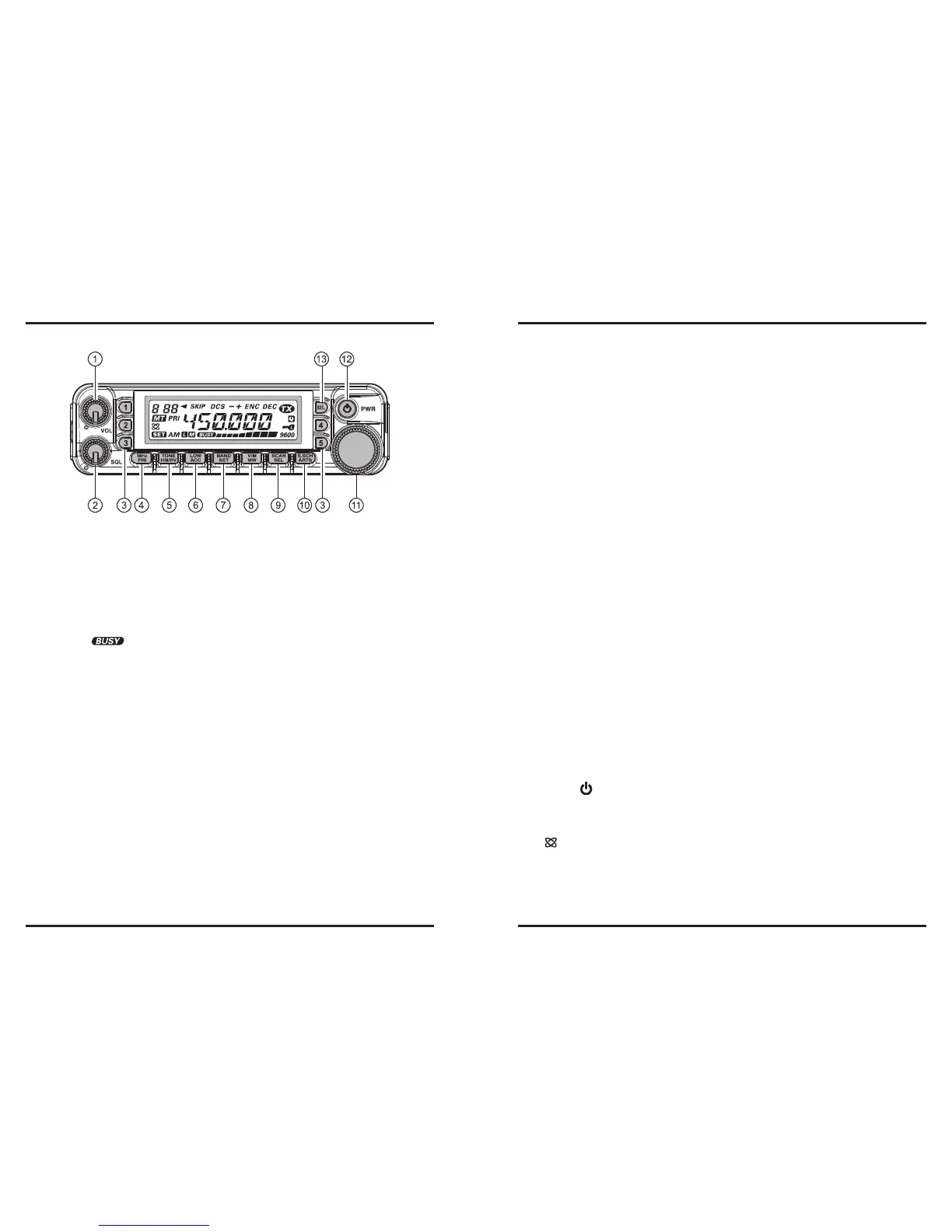
q
VOL
Knob
This control adjusts the volume level of the receiver’s audio. Clockwise rotation in-
creases the audio level.
w
SQL
Knob
This control sets the threshold level at which received signals (or noise) will open the
squelch. It should be advanced clockwise just to the point where the noise is silenced
(and the “ ” indicator on the display turns off), so as to provide the best sensi-
tivity to weak signals.
e
Hyper Memory Buttons ([
1
] ~ [
5
])
Press and hold in one of these buttons for 2 seconds to store the current total congu-
ration of the radio into a special “Hyper” memory bank.
Press the appropriate button momentarily to recall the desired “Hyper” memory.
r
[
MHz
(
PRI
)] Key
Press this key momentarily to allow tuning in 1-MHz steps on the VFO frequency
while operating on the VFO mode. In the Memory mode, press this key momentarily
to allow tuning in 10 channel steps on the memory channels.
Press and hold in this key for 1/2 second to activate the Priority Channel Scanning
(Dual Watch feature).
t
[
TONE
(
HM/RV
)] Key
Press this key momentarily to change the Tone Squelch mode: ENC (CTCSS Encod-
er), ENC.DEC (CTCSS Tone Squelch), or DCS (DCS) operation.
Press and hold in this key for 1/2 second to reverse the transmit and receive frequen-
cies during split-frequency (i.e. “Repeater”) operation.
y
[
LOW
(
ACC
)] Key
Press this key momentarily to select the transmitter power output level (“LOW”,
“MID2”, “MID1”, or “HIGH”).
Press and hold in this key for 1/2 second to recall the Weather Broadcast Channels.
You can program the alternate (press and hold in) function of this key to another
function, if desired.
u
[
BAND
(
SET
)] Key
While operating on the VFO mode, press this key momentarily to toggle the operat-
ing band as follows:
144 MHz
250 MHz
350 MHz
430 MHz
850 MHz
144 MHz ......
In the Memory mode, press this key momentarily to activate the “Memory Tune”
function.
Press and hold in this key for 1/2 second to enter the Set (“Menu”) mode.
i
[
V/M
(
MW
)] Key
Press this key momentarily to switch the frequency control among the VFO, Memory
System, and Home channel.
Press and hold in this key for 1/2 second to transfer the VFO contents into a Memory
register.
o
[
SCAN
(
SEL
)] Key
Press this key momentarily to activate the Scanner.
Press and hold in this key for 1/2 second to select the scan mode.
!0
[
S.SCH
(
ARTS
)] Keys
Press this key momentarily to activate the Smart Search feature.
Press and hold in this key for 1/2 second to activate the ARTS feature.
!1
DIAL
knob
This 20-position detented rotary switch is the tuning dial for the transceiver. It is used
for most tuning, memory selection, and function setting tasks on the transceiver.
!2
PWR
(
) Switch
Press and hold in this switch for 1/2 second to toggle the transceiver’s power on and
off.
!3
[
(
L
)] Key
Press this key momentarily to activate the Internet Connection Feature.
Press and hold in this key for 1/2 second to toggle the Lockout Feature “on” or “off”.













 To Next Page