R
EGULAR
M
EMORY
C
HANNEL
O
PERATION
Storing Independent Transmit Frequencies (“Odd Splits”)
1. Store the receiving frequency using the method already described.
2. Turn to the desired transmit frequency, then press and hold in the [
V/M
(
MW
)] key for
1/2 second.
3. Within ten seconds of pressing the [
V/M
(
MW
)] key, use the
DIAL
knob or micro-
phone’s [
UP
]/[
DWN
] buttons to select the same memory channel number as used in
step 1 above.
4. Press and hold in the
PTT
switch, then pressing and holding the [
V/M
(
MW
)] key for
1/2 second while holding the
PTT
switch to save the entry and exit to normal opera-
tion. This will not cause transmission; instead, it signals the microprocessor that a
separate transmit frequency is being programmed into that memory register.
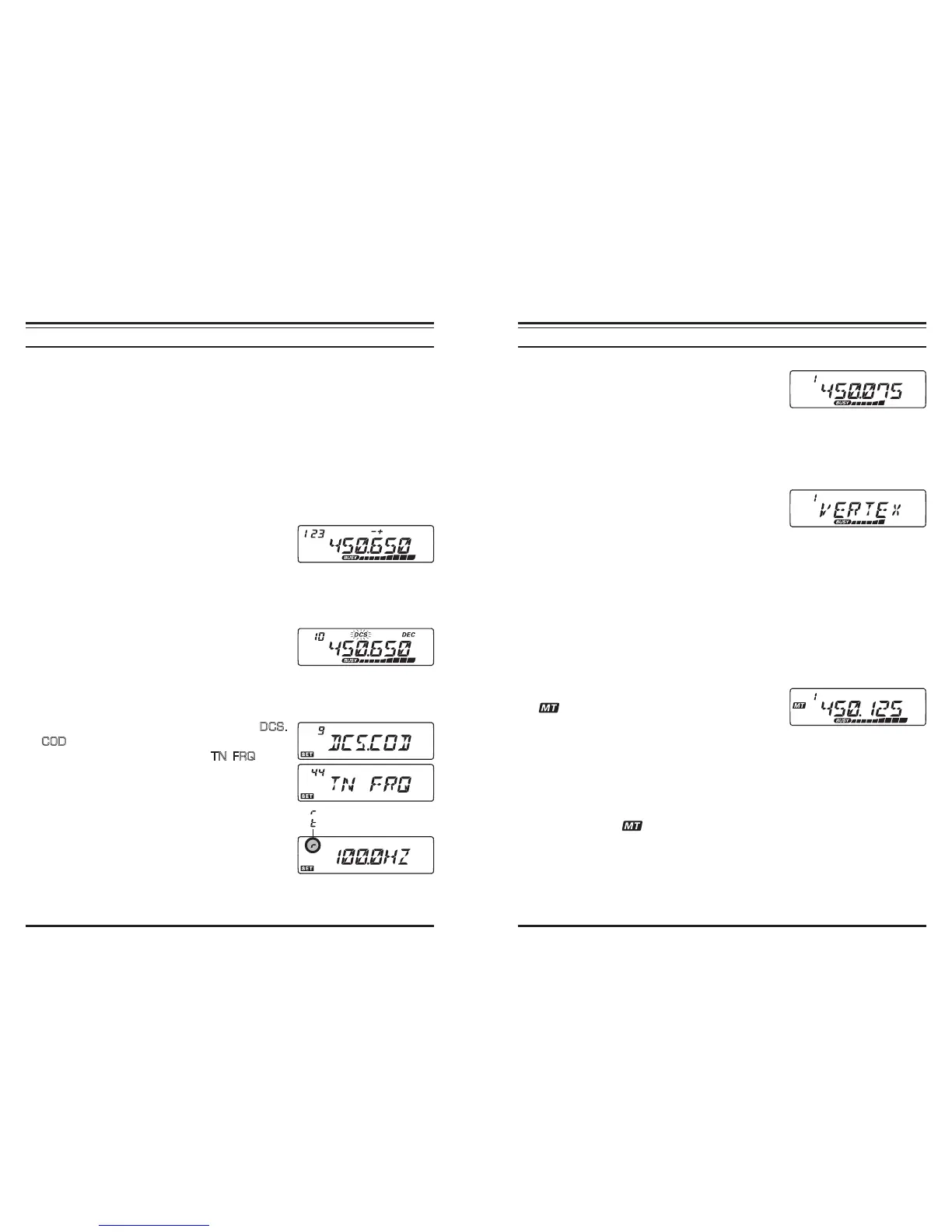
Whenever you recall a memory which contains inde-
pendently-stored transmit and receive frequencies, the
“
-+
” indication will appear in the display.
If you set the CTCSS/DCS functions to the receiver frequency and transmit frequency in-
dividually, the “Odd Splits” feature can be memorize the frequency/code individually for
transmit and receive.
Whenever you recall a memory which contains inde-
pendently-stored CTCSS/DCS functions, the decoder
icon will appear and the encoder icon will blink in the
display.
To conrm the memorized frequency/code:
1. Press and hold in the [
BAND
(
SET
)] key for 1/2 second to enter the Set mode.
2. Rotate the
DIAL
knob to select Menu #9 (
DCS.
COD
) when the receiver CTCSS/DCS function is
set to “DCS”, or select Menu #44 (
TN FRQ
) when
the receiver CTCSS/DCS function is set to “TONE
SQUELCH”.
3. Press the [
BAND
(
SET
)] key momentarily to display
the memorized frequency/code for the receiver.
4. Press and hold in the [
TONE
(
HM/RV
)] key for 1/2
second to display the memorized frequency/code for
the transmitter. You can conrm the Transmit and Re-
ceive TONE/DCS by alternately press and holding of
the [
TONE
(
HM/RV
)] key.
5. Press and hold in the [
BAND
(
SET
)] key for 1/2 second to exit to normal operation.
: Receive TONE/DCS
: Transmit TONE/DCS
R
EGULAR
M
EMORY
C
HANNEL
O
PERATION
Memory Recall
1. While operating in the VFO mode, press the [
V/
M
(
MW
)] key momentarily to enter the Memory
mode.
2. Rotate the
DIAL
knob to select the desired channel. If you press the [
MHz
(
PRI
)] key
momentarily, then rotate the
DIAL
knob, you’ll be able to scroll through the memory
channels at a rate of 10 channels per click of the
DIAL
.
3. When selecting a memory channel that has an alpha-numeric “Tag” (label) appended,
press the microphone’s [
B
] key momentarily to switch the Memory Channel display
between the “Frequency” format and “Alpha-numeric
Tag” format.
4. To return to the VFO mode, press the [
V/M
(
MW
)] key
momentarily again.
When the radio is already set to the Memory mode, an easy way to recall memories is
to enter the microphone’s key in the memory channel number. For example, to recall
memory channel #4, press [
0
]
[
0
]
[
4
].
Memory Offset Tuning
Once you have recalled a particular memory channel, you may easily tune off that chan-
nel, as though you were in the “VFO” mode.
1. With the transceiver in the “MR” (Memory Recall) mode, select the desired memory
channel.
2. Now press the [
BAND
(
SET
)] key momentarily; the
“ ” icon will appear on the display.
3. Rotate the
DIAL
knob, as desired, to tune to a new
frequency. The synthesizer steps selected for VFO operation on the current band will
be the steps used during Memory Tuning.
4. If you press and hold in the [
SCAN
(
SEL
)] key for 1/2 second during Memory Tun-
ing, the data will now have been copied to VFO, although the original memory con-
tents will remain intact on the previously-stored channel.
5. If you wish to return to the original memory frequency, press the [
BAND
(
SET
)] key
momentarily. The “ ” icon will disappear.













 To Next Page