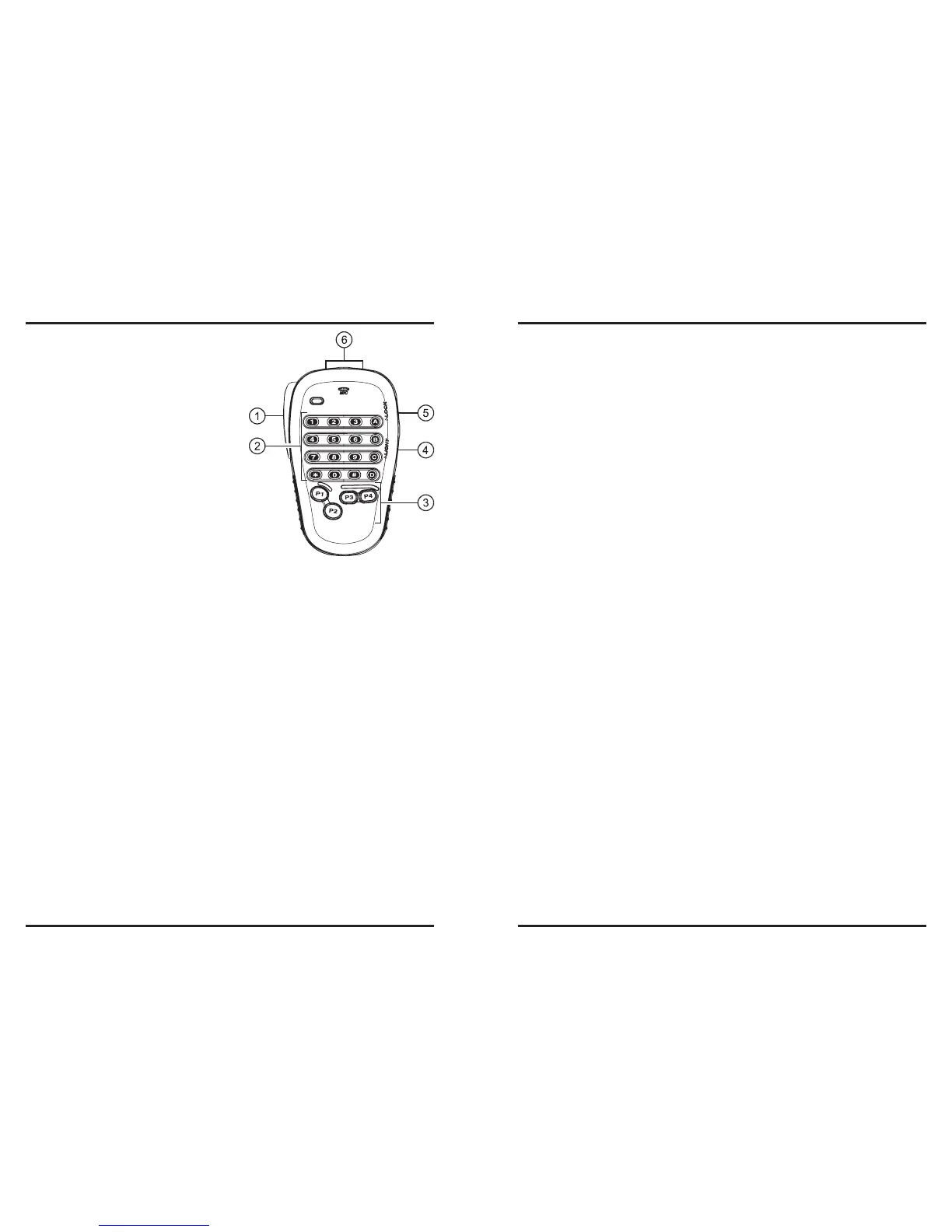
q
PTT
Switch
Press this switch to transmit, and release
it to receive.
w
Keypad
These 16 keys generate DTMF tones
during transmission.
In the receive mode, the numeric (0 - 9)
keys can be used for direct frequency
entry and/or direct numeric recall of the
Memory channels and the alphabet (A
- D) keys can be used for controls the
transceiver, as follow:
[
A
] Key:
Press this key momentarily to acti-
vate the Smart Search feature.
Press and hold in this key for 1/2 second to activates the ARTS feature.
[
B
] Key:
Press this key momentarily to switch the Memory Channel display between the
“Frequency” format and “Alpha-numeric Tag” format.
[
C
] Key:
Press this key momentarily to disable the noise squelch action, allowing you to
hear very weak signals near the background noise level.
[
D
] Key:
Press this key momentarily to allow tuning in 1-MHz steps on the VFO frequen-
cy while operating on the VFO mode. In the Memory mode, this allows tuning in
10 channel steps on the memory channels.
Press and hold in this key for 1/2 second to activate the Priority Channel Scan-
ning (Dual Watch) feature.
e
[
P1
]/[
P2
]/[
P3
]/[
P4
] Buttons
[
P1
] button:
This button replicates the functions of the front panel [
BAND
(
SET
)] key.
While operating on the VFO mode, press this button momentarily to toggle the
operating band as follows:
144 MHz
250 MHz
350 MHz
430 MHz
850 MHz
144 MHz ......
In the Memory mode, press this button momentarily to activate the “Memory
Tune” function.
Press and hold in this key for 1/2 second to enter the Set (“Menu”) mode.
[
P2
] button:
This button replicates the functions of the front panel [V/M(MW)] key.
Press this button momentarily to switch the frequency control among the VFO,
Memory System, and Home channel.
Press and hold in this button for 1/2 second to transfer the VFO contents into a
Memory register.
[
P3
] button:
This button replicates the functions of the front panel [
TONE
(
REV
)] key.
Press this button momentarily to change the Tone Squelch mode: ENC (CTCSS
Encoder), ENC.DEC (CTCSS Tone Squelch), or DCS (DCS) operation.
Press and hold in this key for 1/2 second to reverse the transmit and receive fre-
quencies during split-frequency (i.e. “Repeater”) operation.
[
P4
] button:
This button replicates the functions of the front panel [
LOW
(
ACC
)] key.
Press this button momentarily to select the transmitter power output level
(“LOW”,“MID2”, “MID1”, or “HIGH”).
Press and hold in this key for 1/2 second to recall the Weather Broadcast Chan-
nels.
You can program the [
P1
], [
P2
], [
P3
], and [
P4
] buttons for other functions, if de-
sired.
r
LAMP
Switch
This switch illuminates the Microphone’s keypad.
t
LOCK
Switch
This switch locks out the Microphone’s buttons (except for the keypad and
PTT
switch).
y
[
UP
]/[
DWN
] Button
Press (or hold in) either of these buttons to tune (or scan up or down) the operating
frequency or through the memory channels. In many ways, these buttons emulate the
function of the (rotary)
DIAL
knob.













 To Next Page