M
ISCELLANEOUS
S
ETTINGS
M
ISCELLANEOUS
S
ETTINGS
P
ROGRAMMING THE
K
EY
A
SSIGNMENTS
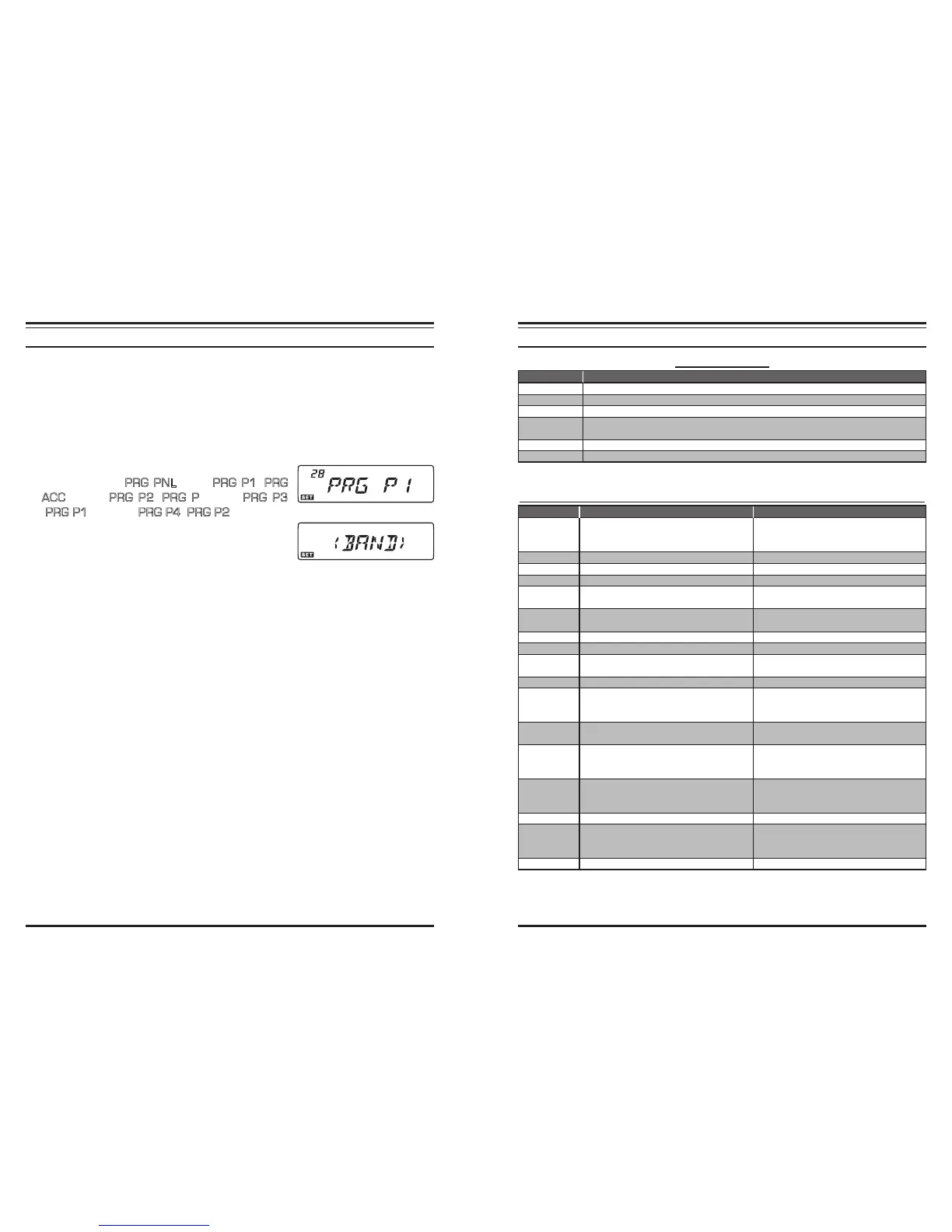
Default transceiver functions have been assigned to “alternate” (press and hold in) func-
tion of the front panel’s [
LOW
(
ACC
)] key, as well as the Microphone’s [
P1
]/[
P2
]/[
P3
]/
[
P4
] buttons’ functions (for the
MH-RM50
; [
ACC
]/[
P
]/[
P1
]/[
P2
] buttons for
MH-
42B6JS
) at the factory. These may be changed by the user, if you wish to utilize another
function on one of these keys.
To program the function assigned to a key:
1. Press and hold in the [
BAND
(
SET
)] key for 1/2 second to enter the Set mode.
2. Rotate the
DIAL
knob to select the Menu Item to be
congured (“#27
PRG PNL
”, “#28
PRG P1
(
PRG
ACC
)”, “#29
PRG P2
(
PRG P
)”, “#30
PRG P3
(
PRG P1
)”, or “#31
PRG P4
(
PRG P2
)”).
3. Press the [
BAND
(
SET
)] key momentarily, then rotate
the
DIAL
knob to select the function you wish to as-
sign to the button you selected in the previous step.
4. Press the [
BAND
(
SET
)] key to save the new setting, then rotate the knob to select
another programmable button to modify, if desired, and repeat the above steps.
5. Press the [
BAND
(
SET
)] key momentarily to save the new setting, then press and hold
in the [
BAND
(
SET
)] key for 1/2 second to exit to normal operation.
P
ROGRAMMING THE
K
EY
A
SSIGNMENTS
For Menu #28 PRG P1
(
PRG ACC
)
, #29 PRG P2
(
PRG P
)
, #30 PRG P3
(
PRG P1
)
, #31 PRG P4
(
PRG P2
)
Press and hold the
[
LOW
(
ACC
)]
key
Recall the Weather Broadcast Channels.
Reverses the transmit and receive frequencies during split-frequency operation.
Selects Repeater Shift direction.
Disable the noise squelch action, allowing you to hear very weak signals near the
background noise level.
Selects the Key locking schemes.
(
Short-cut to Menu #21:
LOCKLOCK
LOCKLOCK
LOCK
)
Sets the display Brightness.
Function
< WX >< WX >
< WX >< WX >
< WX >
< REV >< REV >
< REV >< REV >
< REV >
< RPTR >< RPTR >
< RPTR >< RPTR >
< RPTR >
< SQ.OF >< SQ.OF >
< SQ.OF >< SQ.OF >
< SQ.OF >
< LOCK >< LOCK >
< LOCK >< LOCK >
< LOCK >
< DIM >< DIM >
< DIM >< DIM >
< DIM >
Function
< SQ.OF >< SQ.OF >
< SQ.OF >< SQ.OF >
< SQ.OF >
< TCAL >< TCAL >
< TCAL >< TCAL >
< TCAL >
< SSCH >< SSCH >
< SSCH >< SSCH >
< SSCH >
< ARTS >< ARTS >
< ARTS >< ARTS >
< ARTS >
< TN.FQ >< TN.FQ >
< TN.FQ >< TN.FQ >
< TN.FQ >
< DCSC>< DCSC>
< DCSC>< DCSC>
< DCSC>
< WX >< WX >
< WX >< WX >
< WX >
< RPTR >< RPTR >
< RPTR >< RPTR >
< RPTR >
< PRI >< PRI >
< PRI >< PRI >
< PRI >
< LOW >< LOW >
< LOW >< LOW >
< LOW >
< TONE >< TONE >
< TONE >< TONE >
< TONE >
< MHz >< MHz >
< MHz >< MHz >
< MHz >
< REV >< REV >
< REV >< REV >
< REV >
< HOME >< HOME >
< HOME >< HOME >
< HOME >
< BAND >< BAND >
< BAND >< BAND >
< BAND >
< V< V
< V< V
< V/
M >M >
M >M >
M >
< SCAN >< SCAN >
< SCAN >
Press the button
Disable the noise squelch action, allow-
ing you to hear very weak signals near
the background noise level.
Activates 1750 Hz Tone Burst.
Activate the Smart Search operation.
Activate the ARTS
TM
operation.
Select the CTCSS Tone Frequency.
(
Short-cut to Menu #44:
TN FRQTN FRQ
TN FRQTN FRQ
TN FRQ
)
Select the DCS code.
(
Short-cut to Menu #9:
DCS.CODDCS.COD
DCS.CODDCS.COD
DCS.COD
)
Recall the Weather Broadcast Channels.
Selects Repeater Shift direction.
Activates the Priority Channel Scanning
(Dual Watch).
Selects the transmit power output level.
Activates the CTCSS or DCS operation.
Allows tuning in 1-MHz step on the VFO
frequency.
Reverses the transmit and receive fre-
quencies during split-frequency opera-
tion.
Recall the Home Channel.
Switches operating band.
Switches frequency control among the
VFO, Memory System, and Home chan-
nel.
Press and hold the button
Disable the noise squelch action, allow-
ing you to hear very weak signals near
the background noise level.
Activates 1750 Hz Tone Burst.
Activate the ARTS
TM
operation.
–
–
–
–
Selects Repeater Shift direction.
–
Recall the Weather Broadcast Channels.
Reverses the transmit and receive fre-
quencies during split-frequency (re-
peater) operation.
Activates the Priority Channel Scanning
(Dual Watch).
Selects Repeater Shift direction.
Switch the Memory Channel display be-
tween the “Frequency” format and “Al-
pha-numeric Tag” format.
Enter the Set (“Menu”) mode.
Transfer the VFO contents into a Memory
register.













 To Next Page