VDR-100G2/G2S Operation User Manual 56
RUT-UM-02-002_Rev. 2.0
6.15 Alarms Tab Screen
An alarm is an “on” event, only displaying when triggered. When an alarm occurs, the word “ALARM” will
display in the lower left corner of the Playback interface. The Alarms tab allows a user to view information
pertaining to all triggered alarms.
6.16 Data Extraction
The volume of data contained in downloaded VDR data sets can be very large. In many instances it may
be desirable to access smaller portions of the data without downloading the entire data set. As a result it
is possible to copy only a specific portion of a data set, which can then be easily removed to a separate
location for analysis or e-mailed to a third party.
6.16.1 Open Extraction Window
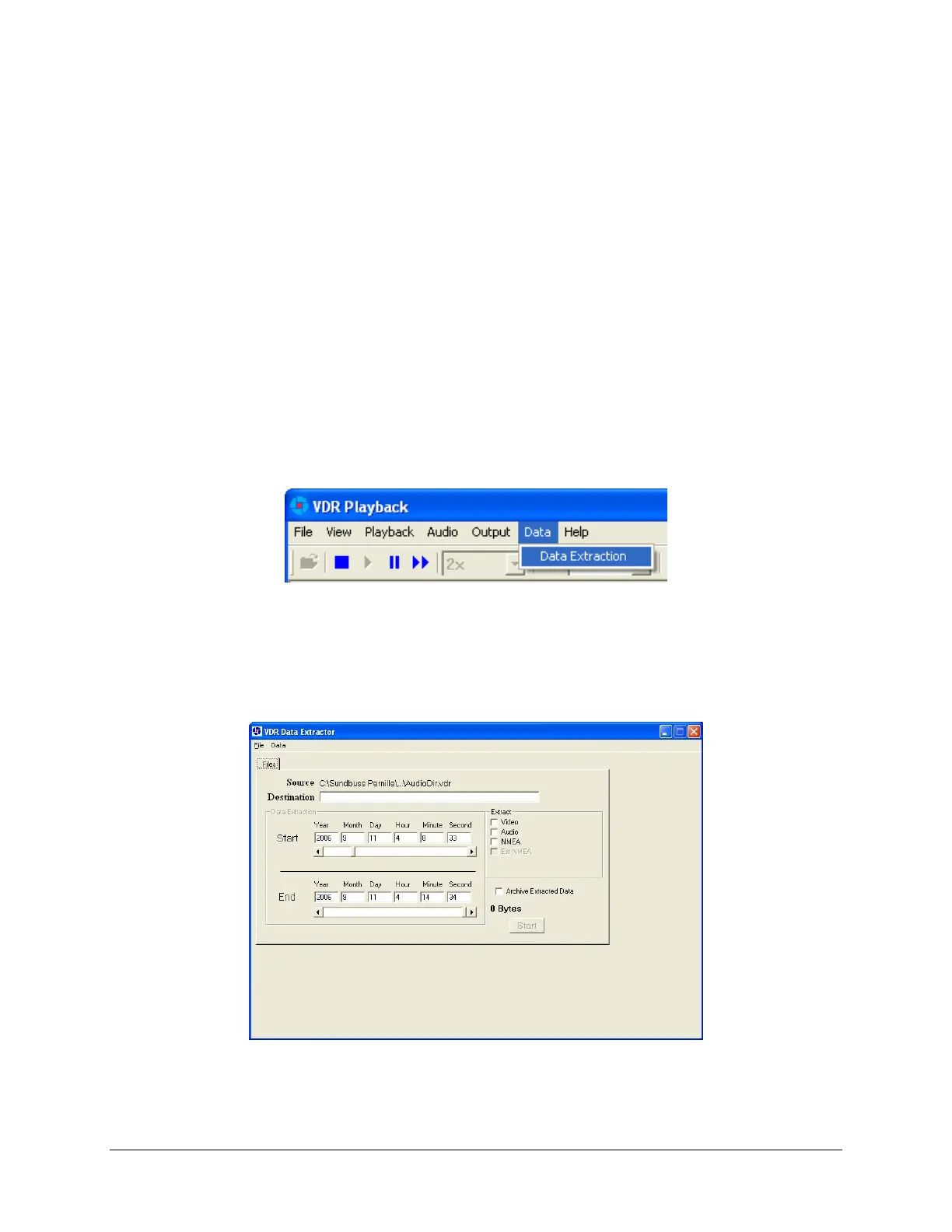
To extract a specific portion of data, begin the playback of captured data. Once data is in active
playback mode allow it to play until the beginning point of the portion desired for extraction is reached:
1. Select “Data Extraction” option from the “Data” file menu.
Figure 6-28 - Data Extraction Option
2. The Data Extraction window will open (see Figure 6-29 - Data Extraction Window belo
w). This
may take a number of seconds. The start time will automatically appear as the point in the
playback where the Data Extraction window was opened.
Figure 6-29 - Data Extraction Window



 To Next Page