SAM4s ER-285M Operator's and Program Manual v1.4 Program Mode Reference Guide • 131
Program 150 - PLU Group Assignment
Each PLU may report to any three of 99 groups. (The number of groups depends upon
memory allocation, see “Memory Allocation” on page 110.) Group totals appear on reports,
so that you can track sales of different types of items. A group can also be used to designate
items that are to print on an optional kitchen printer. (The first group entered is the kitchen
printer routing group.)
Note: By default, a PLU will report to group "1", if not programmed to report to
another group.
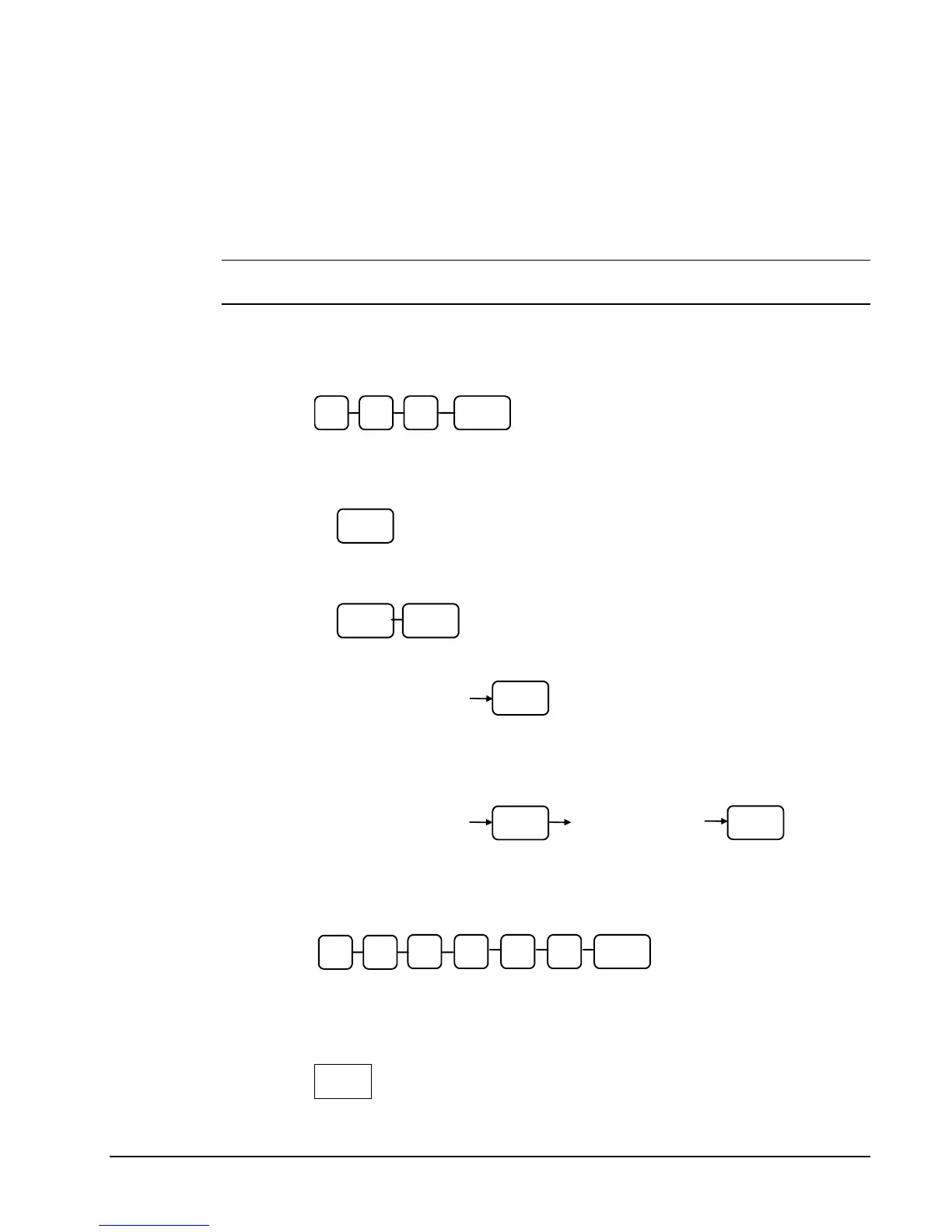
1. Turn the control lock to the PGM position.
2. To begin the program, enter 1 5 0, press the SUBTOTAL key.
0
SUB
TOTAL
5 1
3. Select the PLU or PLUs you wish to program in one of the following ways:
• Press a PLU key on the keyboard, or
PLU
• Press the first PLU keys that are to receive the same status and Press the
last PLU keys, or
PLU PLU
• Enter up to 15 digit number of the PLU and press the PLU key, or
PLU
Enter the PLU#,
up to 15 digits
• Enter the number of the first PLU in a range of PLUs that are to receive the
same setting; press the PLU key. Enter the last number in the range; press
the PLU key.
PLU
Enter the PLU#,
up to 15 digits
Enter the PLU#,
up to 15 digits
PLU
4. Enter up to three 2-digit numbers representing the groups where you wish to
add the PLUs sales, i.e. enter 1 0 for group 10 or enter 0 4 for group four. Press
the X/TIME key.
X/TIME
2
nd
Grou
1
st
Group (KP)
3
r
Grou
5. To program additional PLUs, repeat from step 3, or press the CASH key to
finalize the program.



 To Next Page