24 • Quick Start Guide SAM4s ER-285M Operator's and Program Manual v1.4
Programming a Tax Rate Percentage
1. Turn the control lock to the PGM position.
2. Enter the rate, with a decimal: 0.000-99.999. It is not necessary to enter proceeding
zeros. For example, for 6%, enter 06.000 or 6.000.)
3. Enter 00.
4. Enter the number of the tax rate you are programming (1-4).
5. Press the TAX key.
6. Press the CASH/TEND key to end programming.
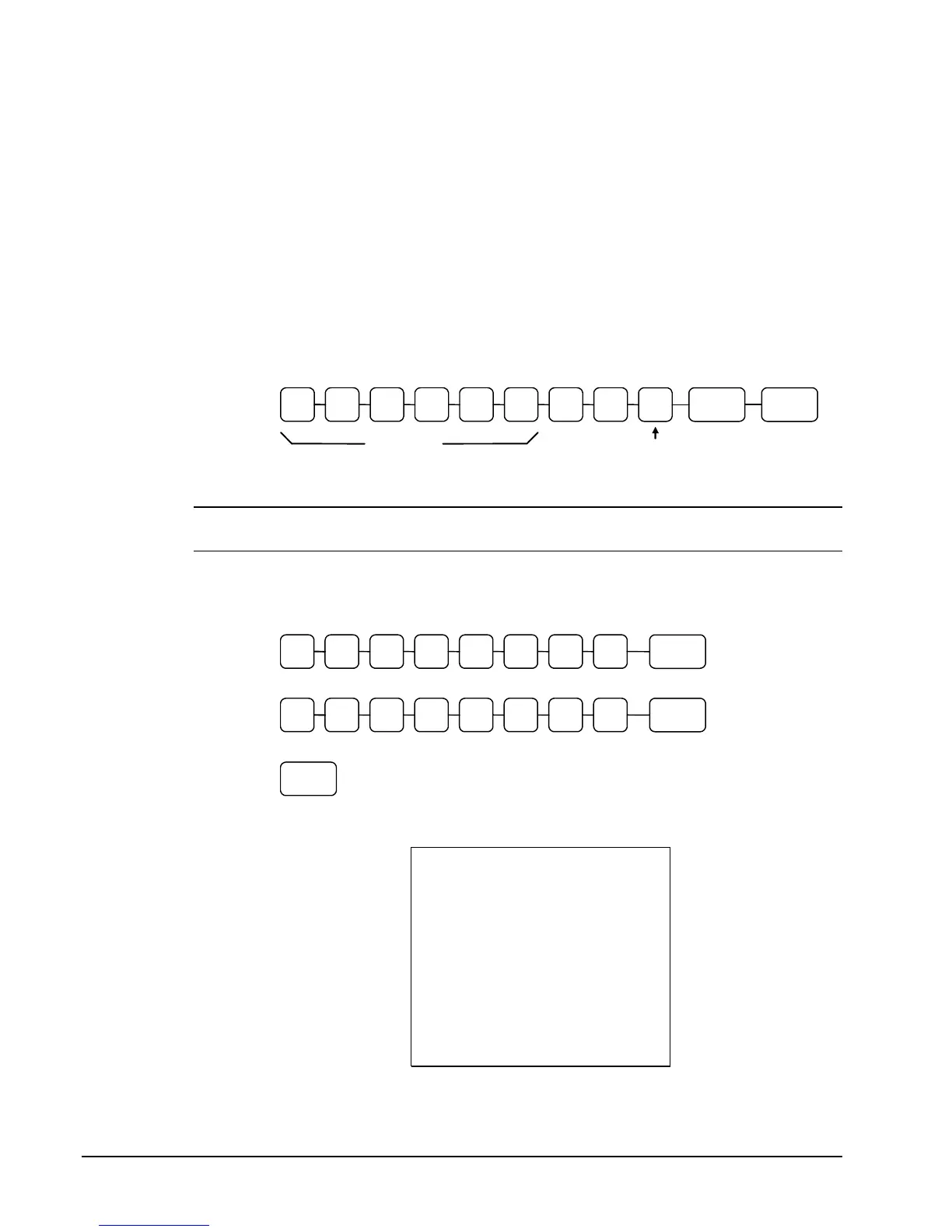
Tax Rate Programming Flowchart
. TAX 0 0
Tax Rate
Tax #
(1-4)
CASH/
TEND
Please Note: After programming the tax rate, you must program the PLUs taxable to
calculate tax. Go to the next page for PLU programming steps.
Tax Rate Programming Examples
If tax 1 is 6 percent, enter:
. TAX 0 1 0 0 0 0 6
If tax 2 is 7.5 percent, enter:
. TAX 0 2 0 5 0 0 7
Press the CASH/TEND key to end programming.
CASH/
TEND
The rates you have entered will display and print on the printer:
DATE 03/09/2007 FRI TIME 01:32
******* TAX PROGRAMMING *******
--------------------------------
TAX1
ADD-ON AT 6.000%
TAX2
ADD-ON AT 7.500%
CLERK 1 000046 00000



 To Next Page