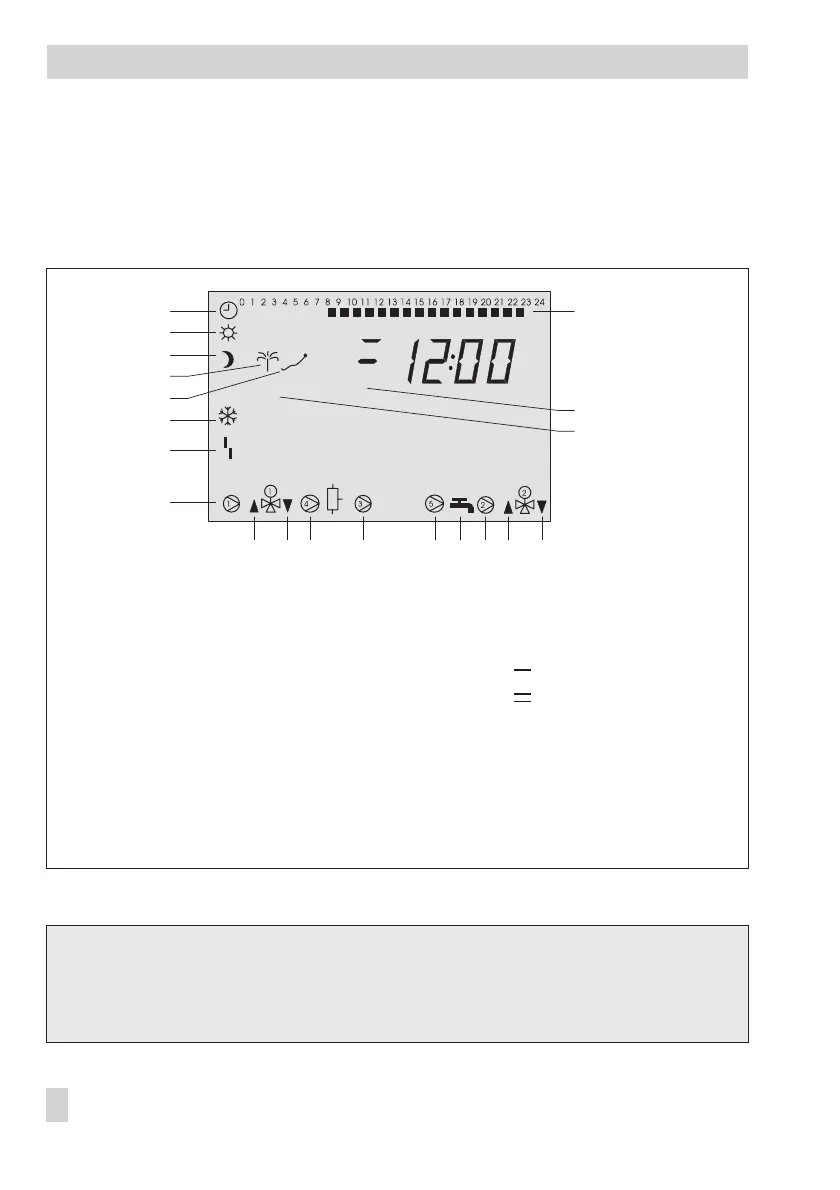
1.3 Display
During operation, the display indicates the current time as well as information about the op
-
eration of the controller. The times-of-use are represented by black squares below the row of
numbers at the top of the display. Icons indicate the operating status of the controller.
The controller status can be displayed in operating level (–> section 1.4).
TROVIS 5575-000x and TROVIS 5575-001x:
An illuminated display indicates that the controller is being operated or a fault exists.
TROVIS 5575-002x:
Version without illuminated display
10 EB 5575 EN
Operation
STOP
1
18
2
3
6
7
8
9
4
5
10 11 12 13 14 15 16 17
19
20
Fig. 1 · Icons
1 Automatic operation
2 Day mode
(rated operation)
3 Night mode
(reduced operation)
4 Vacation mode
5 Public holiday mode
6 Frost protection
7 Malfunction
8 Circulation pump UP1*
9 Valve Rk1: OPEN
10 Valve Rk1: CLOSED
11 Storage tank charging
pump SLP
12 Output bA9*
13 Circulation pump UP5*
14 DHW demand
15 Circulation pump UP2*
16 Valve Rk2: OPEN
17 Valve Rk2: CLOSED
18 Time-of-use
19 Control circuit assignment:
: Heating circuit 1
: Heating circuit 2
20 OT dependent control
deactivated
* UP1, UP2, SLP, UP5, bA9 indicate possible choices for pump selection in manual operating mode.



 To Next Page