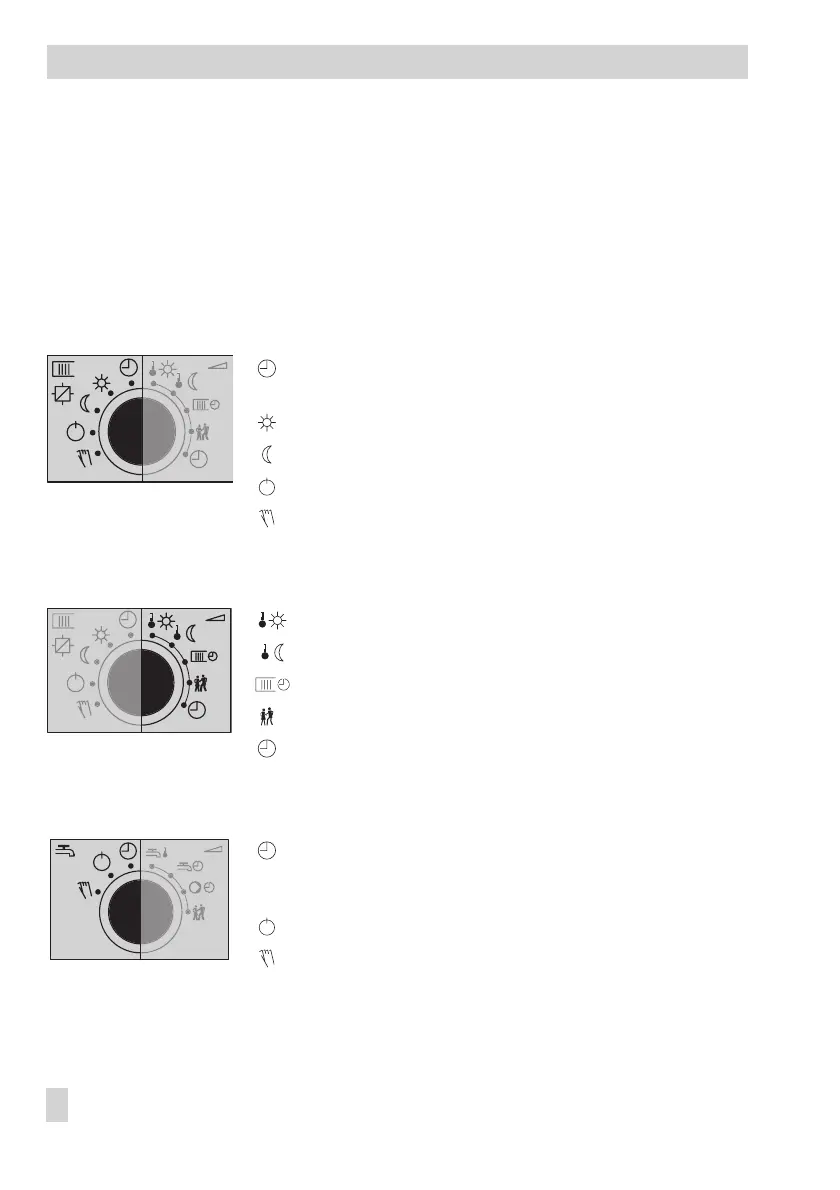
1.1.2 Rotary switches
Use the three rotary switches to adjust the desired operating mode (icons on the left) and the
relevant parameters (icons on the right).
The top and middle switches are assigned to the heating circuits (see page 121). The rotary
switch in the middle is not used in systems without a second heating circuit.
The bottom switch is assigned to the DHW circuit.
Rotary switch to adjust the operating modes of the heating circuit
Automatic/time-controlled operation
with switchover between day and night modes
Day mode (rated operation)
Night mode (reduced operation)
Control operation deactivated, frost protection only
Manual operation: correction value adjusted in percent
and activation/deactivation of the pumps
Rotary switch to adjust the parameters of the heating circuit
Day set point (rated room temperature)
Night set point (reduced room temperature)
Times-of-use for heating
Party mode
Controller time: setting current time, date and year
Rotary switch to adjust the operating modes of the DHW circuit
Automatic/time-controlled operation
with switchover between times when DHW heating
is permissible/impermissible
DHW heating deactivated, frost protection only
Manual operation: correction value adjusted in percent
and activation/deactivation of the pumps
8 EB 5575 EN
Operation



 To Next Page