English - 18
Managing Channels
Using this menu, you can Add/Delete or set Favourite
channels and use the program guide for digital broadcasts.
Viewing All Channels
Show all currently available channels.
To use the Channel List function, first run Auto Program.
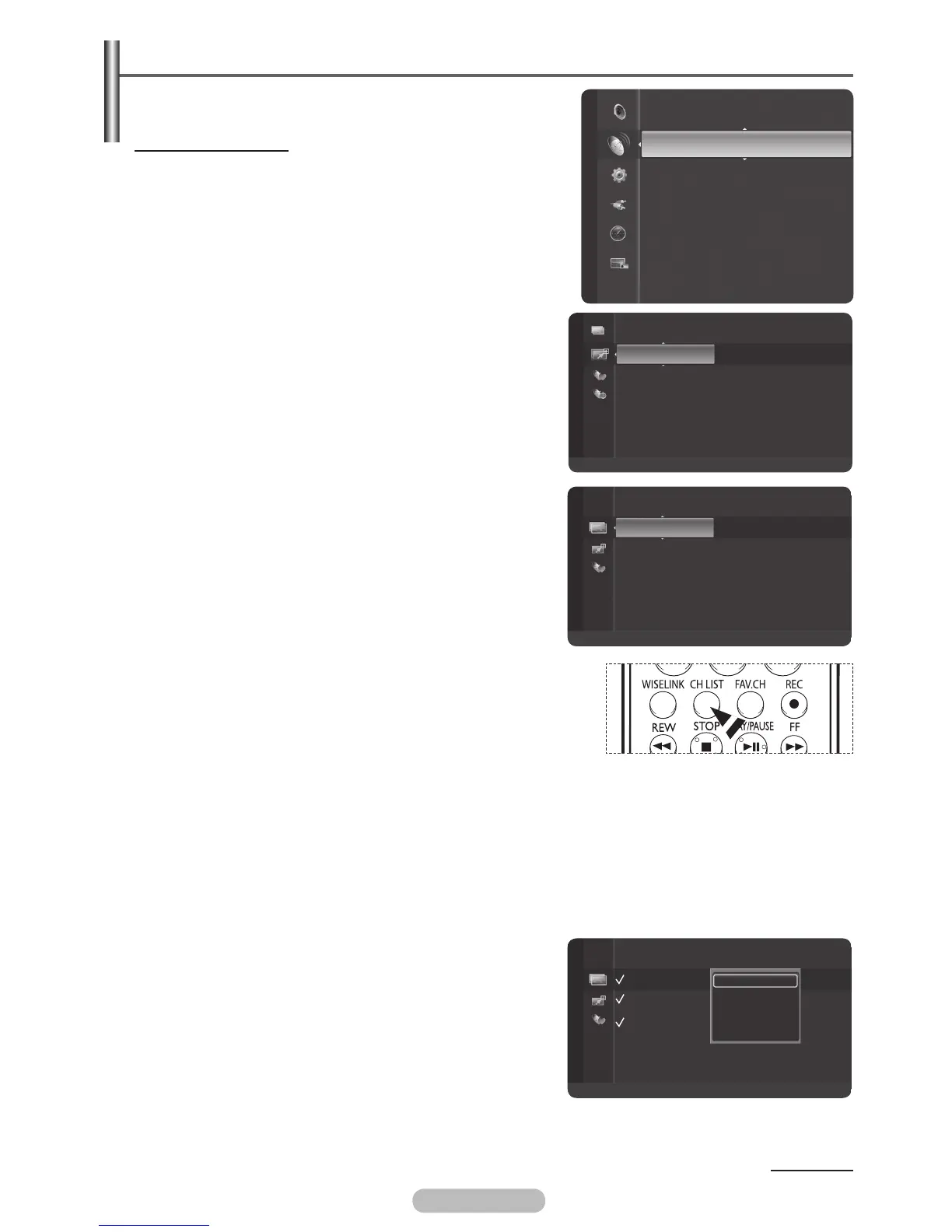
1 Press the MENU button to display the menu.
2 Press the ▲ or ▼ button to select Channel, then press the
ENTER/OK button.
3 Press the ▲ or ▼ button to select Channel List, then
press the ENTER/OK button.
4 Press the ◄ button to select Added Channels.
5 Press the ▲ or ▼ button to select All Channels, then
press the ENTER/OK button.
Shows all currently available channels.
6 Press the ▲ or ▼ button to select a channel to view, then
press the ENTER/OK button.
You can watch the selected channel.
➢
You can press Number buttons on Remote control for
direct channel access,press the same Number button
again to switch between digital channel and ATV channel.
➢
You can select these options simply by pressing the CH LIST
button on the remote control.
Using the Colour buttons on the Remote with the Channel List
Green (Zoom): Enlarges or shrinks a channel number.
Yellow (Select): Selects multiple channel lists.
Blue (Option): Displays the Add (or Delete), Add Favourite (or Delete Favourite), Timer Viewing, and
Channel Name Edit menus.
➢
A gray-coloured channel refers to a deleted channel. The Add menu only appears for deleted
channels.
➢
If you select multiple channel include “favourite
channels”,“delete channel etc. channels”and other
channels, you can choose “Add to Favourite or Delete from
Favourite or Add or Deselect All”etc.
Continued...
Channel
Channel List
Auto Store
Manual Store
Fine Tune
Signal Strength
LNA : On
1 ♥ 7HD Digital
2 ♥ 7Digital 1
3 ♥ 7Digital 2
4 ♥ 7Digital 3
ATV0 C1
ATV1 C2
ATV2 C3
ATV3 C4
ATV4 C5
Added Channels
Zoom
Select
Option
BN68-01314A-00Eng.indd 18 2007-07-21 ¿ÀÈÄ 12:57:49
1 ♥ 7HD Digital
2 ♥ 7Digital 1
3 ♥ 7Digital 2
4 ♥ 7Digital 3
ATV0 C1
ATV1 C2
ATV2 C3
ATV3 C4
ATV4 C5
All Channels
Zoom
Select
Option
1 ♥ 7HD Digital
2 7Digital 1
3 ♥ 7Digital 2
4 ♥ 7Digital 3
ATV0 C1
ATV1 C2
ATV2 C3
ATV3 C4
ATV4 C5
Add
Delete
Add to Favourite
Delete from Favourite
Deselect All
All Channels
Zoom
Select
Option



 To Next Page