English - 41
Setting up the Parental Lock
This feature allows you to prevent unauthorized users,
such as children, from watching unsuitable programmes
by a 4-digit PIN (Personal Identification Number) code that
is defined by the user. The on-screen menu will instruct
you to assign a PIN code (you can change it later, if
necessary).
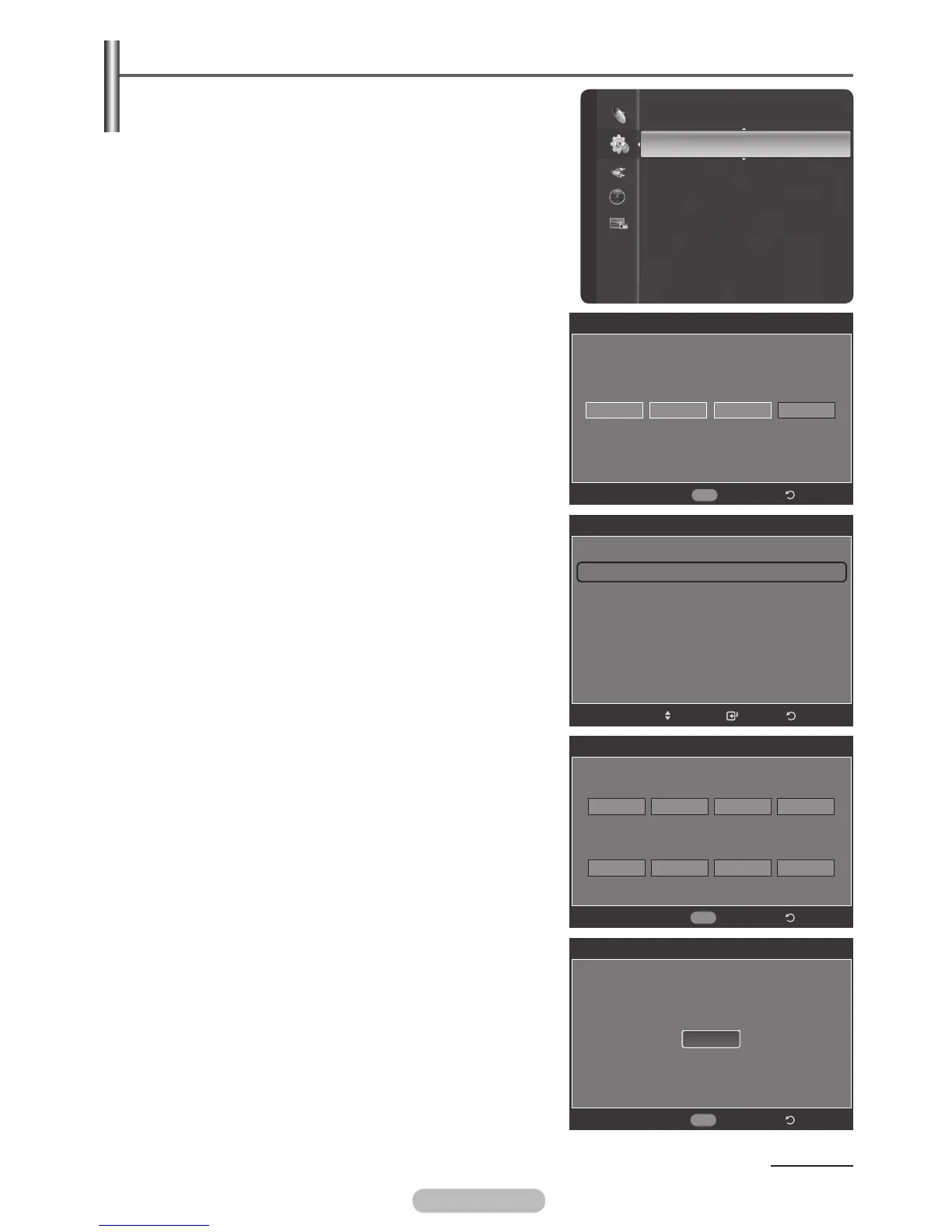
1 Press the MENU button to display the menu.
2 Press the ▲ or ▼ button to select Setup, then press the
ENTER/OK button.
3 Press the ▲ or ▼ button to select Parental Lock, then
press the ENTER/OK button.
4 Press the number buttons to enter your current 4-digit PIN.
➢
The default PIN for a new TV set is “0-0-0-0”.
5 The Parental Lock screen will appear.
Press the ▲ or ▼ button to select Change PIN, then
press the ENTER/OK button.
6 The Change PIN screen will appear.
Press the number buttons to enter your new 4-digit PIN.
Re-enter the same 4 digits. The message
PIN is
changed sucessfully.
is displayed, then your PIN has
been memorized.
7 Press the EXIT button to exit.
➢
If you forget the PIN, press the remote-control
buttons in the following sequence, which resets the
pin to 0-0-0-0 : Power Off. → Mute → 8 → 2 → 4 →
Power On.
Continued...
Setup
Subtitle
Game Mode : Off
Parental Lock
Menu Transparency : Medium
Energy Saving : Off
PC
Home theatre PC : Off
HDMI Black Level : Normal
Film Mode
: Off
Wall-Mount Adjustment
Parental Lock
* *
Enter PIN
*
Return
0~9
Enter PIN
Parental Lock
Parental Rating
Change PIN
ReturnEnter
Move
Change PIN
Enter new PIN.
Return
Confirm new PIN.
0~9
Enter PIN
Change PIN
PIN is changed successfully.
Return
0~9
Enter PIN
OK
BN68-01314A-00Eng.indd 41 2007-07-26 ¿ÀÈÄ 11:40:38



 To Next Page