English - 44
Upgrading the Software
Samsung may offer upgrades for your TV’s firmware in the future. There are two methods to
upgrade the software. Please contact the Samsung call center at 1-800-SAMSUNG to receive
information about downloading upgrades and using the USB device and Over the Air Download.
Upgrades will be possible by connecting a USB drive to the USB port located on the back of your
TV and using Over the Air Download.
Using a USB
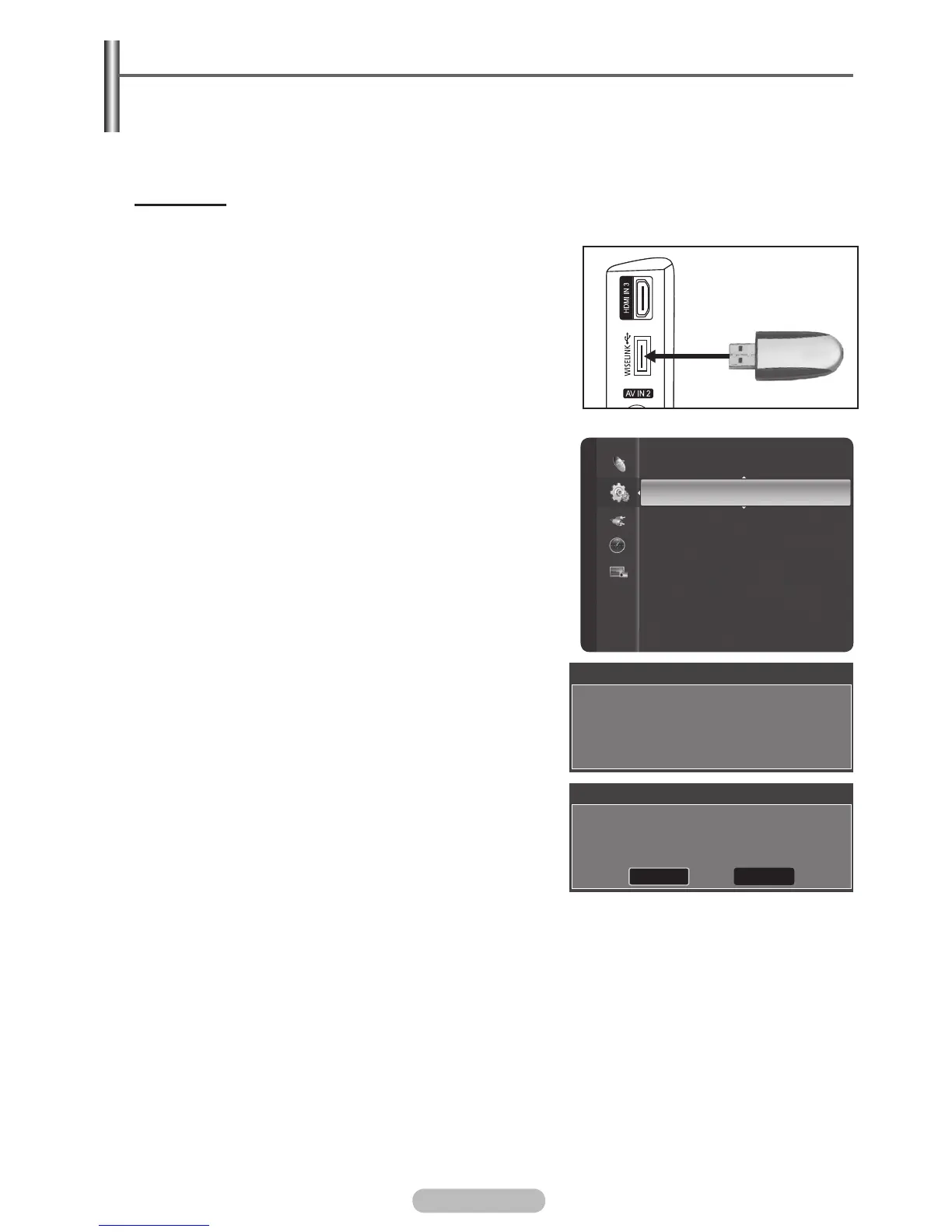
1 Insert a USB drive containing the firmware upgrade into
the USB Upgrade Port on the side of the TV.
2 Press the MENU button to display the menu.
3 Press the ▲ or ▼ button to select Setup, then press the
ENTER/OK button.
4 Press the ▲ or ▼ button to select SW Upgrade, then
press the ENTER/OK button and select USB Download.
The message Scanning for USB. It may take up to 30
seconds. is displayed.
5 If the firmware on the USB is properly recognized, the
message Upgrade version xxxx to version xxxx? The
system would be reset after upgrade. is displayed.
Press the ◄ or ► button to select OK, then press the
ENTER/OK button. The upgrade starts.
Please be careful not to disconnect the power or remove
the USB drive while upgrades are being applied.
The TV will shut off and turn on automatically after completing the firmware upgrade.
Please check the firmware version after the upgrades are complete.
➢
When software is upgraded, video and audio settings you have made will return to their default
(factory) settings. We recommend you write down your settings so that you can easily reset them
after the upgrade.
Setup
Melody : Medium
Anynet+ (HDMI-CEC) Setup
SW Upgrade
Function Help : On
Software Upgrade
Scanning for USB.
It may take up to 30 seconds.
Software Upgrade
Upgrade version XXXX to version XXXX ? The
system would be reset after upgrade.
OK Cancel
BN68-01314A-00Eng.indd 45 2007-07-26 ¿ÀÈÄ 11:40:48
TV Side Panel
USB Drive



 To Next Page