English - 38
Activating the Child Lock
This feature allows you to prevent unauthorized users,
such as children, from watching unsuitable programmes
by muting out video and audio. Child Lock cannot be
released using the buttons on the side.Only the remote
control can release the Child Lock setting, so keep the
remote control away from children.
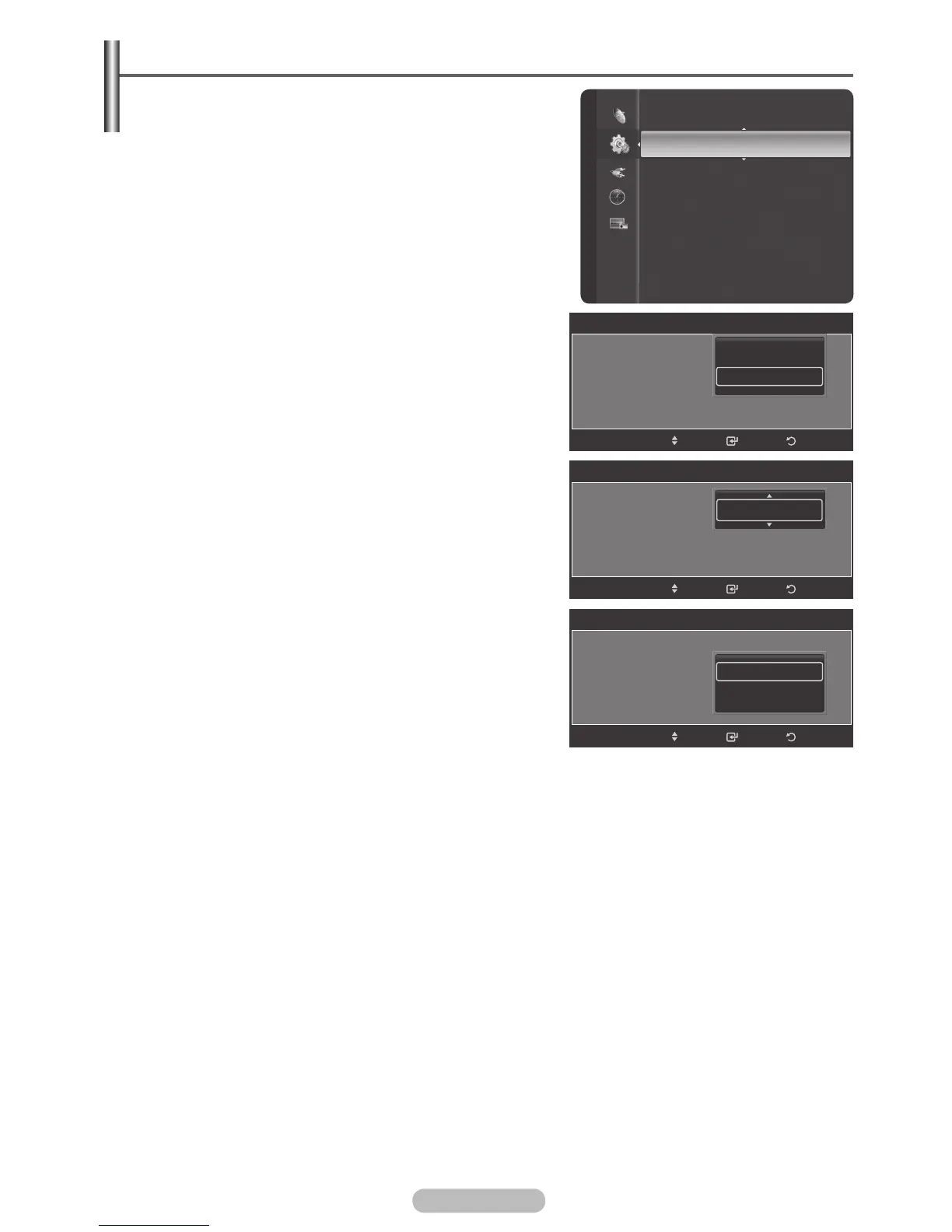
1 Press the MENU button to display the menu.
2 Press the ▲ or ▼ button to select Setup, then press the
ENTER/OK button.
3 Press the ▲ or ▼ button to select Child Lock.
4 Press the ENTER/OK button to select On or Off. Press the
ENTER/OK button.
5 Press the ▲ or ▼ button to select Channel, then press
the ENTER/OK button and select the channels you want
to lock, then press the ENTER/OK button.
6 Press the ▲ or ▼ button to select Lock, then press the
ENTER/OK button to select Unlocked or Locked.
7 Repeat steps for each channel to be locked or unlocked.
8 Press the EXIT button to exit.
➢
While viewing a Analog channel , the Child Lock
function can be selected.
Setup
Timer 2 : Inactivated
Timer 3 : Inactivated
Child Lock
Subtitle
Game Mode : Off
Parental Lock
Menu Transparency : Medium
Energy Saving : Off
PC
Home theatre PC : Off
Child Lock
Child Lock : On
Channel : Air 1
Lock : Unlocked
ReturnEnter
Off
On
Move
Child Lock
Child Lock : On
Channel : Air 1
Lock : Unlocked
ReturnEnter
Move
Child Lock
Child Lock : On
Channel : Air 1
Lock : Unlocked
ReturnEnter
Unlocked
Locked
Move
ATV1
BN68-01314A-00Eng.indd 38 2007-07-26 ¿ÀÈÄ 11:40:35



 To Next Page