Setting the PC
➢
Preset to the PC mode by pressing the SOURCE button.
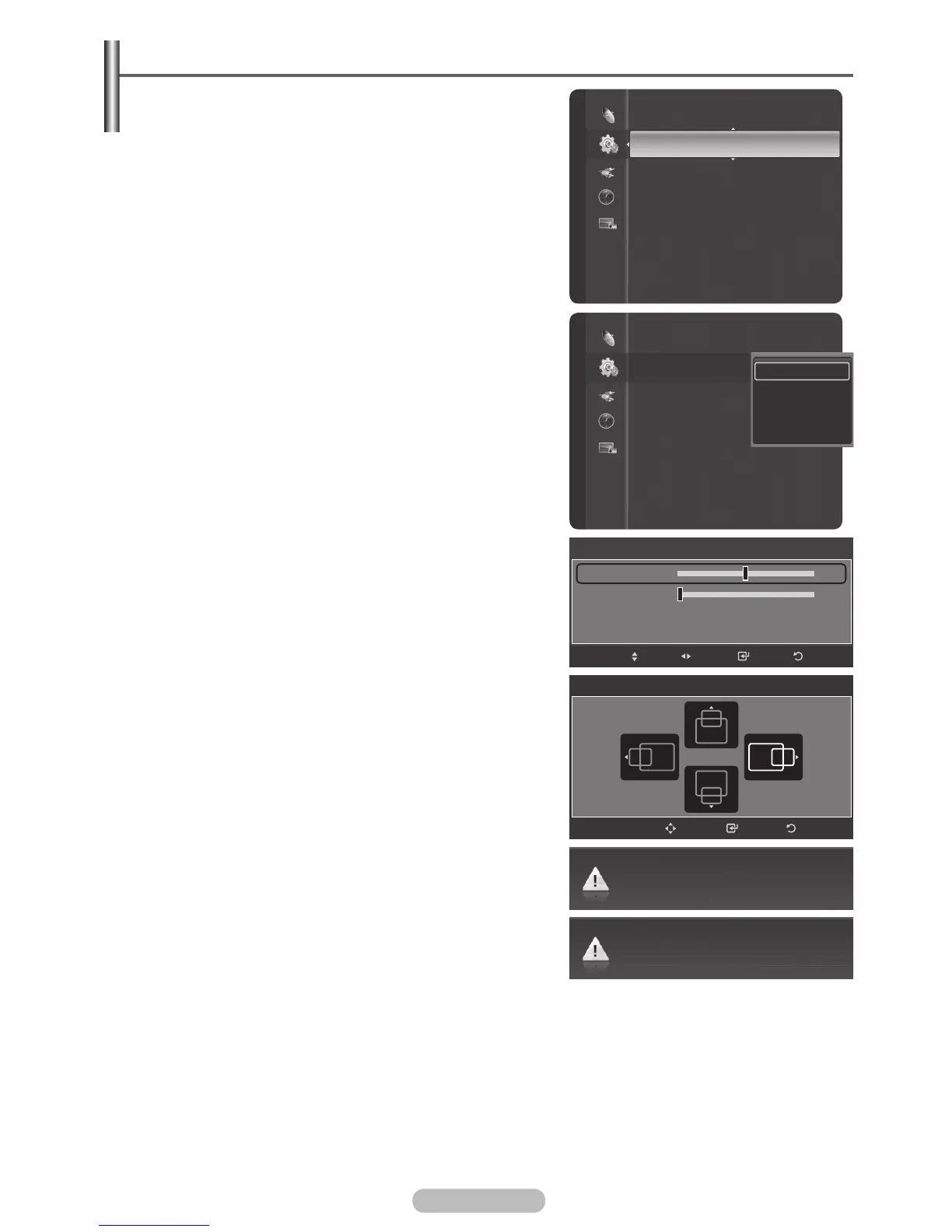
1 Press the MENU button to display the menu.
2 Press the ▲ or ▼ button to select Setup, then press the
ENTER/OK button.
3 Press the ▲ or ▼ button to select PC, then press the
ENTER/OK button.
4 Select the required option by pressing the ▲ or ▼
button, then press the ENTER/OK button.
Available options:
Image Lock, Position, Auto
Adjustment, Image Reset
5 When you are satisfied with your setting, press the
ENTER/OK button.
6 Press the EXIT button to exit.
Image Lock: Coarse/Fine
The purpose of picture quality adjustment is to remove
or reduce picture noise.
If the noise is not removed by Fine-tuning alone, then
adjust the frequency as best as possible (coarse) and
Fine-tune again.
After the noise has been reduced, readjust the picture so
that it is aligned on the centre of screen.
1 Press the ▲ or ▼ button to select Coarse or Fine,
then press the ENTER/OK button.
2 Press the ◄ or ► button to adjust the screen
quality, vertical stripes may appear or the picture
may be blurry. Press the
ENTER/OK button.
Position
Adjust the PC’s screen positioning if it does not fit the
TV screen.
1 Adjust the position by pressing the ▲/▼/◄/►
button.
2 Press the ENTER/OK button.
Auto Adjustment
Auto adjustment allows the PC screen of set to self-
adjust to the incoming PC video signal.
The values of fine, coarse and position are adjusted
automatically.
Image Reset
You can replace all image settings with the factory
default values.
Menu Transparency : Medium
Energy Saving : Off
PC
Home theatre PC : Off
HDMI Black Level : Normal
Film Mode
: Off
Wall-Mount Adjustment
Light Effect
: Always
Blue Screen
: On
Melody
: Medium
Image Lock
Position
Auto Adjustment
Image Rese
t
Setup
Setup
Menu Transparency : Medium
Energy Saving : Off
PC
Home theatre PC : Off
HDMI Black Level : Normal
Film Mode
: Off
Wall-Mount Adjustment
Light Effect
: Always
Blue Screen
: On
Melody
: Medium
Image Lock
Return
Enter
Move
Adjust
50
0
Coarse
Fine
ReturnEnter
Position
Adjust
Auto Adjustment in Progress. Please Wait.
Image Reset is completed.



 To Next Page