English - 8
Viewing the Remote Control
➢
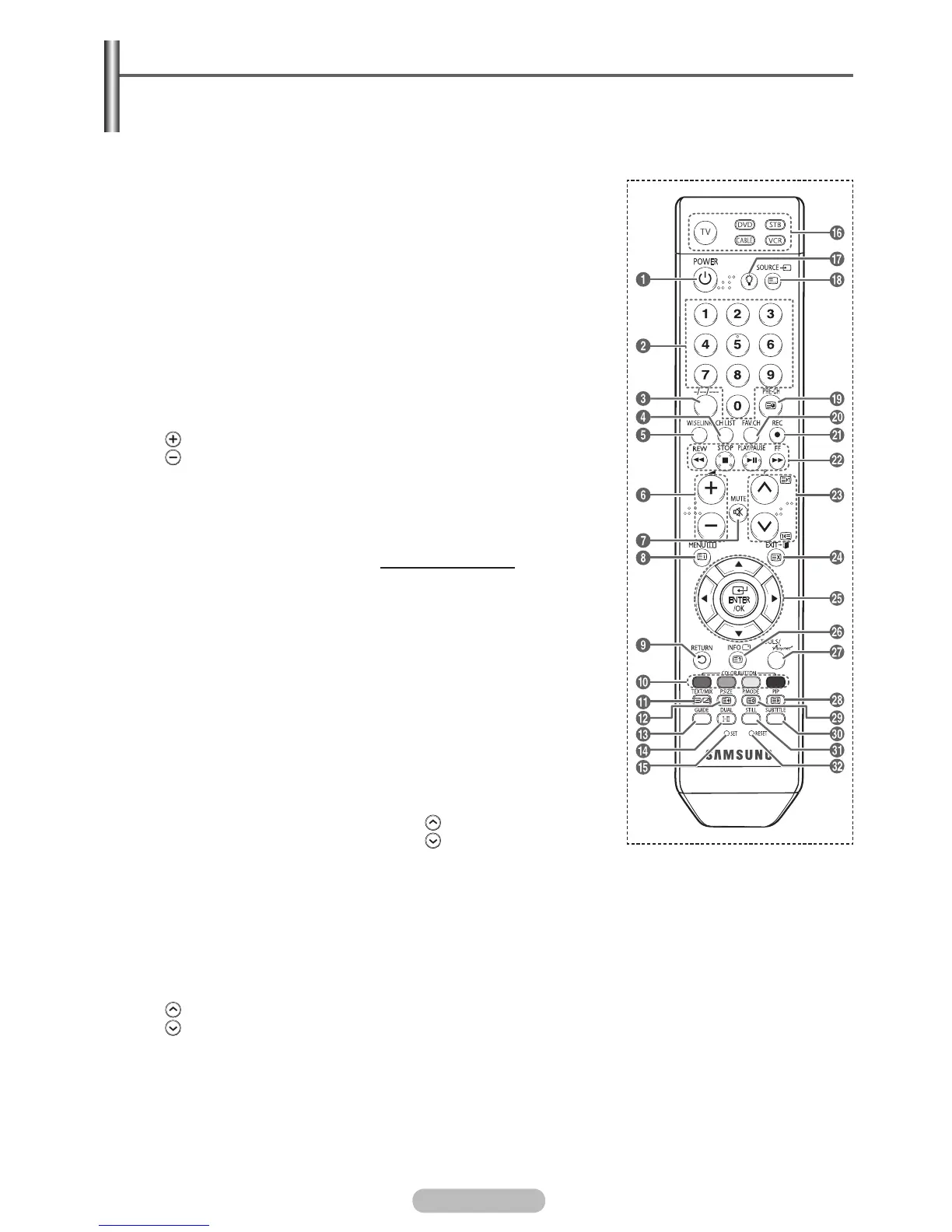
This is a special remote control for the visually impaired persons, and has Braille points on the
Power, Channel, Volume, STOP, and PLAY/PAUSE buttons.
The performance of the remote control may be affected by bright light.
1
POWER button
(turns the TV on and off)
2
Number buttons for direct
channel access
3
One/Two/Three-digit channel
selection
4
Channel control button
(Refer to page 16)
5
This function enables you to
view and play photo (JPEG)
and audio files (MP3) from
an external device. (See
page 52(JPEG), 60 (MP3))
6
Volume increase
Volume decrease
7
Temporary sound switch-off
8
Displays the main on-screen
menu
9
Returns to the previous
menu
@
Picture size selection
#
Electronic Program Guide
(EPG) display
$
Sound mode selection
%
Remote control setup
^
Selects a target device to be
controlled by the Samsung
remote control (TV, DVD,
STB, CABLE, VCR)
&
Press to backlight the VOL,
CH, and the active source
button (TV, DVD, CABLE,
STB, VCR) on the remote.
*
Available source selection
(
Previous channel
)
Press to switch to your
favourite channels.
a
Records for Live
Broadcasting
b
VCR/DVD Function (Rewind,
Stop, Play/Pause, Fast/
Forward)
c
Next channel
Previous channel
d
Exit the on-screen menu
e
Control the cursor in the
menu
f
Use to see information on
the current broadcast
g
TOOLS : Use to quickly
select frequently used
functions.
Anynet
+
: Runs the Anynet
+
view functions and sets up
Anynet
+
devices.
h
Picture-In-Picture On/Off
i
Picture effect selection
(Refer to page 26)
j
Digital subtitle display
k
Picture freeze
l
If your remote control is not
functioning properly, take out
the batteries and press the
reset button for about 2~3
seconds.
Reinsert the batteries and
try using the remote control
again.
Teletext Functions
(Refer to page 68)
8
Teletext index
9
Exit from the teletext display
(depending on the model)
0
Fastext topic selection
!
Teletext display/mix both
teletext information and the
normal broadcast
@
Teletext size
*
Teletext mode selection
(LIST/FLOF)
(
Teletext sub page
c
P :Teletext next page
P
:Teletext previous page
d
Teletext cancel
f
Teletext reveal
h
Teletext hold
i
Teletext store
BN68-01314A-00Eng.indd 8 2007-07-26 ¿ÀÈÄ 11:39:57



 To Next Page