English - 52
Using the Photo (JPEG) List
You can play back the JPEG files saved on a memory device in various ways.
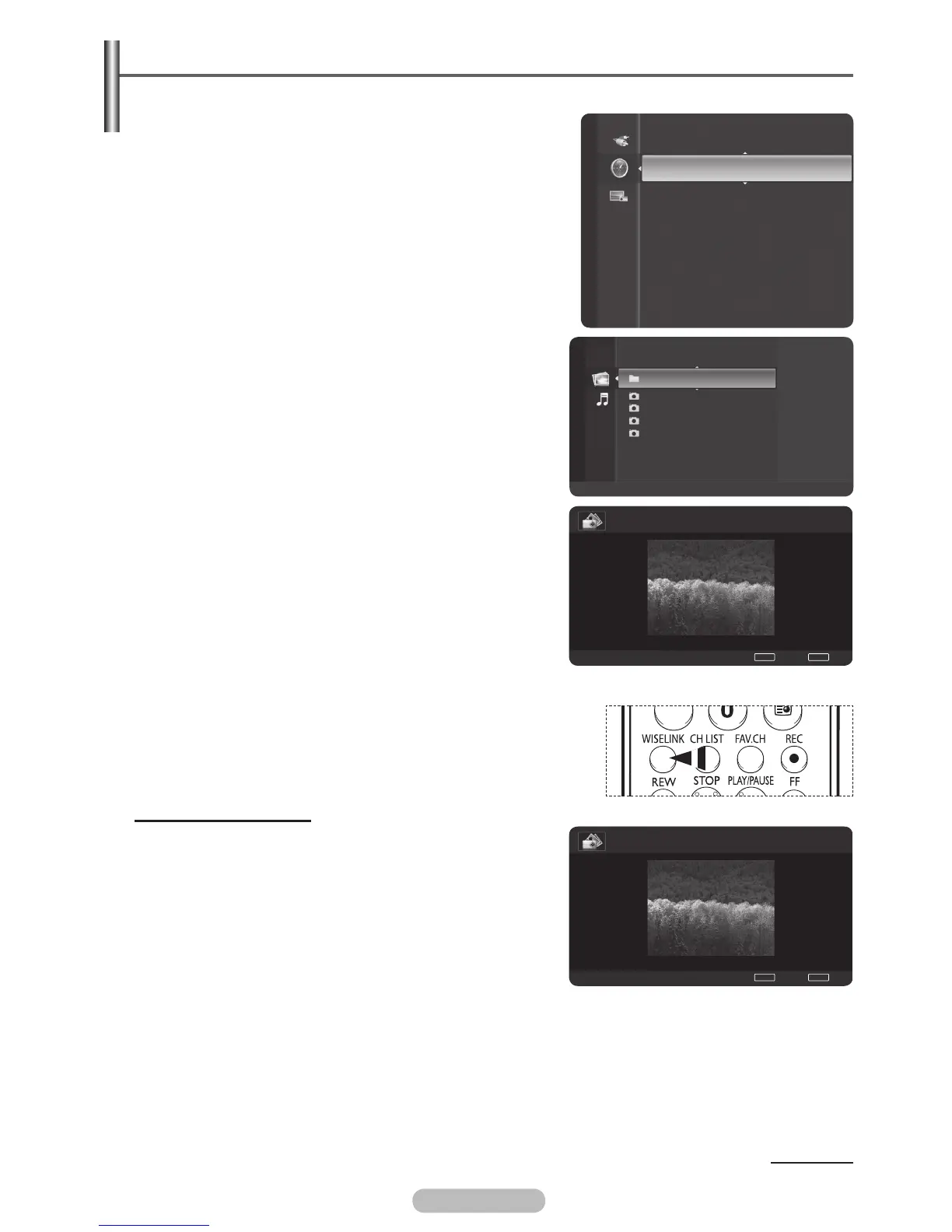
1 After switching the mode to WISELINK, select a memory
device that you have installed. (Refer to page 50~51)
2 Press the ENTER/OK button to select Photo.
JPEG files and existing folders are displayed.
3 Press the ▲ or ▼ button to select a photo, then press the
ENTER/OK button.
➢
Pressing the button over a photo icon shows the
currently selected photo in full screen.
➢
Pressing the button over a folder icon shows the JPEG
files included in the folder.
➢
While a full screen is displayed, ◄ or ► button will let
you see another photo image in the same folder.
➢
Press the PLAY/PAUSE button when a photo icon is
selected to start a Slide Show.
4 To exit WISELINK mode, press the EXIT button on the
remote control.
➢
Moving to a photo may take a few seconds because the
file needs to be loaded. At this point, the icon will appear.
➢
This menu shows only the files whose extension is jpeg
(or jpg). Files with other formats such as gif or tif will not
be displayed.
➢
Folders are displayed first and they are followed by all
JPEG files in the current folder.
The folders and JPEG files are sorted in alphabetical
order.
➢
If the photo is displayed in full screen, you can zoom in
and out or rotate the photo on the screen. (Refer to pages
55~57)
➢
If the size of a photo file is too big, the playing of the
background music may be interrupted intermittently.
(When Background Music is On) See page 58.
➢
Press the WISELINK button on the remote control to turn on
the WISELINK mode.
Using the Options Menu
Start Slide Show (or Stop Slide Show):
You can start or stop a Slide Show.
(Refer to “Viewing a Slide Show” on pages 54~55)
Slide Show Speed::
when you choose Start Slide Show, you can select Slide
Show Speed (Refer to Slide Show Speed on page 55)
Continued...
WISELINK
Full Guide
Now&Next Guide
Default Guide : Full Guide
Guide
Folder 1 2007/1/2
File 1.jpg 2007/1/2
File 2.jpg 2007/1/2
File 3.jpg 2007/1/2
File 4.jpg 2007/1/2
USB
Device
Zoom
Option
Photo
II
1/4 File 1.jpg 800x600 103.1KB 2007/1/2
II
Slide Show
◀
Previous
▶
Next
TOOL
S
Option
WISELINK
List
Normal
1/4 File 1.jpg 800x600 103.1KB 2007/1/2
II
Pause
◀
Previous
▶
Next
TOOL
S
Option
WISELINK
List
BN68-01314A-02Eng.indd 53 2007-08-22 ¿ÀÀü 10:37:30



 To Next Page