English - 26
Changing the Picture Standard
You can select the type of picture which best
corresponds to your viewing requirements.
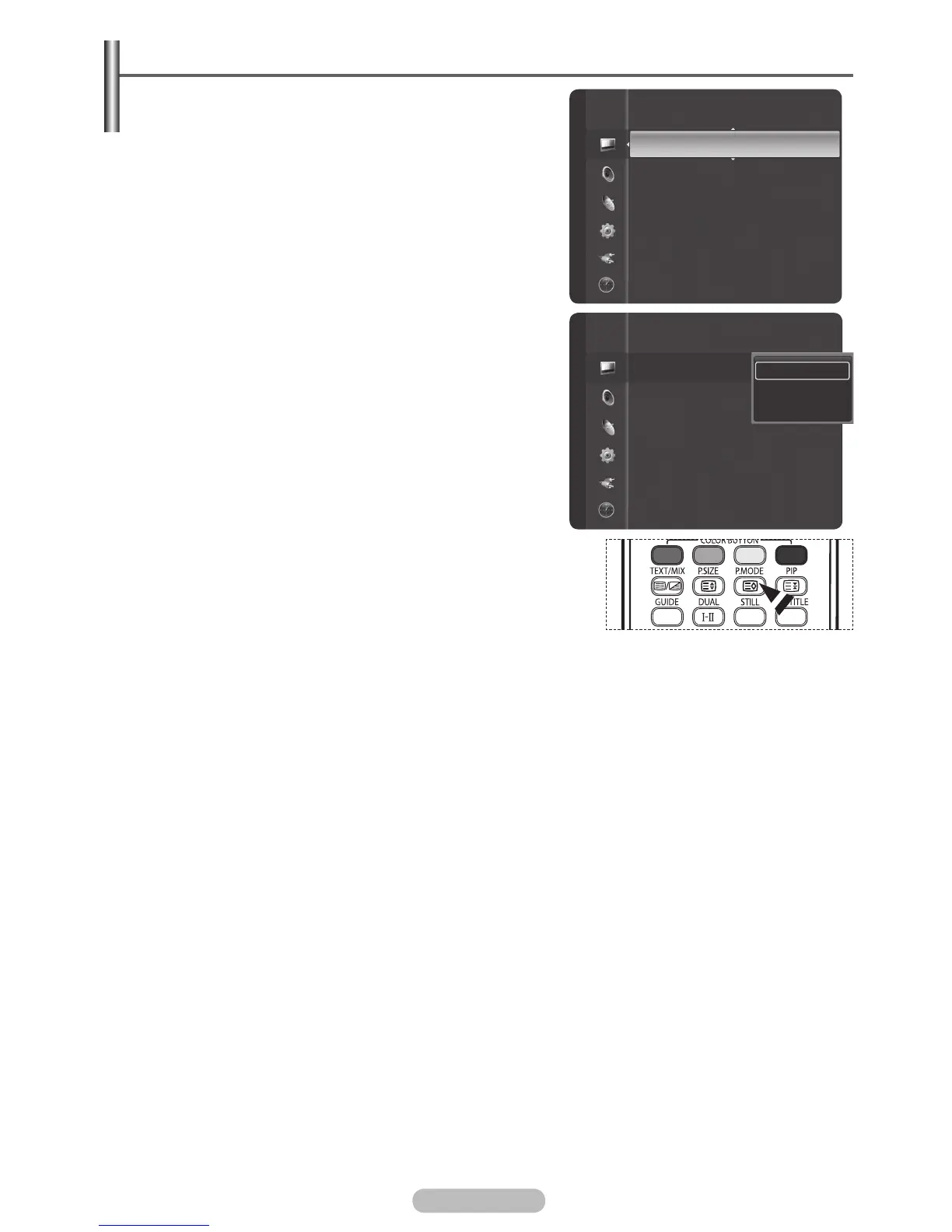
1 Press the MENU button to display the menu.
2 Press the ENTER/OK button to select Picture.
3 Press the ENTER/OK button again to select Mode.
4 Select the required mode by pressing the ▲ or ▼ button,
then press the ENTER/OK button.
Available modes:
Dynamic, Standard, Movie
➢
The settings values may vary depending on the input
source. (ex. RF, Video, Component, PC, or HDMI)
5 Press the EXIT button to exit.
➢
You can select these options simply by pressing the P.MODE
button on the remote control.
➢
Choose Dynamic for viewing the TV during the day or
when there is bright light in the room.
Choose Standard for general TV watching mode.
Choose Movie when viewing the movie.
Mode
:
Dynamic
Contrast : 100
Brightness : 45
Sharpness : 75
Colour : 55
Tint (G/R) : G50/R50
Colour Tone : Cool1
Backlight :10
Picture Picture
Mode
:
Dynamic
Contrast : 100
Brightness : 45
Sharpness : 75
Colour : 55
Tint (G/R) : G50/R50
Colour Tone : Cool1
Backlight :10
Dynamic
Standard
Movie
BN68-01314A-00Eng.indd 26 2007-07-26 ¿ÀÈÄ 11:40:21



 To Next Page