English - 31
Viewing Picture-in-Picture
This product has one built-in tuner, which does not allow PIP to function in the same mode. For
example, you cannot watch one TV channel in the main screen, and a different one in the PIP
screen. Please see ‘PIP Settings’ below for details. You can use the PIP feature to simultaneously
watch two video sources.
➢
While Parental Lock is in operation, the PIP function cannot be used. (Refer to page 41)
Activating Picture-in-Picture
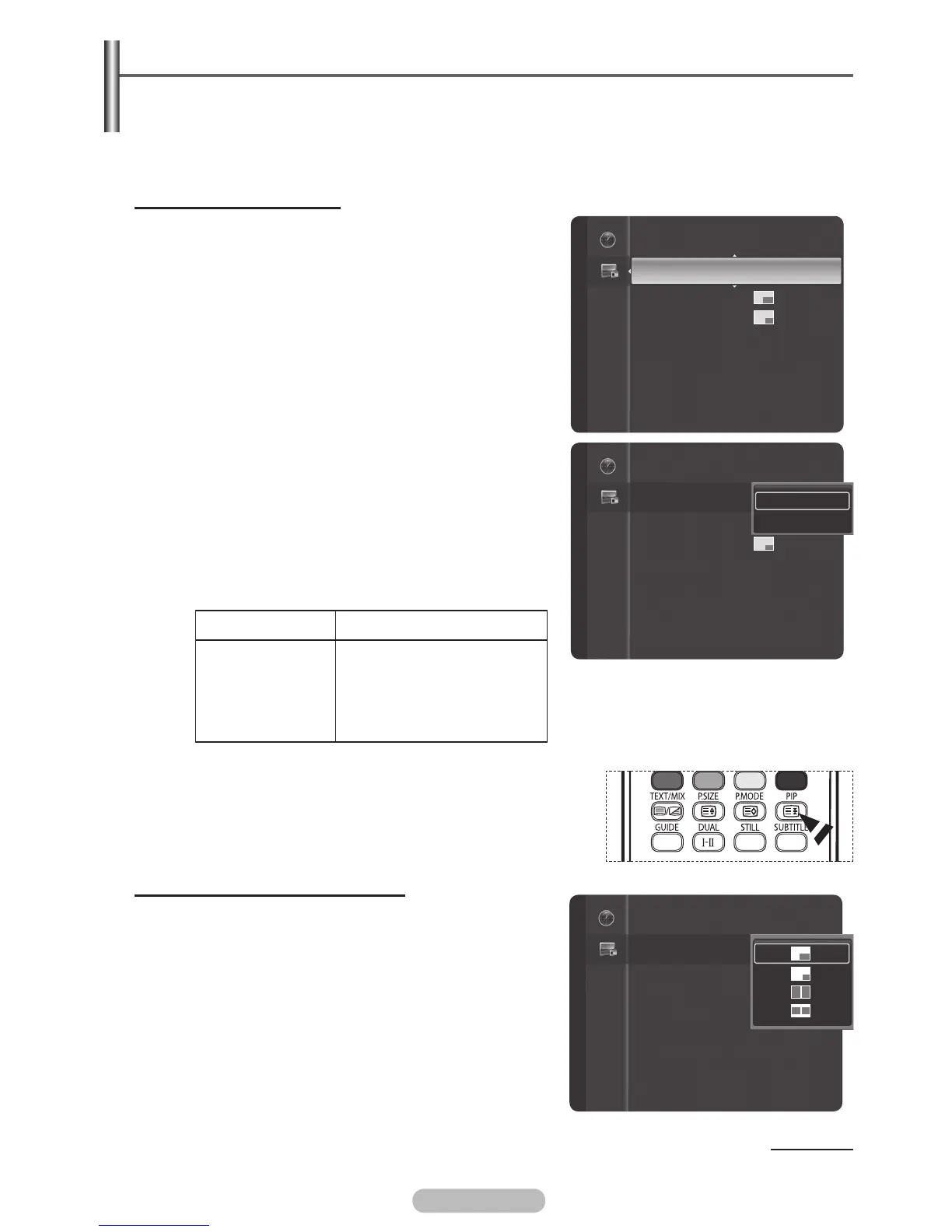
1 Press the MENU button to display the menu.
2 Press the ▲ or ▼ button to select PIP, then press the
ENTER/OK button.
3 Press the ENTER/OK button again.
Press the ▲ or ▼ button to select On, then press the
ENTER/OK button.
➢
If you turn the TV off while watching in PIP mode and
turn it on again, the PIP window will disappear.
➢
You can view Analog TV broadcasts on the PIP
screen (sub-picture) when the main picture is
from an external device connected to HDMI1,2,3
Component1,2 PC, or AV1,2, S-Video.
Main picture Sub picture
Component 1,2
HDMI 1,2,3
PC
AV1,2
S-Video
Analog TV broadcasts only
➢
You can select these options simply by pressing the PIP button
on the remote control.
➢
If the main picture is 60Hzexcept PC), the PIP function cannot
be used. When you see DVD,please choose 50HZ signal
Changing the Size of the PIP Window
4 Press the ▲ or ▼ button to select Size, then press the
ENTER/OK button.
Press the ▲ or ▼ button to select the desired size of the
PIP window, then press the
ENTER/OK button.
➢
You may notice that the picture in the PIP window
becomes slightly unnatural when you use the main
picture to view a game or karaoke.
➢
The Double Window and Double Wide cannot be use
when the main picture is PC model.
Continued...
PIP : Off
Size :
Position :
Channel : ATV3
PIP
PIP : Off
Size :
Position :
Channel : ATV3
PIP
Off
On
PIP : On
Size :
Position :
Channel : Cable 3
PIP
BN68-01314A-00Eng.indd 31 2007-07-26 ¿ÀÈÄ 11:40:26



 To Next Page