English - 45
Over the Air Download
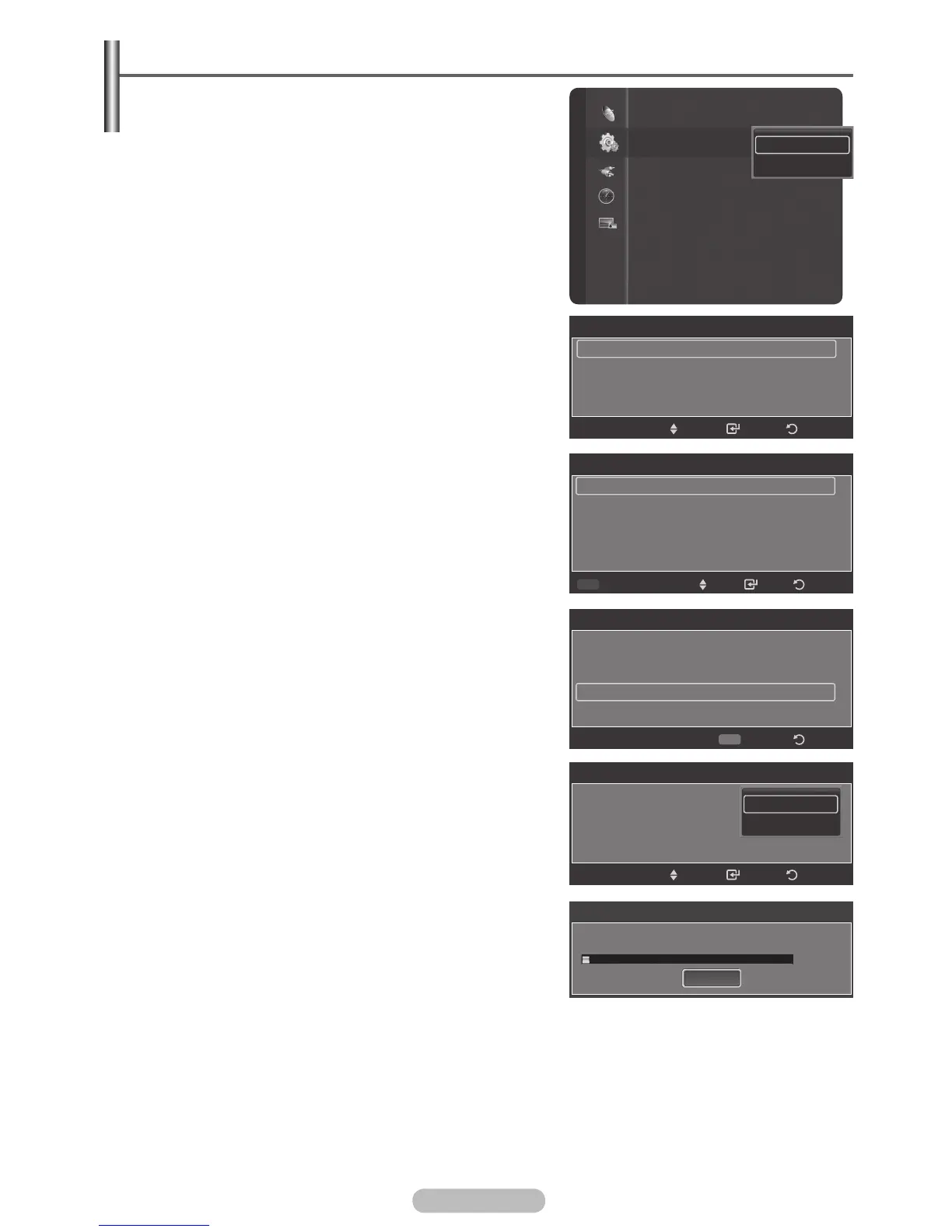
1 Press the MENU button to display the menu.
2 Press the ▲ or ▼ button to select Setup, then press the
ENTER/OK button.
3 Press the ▲ or ▼ button to select SW Upgrade, then
press the ENTER/OK button.
4 press the ENTER/OK button to select the Over the Air
Download.
5 Press the ▲ or ▼ button to select Software Information,
Manual Upgrade or Standby Mode Upgrade.
Press the ENTER/OK button.
➢
Software Information
Press the
ENTER/OK button, then the current software
version appears. Then you can upgrade the software as
the pictures.
➢
Manual Upgrade
Press the
ENTER/OK button to search for new software
from the currently broadcasting channels. The operations
are same as you enter the software information.
➢
Standby Mode Upgrade : On / Off
When you turn off your TV, software upgrade will be
conducted automatically, after 45 minutes. During this
upgrade, the screen can be illuminatedslightly, in case of
plasma. This phenomenon may continue for 3~5 minutes
if there is no upgrade signal. But this phenomenon may
continue for more than 1 hour if there is new software
version. After upgrade is completed, your TV will be
turned off automatically. If you don’t want this process,
select Off by pressing the ▲ or ▼ button. Press the
ENTER/OK button.
SWUpgrade Scan
Searching for Upgrade...
Stop
3%
Melody :Medium
Anynet+ (HDMI-CEC) Setup
SW Upgrade
Function Help : On
Setup
Over the Air Download
USB Download
Software Upgrade
Software Information
Manual Upgrade
Standby Mode Upgrade : On
Enter
Return
Move
Software Upgrade
Software Information
Manual Upgrade
Standby Mode Upgrade : On
Off
On
Software Information
Current Software: T-PENYDAU0-XXXX
Default
Alternative Software: X-PENYDAU0-XXXX
(Old Version)
Enter
Return
Move
Switch Default Software
Software Information
Current Software: T-PENYDAU0-XXXX
Alternative Software: X-PENYDAU0-XXXX
(Old Version) New Default
BN68-01314A-02Eng.indd 46 2007-08-22 ¿ÀÀü 10:37:21



 To Next Page