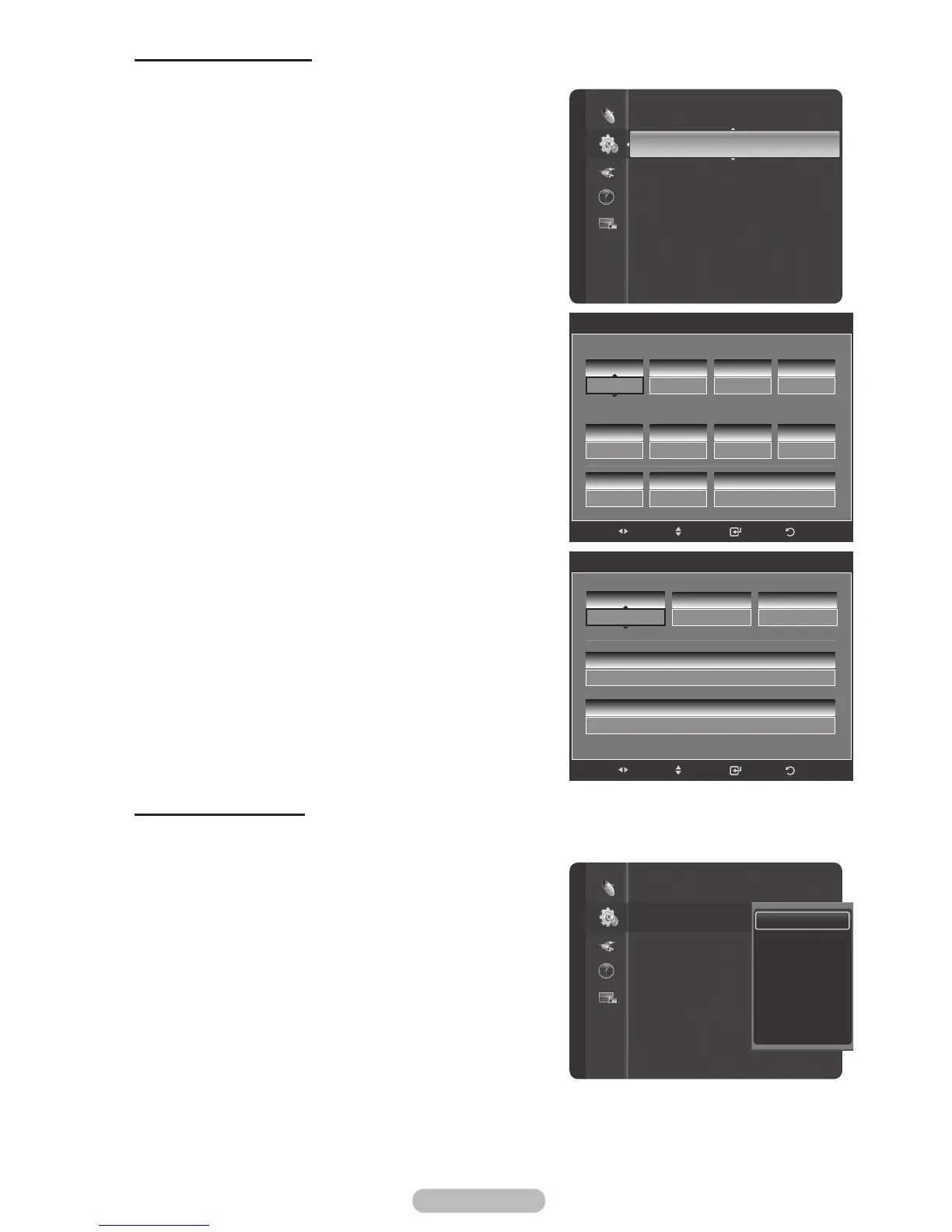
Setting the On/Off Timer
Use this feature to set the TV to turn on or off at a desired time.
1 Press the MENU button to display the menu.
2 Press the ▲ or ▼ button to select Setup, then press the
ENTER/OK button.
3 Press the ▲ or ▼ button to select Timer 1, then press
the ENTER/OK button.
The Timer 1 menu is displayed.
4 Press the ◄ or ► button to select the required item
below.
Press the ▲ or ▼ button to adjust to the setting satisfied.
5 Press the EXIT button to exit.
On Timer: Select Hour, Minute, am/pm, and No/Yes.
(To activate timer with the setting satisfied, set to Yes
.)
Off Timer: Select Hour, Minute, am/pm, and No/Yes.
(To activate timer with the setting satisfied, set to Yes
.)
Repeat: Select Once, Everyday, Mon~Fri, Mon~Sat, or
Sat~Sun.
Volume: Select the required volume level.
Contents: When the On Time is active, you can turn on
a specific channel or play back contents such as photo or
audio files. (Make sure that a USB device is connected to
your TV.)
➢
Auto Power Off
When you set the timer On, the TV will eventually turn off
if no controls are operated for 3 hours after the TV was
turned on by timer. This function is only available in timer
On mode and prevents overheating, which may occur if a
TV is on for too long time.
Setting the Sleep Timer
The sleep timer automatically shuts off the TV after a preset time (30, 60, 90, 120, 150 and 180
minutes).
1 Press the MENU button to display the menu.
2 Press the ▲ or ▼ button to select Setup, then press the
ENTER/OK button.
3 Press the ▲ or ▼ button to select Sleep Timer, then
press the ENTER/OK button.
4 Press the ▲ or ▼ button to select the minute, then press
the ENTER/OK button.
To cancel the set sleep timer:
Press the ▲ or ▼ button to select Off, then press the
ENTER/OK button.
5 Press the EXIT button to exit.
Setup
Clock : 12 : 00 am
Sleep Timer
:
Off
Timer 1 : Inactivated
Timer 2 : Inactivated
Timer 3 : Inactivated
Child Lock
Subtitle
Game Mode : Off
Parental Lock
Menu Transparency : Medium
Timer 1
12
Hour
00
Minute
am
am/pm
No
Activation
00
Minute
am
am/pm
No
Activation
On Timer
Off Timer
12
Hour
10
Volume
TV ATV 3
Contents
Once
Repeat
Return
Enter
Adjust
Move
Contents
Music
ATV
ATV/DTV
3
Channel
TV
TV/USB
Photo
Return
Enter
Adjust
Move
None
None
Setup
Plug & Play
Clock
:
--
:
--
--
Sleep Timer : Off
Timer 1 : Inactivated
Timer 2 : Inactivated
Timer 3 : Inactivated
Child Lock
Subtitle
Game Mode : Off
Parental Lock
Off
30min.
60min.
90min.
120min.
150min.
180min.



 To Next Page