English - 53
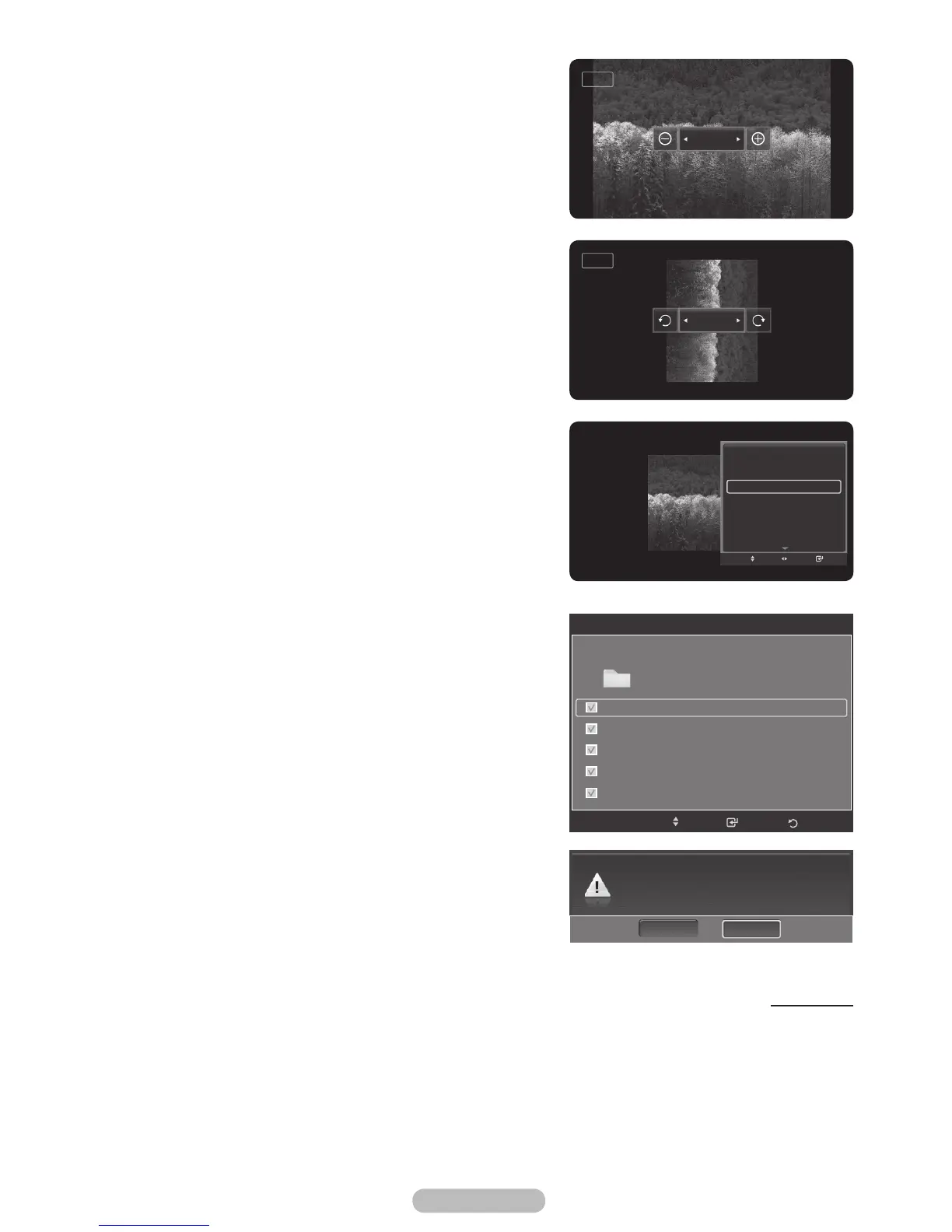
Zoom:
You can zoom into images in full screen mode.
Images are zoomed in, in the order of x1 (original size), x2
and x4.
(Refer to “Zooming-In” on page 55)
Rotate:
You can rotate images in full screen mode.
Images are rotated in the order of 0° (original state), 180°,
270° and 90°.
(Refer to “Rotating” on page 57)
Background Music:
You can determine whether to play the configured background
music.
(Refer to “Background Music On/Off” on page 58)
Background Music Setting:
You can set the background music.
(Refer to “Background Music Setting” on page 58)
Delete:
You can delete a photo (JPEG) file.
(Refer to “Deleting the Photo files” on page 59)
Continued...
Zoom Out Zoom In
x2
Rotate
90°
Start Slide Show
Zoom
Rotate
Background Music
On
Background Music Setting
Delete
Picture Mode :Dynamic
Sound Mode :Custom
Information
Adjust
Enter
Move
Do you want to delete file File 1.jpg?
NoYesS
Save
Background Music Setting
Select
Folder 1
Steve-Love.mp3
Tomas-Feel So Good.mp3
Jane-Holiday.mp3
Rachel-Happy day.mp3
Maritha-Rain.mp3
Move
Return
Flash Disk/ 5File(s) Selected
BN68-01314A-02Eng.indd 54 2007-08-22 ¿ÀÀü 10:37:32



 To Next Page