English - 35
Setting the Time
Setting the clock is necessary in order to use the various
timer features of the TV.
Also, you can check the time while watching the TV. (Just
press the INFO button.)
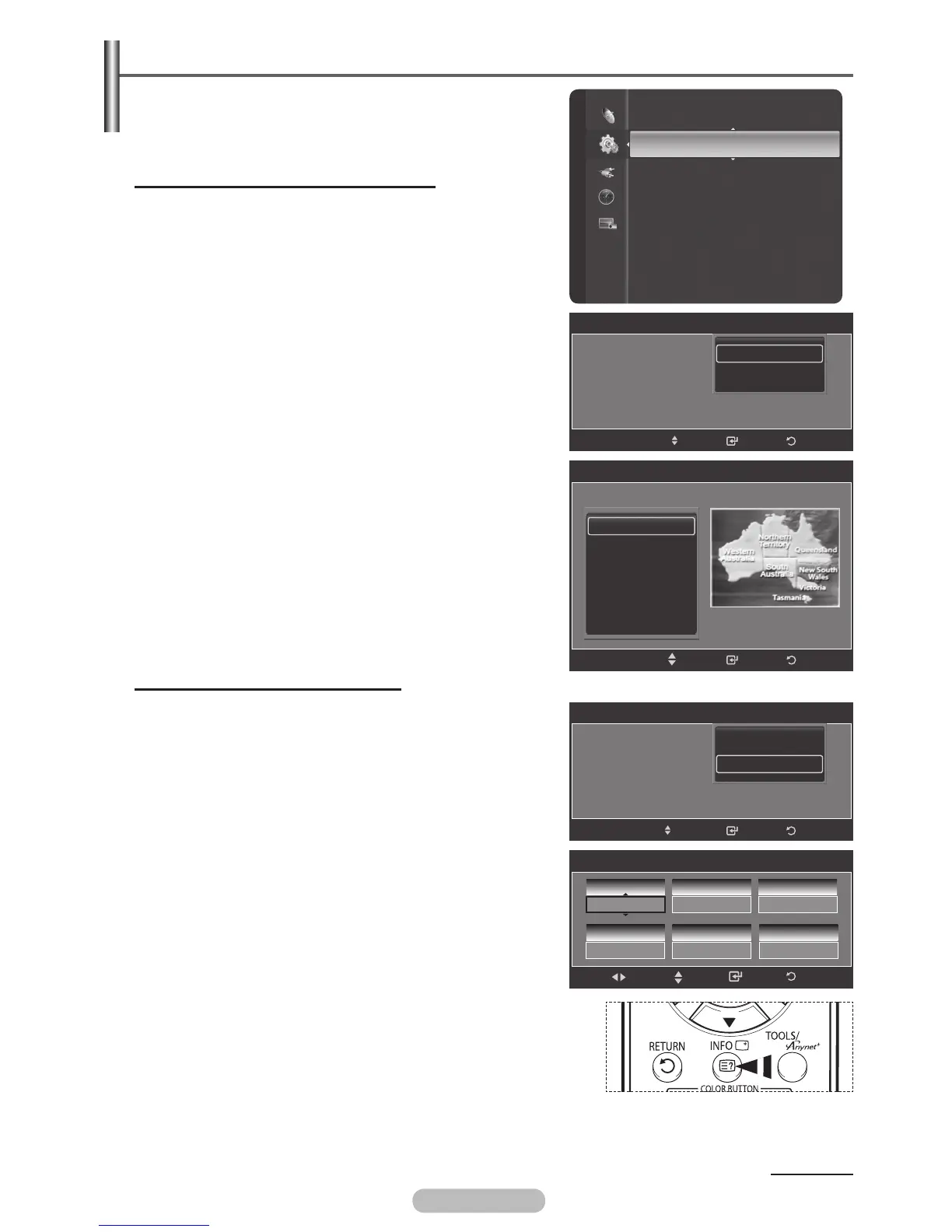
Option 1: Setting the Clock Automatically
The Clock can be set automatically if you are receiving a
digital signal.
1 Press the MENU button to display the menu.
2 Press the ▲ or ▼ button to select Setup, then press the
ENTER/OK button.
3 Press the ▲ or ▼ button to select Clock, then press the
ENTER/OK button.
4 Press the ENTER/OK button to select Clock Mode.
5 Press the ▲ or ▼ button to select Auto, then press the
ENTER/OK button.
6 Press the ▲ or ▼ button to select Time Zone, then press
the ENTER/OK button.
Press the ▲ or ▼ button to highlight the time zone
for your local area (and to move the highlight to the
appropriate time zone on the map of the United States),
then press the ENTER/OK button.
7 Press the EXIT button to exit.
Option 2: Setting the Clock Manually
1 Press the MENU button to display the menu.
2 Press the ▲ or ▼ button to select Setup, then press the
ENTER/OK button.
3 Press the ▲ or ▼ button to select Clock, then press the
ENTER/OK button.
4 Press the ENTER/OK button to select Clock Mode.
5 Press the ▲ or ▼ button to select Manual, then press the
ENTER/OK button.
6 Press the ▲ or ▼ button to select Clock Set, then press
the ENTER/OK button.
7 Press the ◄ or ► button to move to Month, Day, Year,
Hour, or Minute, am/pm.
Set the date and time you want by pressing the ▲ or ▼
button, then press the ENTER/OK button.
8 Press the EXIT button to exit.
➢
The current time will appear every time you press the
INFO button.
➢
You can set the Month, Day, Year, Hour, and Minute
directly by pressing the number buttons on the remote
control.
Continued...
Setup
Plug & Play
Clock
:
--
:
--
--
Sleep Timer : Off
Timer 1 : Inactivated
Timer 2 : Inactivated
Timer 3 : Inactivated
Child Lock
Subtitle
Game Mode : Off
Clock
Clock Mode : Auto
Clock Set
Time zone
ReturnEnter
Auto
Manual
Move
Clock
Clock Mode : Auto
Clock Set
Time zone
ReturnEnter
Auto
Manual
Move
Clock Set
1
Month
1
Day
2007
Year
00
Hour
04
Minute
Enter
Move
Adjust
Return
am
am/pm
Time Zone
Return
Enter
New South Wales /ACT
Victoria
QueenSland
South Australia
West Australia
Tasmania
Move
BN68-01314A-00Eng.indd 35 2007-07-26 ¿ÀÈÄ 11:40:32



 To Next Page