English - 60
Deleting Multiple Photos
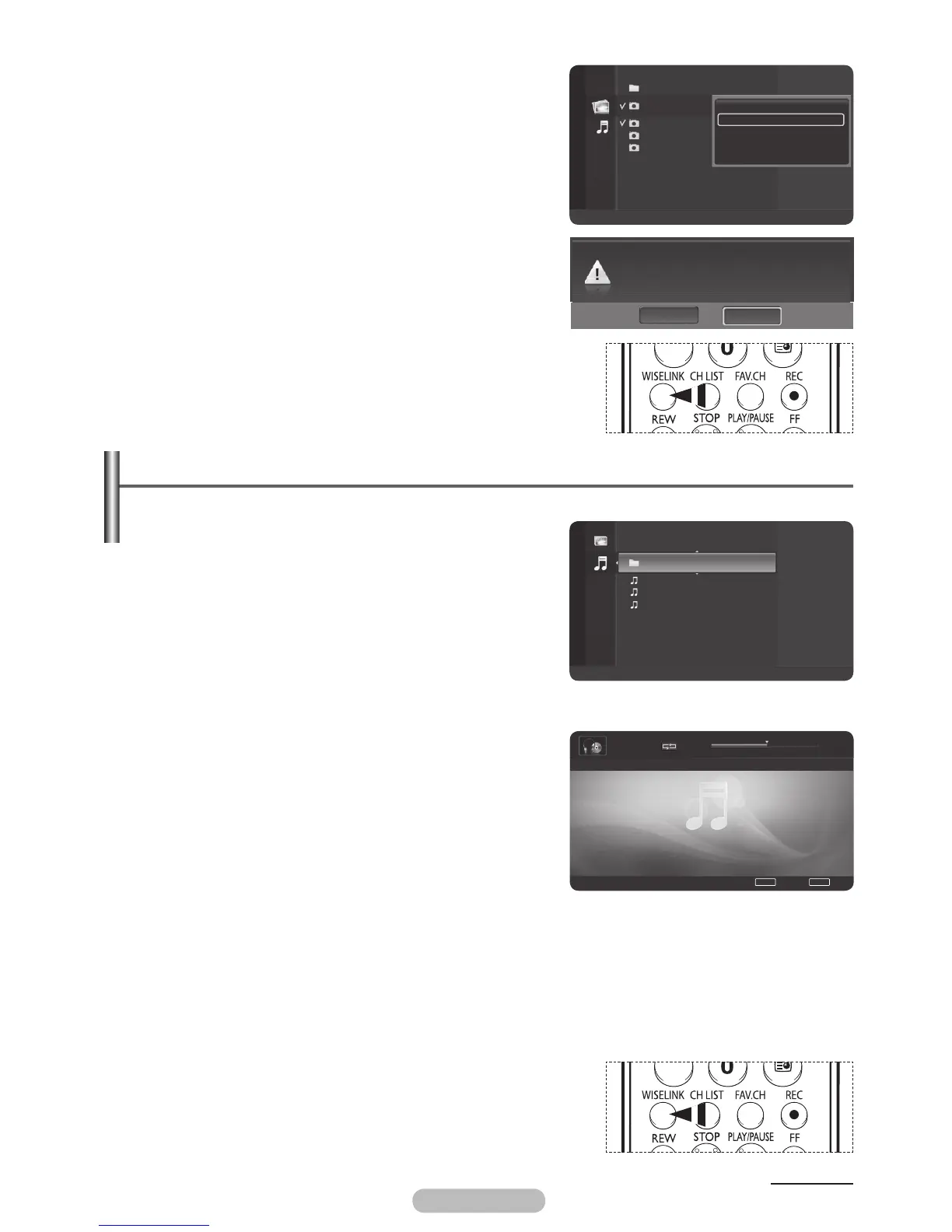
1 In the Photo list, press the ▲ or ▼ button to select a
photo to be deleted and press the yellow button.
➢
The <✔> mark appears to the left of the selected
photo.
➢
Repeat the above operation to select multiple photos.
2 Press the blue button, press the ▲ or ▼ button to select
Delete selected File and press the ENTER/OK button.
3 Press the ◄ or ► button to select Yes and press the
ENTER/OK button.
➢
The selected photos are deleted.
➢
If you select No, the deletion will be cancelled.
4 To exit WISELINK mode, press the EXIT button on the
remote control.
➢
You cannot remove the read-only files from the selected
ones.
➢
You cannot restore the removed pictures.
➢
Press the WISELINK button on the remote control to turn on
the WISELINK mode.
Using the Music (MP3) List
You can play back the MP3 files saved on a memory device in various ways.
1 After switching the mode to WISELINK, select a memory
device that you have installed. (Refer to page 50~51)
2 Press the ▲ or ▼ button to select Music, then press the
ENTER/OK button.
MP3 files and existing folders are displayed.
3 Press the ▲ or ▼ button to select a music to be played,
then press the ENTER/OK button.
➢
Pressing the ENTER/OK button while a music file is
highlighted immediately plays the music file.
➢
Pressing the ENTER/OK button while a folder is
highlighted shows the music files in the folder.
➢
To select a file on the next page, press the REW or
FF button.
➢
Pressing the ◄ or ► button while playing a music file
will let you play another music file in the same folder.
➢
To play back the files repeatedly, change the setting
by referring to page 61.
4 Press the PLAY/PAUSE button while playing an MP3 file
to pause the file.
Press the STOP button to stop playback.
5 To exit WISELINK mode, press the EXIT button on the
remote control.
➢
This menu shows only the files whose extension is mp3. Files with other extensions are not
displayed, even if they have been saved on the same memory device.
➢
The selected file is displayed on the top of the screen with its playing time.
➢
To adjust the music volume, press the VOL+ or VOL- button on the remote control.
To mute the sound, press the MUTE button on the remote control.
➢
To move to the music list while playing a music file, press the WISELINK button.
➢
Press the WISELINK button on the remote control to turn on
the WISELINK mode.
Continued...
Folder 1 2007/1/2
File 1.jpg 2007/1/2
File 2.jpg 2007/1/2
File 3.jpg 2007/1/2
File 3.jpg 2007/1/2
Flash Disk
Device
Zoom
Select
Option
II
Slide Show
Photo
Start Slide Show
Delete selected File
Select All
Deselect All
Safe Remove
Do you want to delete the 2 files including
File 1.jpg?
NoYes
1/4 00:01:53 00:04:10
Tomas-Feel So Good.mp3
II
Pause
◀
Previous
▶
Next
TOOL
S
Option
WISELINK
List
Folder 1 2007/1/2
Tomas-Feel So Good.mp3
2007/1/2
Steve-Love.mp3 2007/1/2
Jane-Holiday.mp3 2007/1/2
Flash Disk
Device
Zoom
Option
Music
BN68-01314A-02Eng.indd 61 2007-08-22 ¿ÀÀü 10:37:43



 To Next Page