English - 59
➢
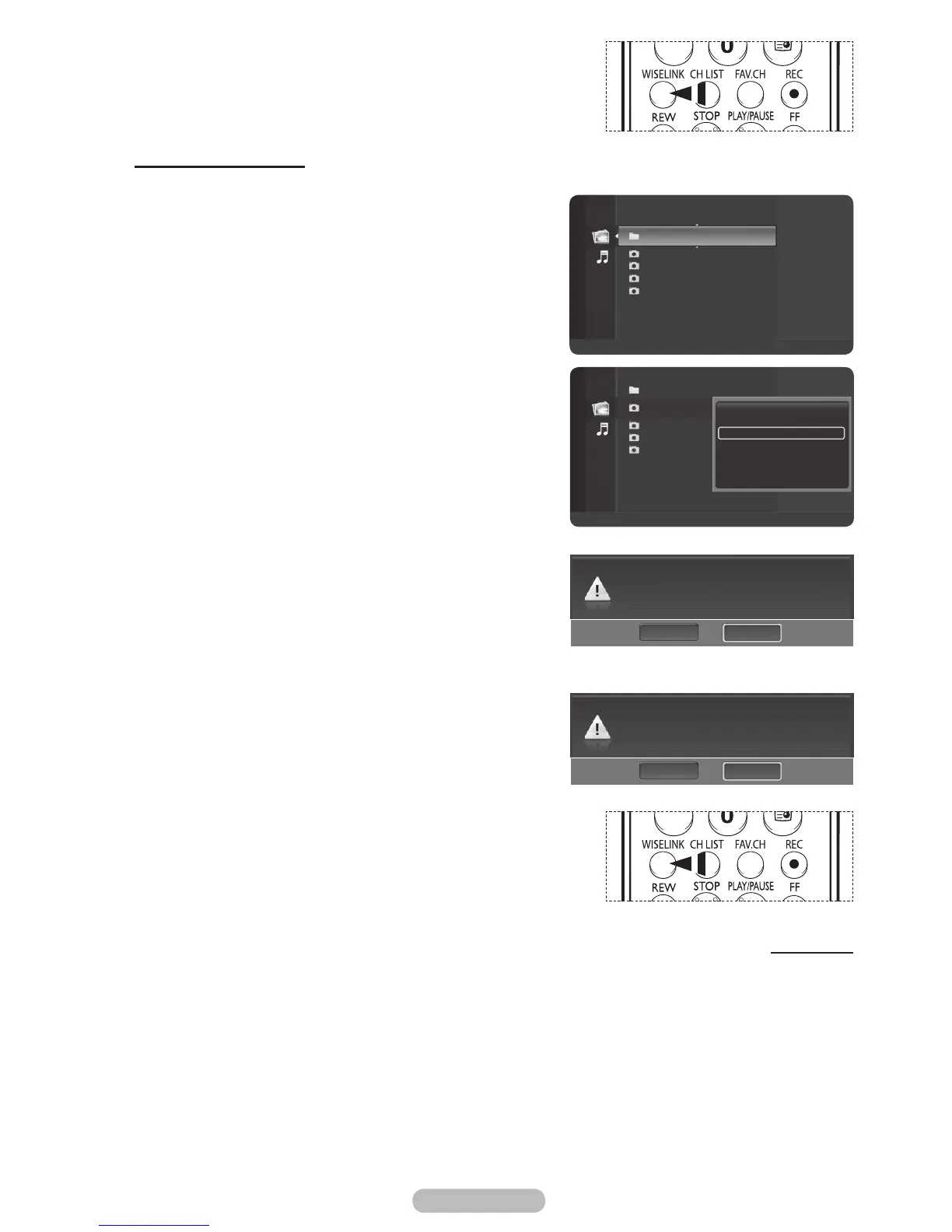
Press the WISELINK button on the remote control to turn on
the WISELINK mode.
Deleting the Photo files
You can delete photo (JPEG) files saved on a USB storage device.
1 After switching the mode to WISELINK, select a memory
device that you have installed. (Refer to page 50~51)
2 Press the ENTER/OK button to select Photo.
JPEG files and existing folders are displayed.
3 Press the ▲ or ▼ button to select a photo you want to
delete and then press the blue button.
4 Press the ▲ or ▼ button to select Delete or Delete All
and then press the ENTER/OK button.
➢
If you select Delete, only the selected photo will be
deleted.
➢
If you select Delete All, all photos in the folder will be
deleted.
5 Press the ◄ or ► button to select Yes and press the
ENTER/OK button.
➢
The photo will be deleted.
➢
If you select No, the deletion is cancelled.
6 To exit WISELINK mode, press the EXIT button on the
remote control.
➢
You cannot remove the following files:
PTP-connected digital camera picture files
Read-only files
➢
While removing files, don’t remove the USB memory
device.
➢
You cannot recover a deleted photo file.
Removing read-only files
When removing any read-only files, the screen to the right
appears.
Press the ◄ or ► button to select Yes, then press the
ENTER/OK button.
➢
If you select No, the removing operation is cancelled.
➢
Press the WISELINK button on the remote control to turn on
the WISELINK mode.
Continued...
Folder 1 2007/1/2
File 1.jpg 2007/1/2
File 2.jpg 2007/1/2
File 3.jpg 2007/1/2
File 4.jpg 2007/1/2
Flash Disk
Device
Zoom
Option
Photo
Do you want to delete file File 1.jpg?
NoYes
Folder 1 2007/1/2
File 1.jpg 2007/1/2
File 2.jpg 2007/1/2
File 3.jpg 2007/1/2
File 3.jpg 2007/1/2
View
Start Slide Show
Delete
Delete All
Select All
Information
Safe Remove
Flash Disk
Device
Zoom
Select
Option
II
Slide Show
Photo
File 1.jpg is read-only file. Delete it?
NoYes
BN68-01314A-02Eng.indd 60 2007-08-22 ¿ÀÀü 10:37:40



 To Next Page