English - 65
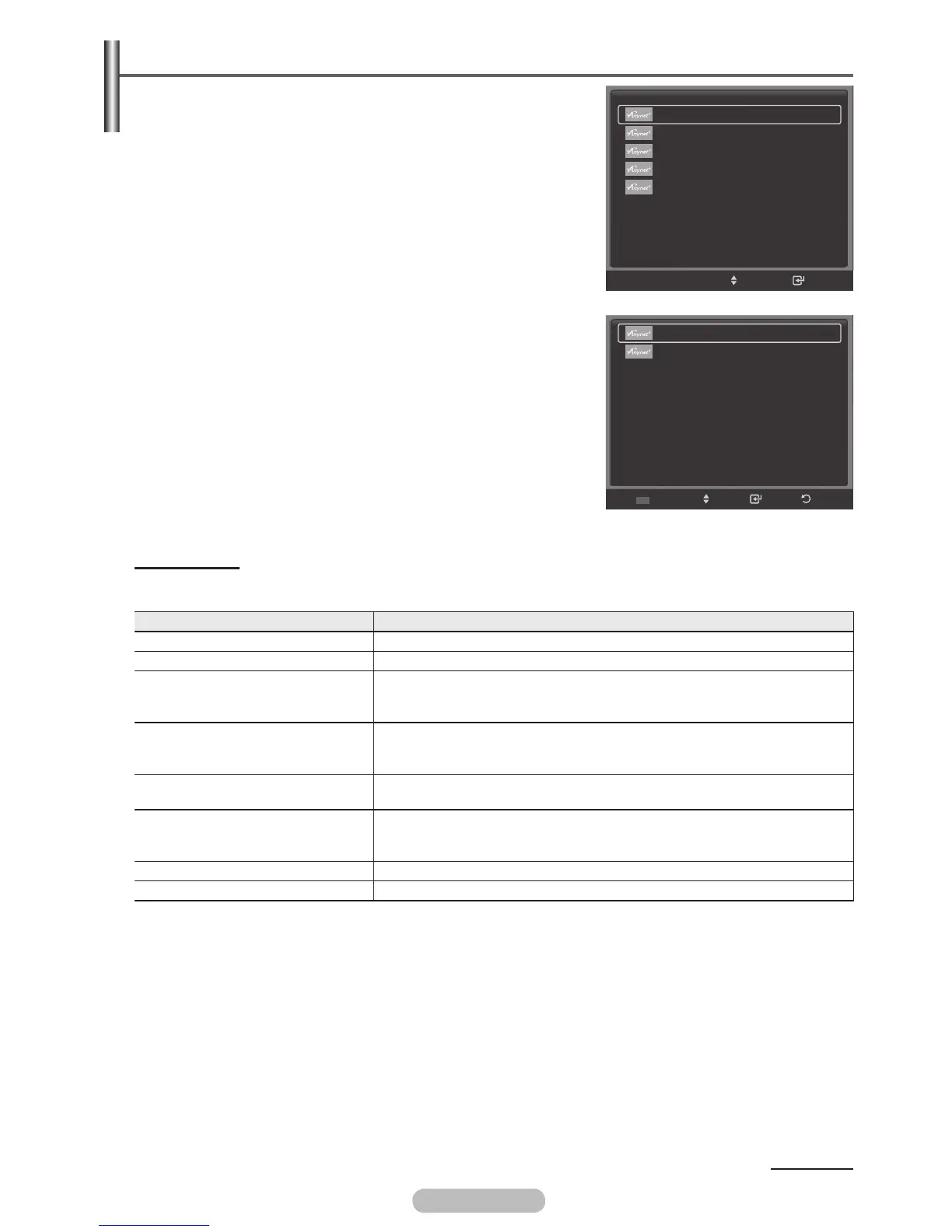
Scanning and Switching between Anynet+ Devices
1 Press the Anynet+ button.
Press the ENTER/OK button to select Device List.
➢
Anynet+ devices connected to the TV are listed.
➢
If you cannot find a device you want, press the red button
to scan for devices.
2 Press the ▲ or ▼ button to select to a particular device and
press the ENTER/OK button. It is switched to the selected
device.
➢
Only when you set Anynet+ (HDMI-CEC) to On in the Setup
menu, the Device List menu appears.
➢
Switching to the selected devices may take up to 2 minutes.
You cannot cancel the operation during the switching
operation.
➢
The time required to scan for devices is determined by the
number of connected devices.
➢
When the device scan is complete, the number of devices
found is not displayed.
➢
Although the TV automatically scans devices when it is turned
on using the POWER button, devices connected when the TV
is already on are not displayed in the device list. Therefore
press the red button to re-scan devices if necessary.
➢
If you have selected an external device by pressing the
SOURCE button, you cannot use the Anynet+ function. Make
sure to switch to an external Anynet+ device by using the
Anynet+ button.
Anynet+ Menu
The Anynet+ menu changes depending on the type and status of the Anynet+ devices connected
to the TV.
Anynet+ Menu Description
View TV Switches from Anynet+ to TV broadcast mode.
Device List Displays the Anynet+ device list.
Menu on Device
Shows the menu of the connected device.
Example. When a DVD Recorder is connected, the DVD Recorder’s
title menu appears.
Device Operation
Shows the play control menu of the connected device.
Example. When a DVD Recorder is connected, the play control
menu of the DVD Recorder appears.
Record
Starts a recording immediately. (This menu works only for a device
supporting recording.)
Timer Recording
Allows reserving a recording.
(This menu works only for a device supporting recording
reservations.)
Stop Recording Stops recording.
Receiver Sound is output through the receiver (home theatre).
.
Continued...
View TV
Device List
Recording : DVDR
DVDR Menu
DVDR Operation
Picture Size : 16:9
Picture Mode : Dynamic
Sound Mode : Standard
Sleep Timer : Off
Move
Enter
TOOLS
BD Player
DVDR
Move
Enter
Refresh
Return
BN68-01314A-02Eng.indd 66 2007-08-22 ¿ÀÀü 10:37:54



 To Next Page