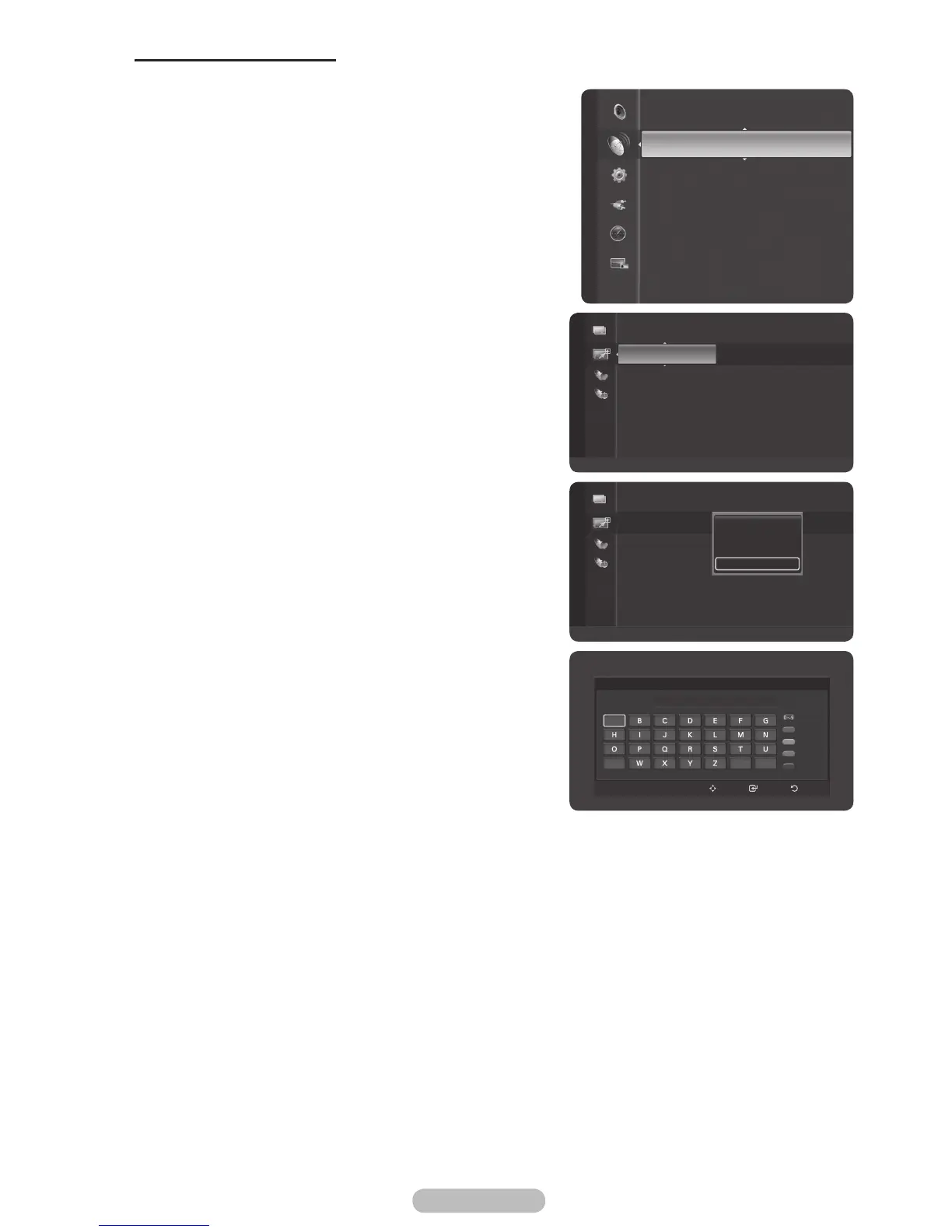
Labeling Channels - Analog
Channels can labeled so that their call letters appear whenever the channel is selected.
1 Press the MENU button to display the menu.
2 Press the ▲ or ▼ button to select Channel, then press
the ENTER/OK button.
3 Press the ▲ or ▼ button to select Channel List, then
press the ENTER/OK button.
4 Press the ▲ or ▼ button to select the channel to be
assigned a new name, then press the blue button.
5 Press the ▲ or ▼ button to select Channel Name Edit,
then press the ENTER/OK button.
6 Press the ▲/▼/◄/► button to select a letter, then press
the ENTER/OK button.
Numeric buttons: You can enter numbers.
Red button: You can switch between English and
Characters.
Green button: You can delete an already entered
character.
Yellow button: You can enter a blank space.
Blue button: Press this button to finish renaming a
channel.
7 When you have finished, press the blue button to assign
the new name.
8 Press the EXIT button to exit.
➢
The names of digital broadcasting channels are
automatically assigned and thus cannot be assigned by
users.
Channel
Channel List
Auto Store
Manual Store
Fine Tune
Signal Strength
LNA : On
Channel Name Edit
6
Number
Character
Delete
Blank
Done
Enter ReturnMove
_
A
V
3 ♥ 7Digital 2
4 ♥ 7Digital 3
ATV0 C1
ATV1 C2
ATV2 C3
ATV3 C4
ATV4 C5
ATV5 C6
ATV6 C7
Added Channels
Zoom
Select
Option
3 ♥ 7Digital 2
4 ♥ 7Digital 3
ATV0 C1
ATV1 C2
ATV2 C3
ATV3 C4
ATV4 C5
ATV5 C6
ATV6 C7
Added Channels
Zoom
Select
Option
Delete
Add to Favourite
Timer Viewing
Channel Name Edit



 To Next Page