COM-
MAND-
LINE
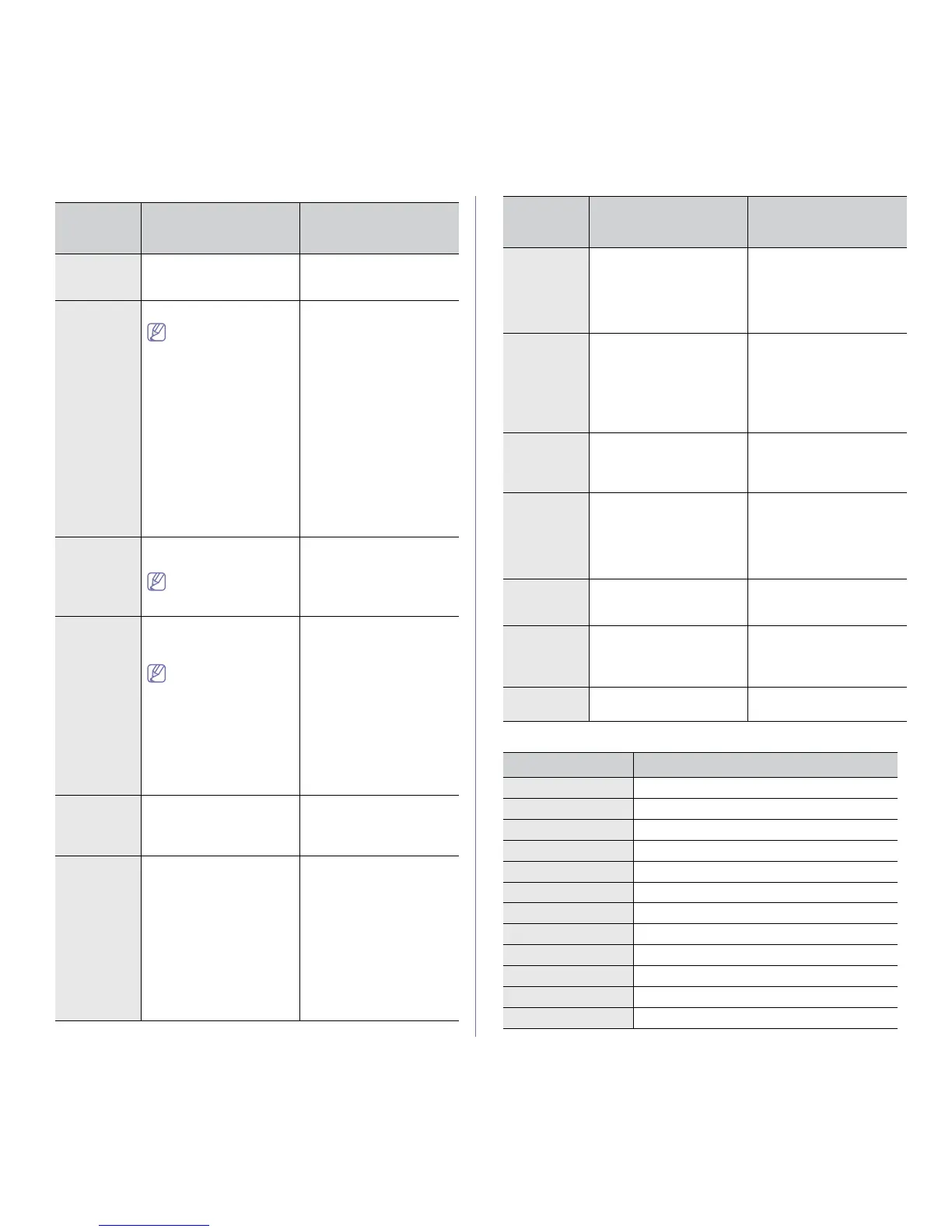
DEFINITION DESCRIPTION
/s or
/S
Starts silent installation. Installs machine drivers
without prompting any UIs
or user intervention.
/p”<port
name>” or
/P”<port
name>
”
Specifies printer port.
Network Port will be
created by use of
Standard TCP/IP Port
monitor. For local port,
this port must exist on
system before being
specified by com-
mand.
Printer port name can be
speci
fied as IP address,
hostname, USB local port
name or IEEE1284 port
name.
For example
• /p”xxx.xxx.xxx.xxx” in
where, “xxx.xxx.xxx.xxx”
means IP address for
network printer.
/p”USB001”, /P”LPT1:”,
/p”hostname”
• When installing the
driver silently in Korean,
type in-Setup.exe /s
/L"0x0012” or
Setup.exe /s /L"18” .
/a”<dest_pat
h>” or
/A”<dest_pat
h>
”
Specifies destination path
for instal
lation.
The destination path
should be a fully quali-
fied path.
Since machine drivers
should be installed on the
OS specific location, this
command applies to only
application software.
/i”<script file-
name>” or
/I”<script file-
name>”
Specifies customized install
script file for
custom opera-
tion.
The script filename
should be a fully quali-
fied filename.
Customized script file can
be
assigned for customized
silent installation. This script
file can be created or modi-
fied through provided
in
staller customizing utility
or by text editor.
Note: This customized
script fil
e is prior than
default installer setting in
setup package but not prior
than command-line parame-
ters.
/n”<Printer
name>” or
/N”<Printer
name>
”
Specifies printer name.
Printer instance
shall be
created as specified printer
name.
With this parameter, you
can add printer instances as
your wishes.
/nd or
/ND
Commands not to set the
installed driver as a default
machine driver.
It indicates installed
machine driver will not be
the default machine driver
on your system if there are
one or more printer drivers
installed. If there is no
installed machine driver on
your system, then this
option won’t be applied
because Windows OS will
set installed printer driver as
a default machine driver.
/x or
/X
Uses existing machine
dri
ver files to create printer
instance if it is already
installed.
This command provides a
way to install a printer
instance that uses installed
printer driver files without
installing an additional
driver.
/up”<printer
name>” or
/UP”<printer
name>
”
Removes only specified
pri
nter instance and not the
driver files.
This command provides a
way
to remove only speci-
fied printer instance from
your system withou
t effect-
ing other printer drivers. It
will not remove printer driver
files from your system.
/d or
/D
Uninstalls all device drivers
and applications from your
system.
This command will remove
all installed device drivers
and application software
from your system.
/v”<share
name>” or
/V”<share
name>
”
Shares installed machine
an
d add other available
platform drivers for Point &
Print.
It will install all supported
Windows OS platform’s
machine drivers to system
and share it with specified
<share name> for point and
print.
/o or
/O
Opens Printers and Faxes
folder after installation.
This command will open
Printers and Faxes folder
after the silent installation.
/f”<log file-
name>” or
/F”<log file-
name>”
Specifies log filename.
The default log file is cre-
ated in the system temp
fold
er if not specified.
It will create a log file to a
specified folder.
/h, /H or /? Shows Command-line
Usage.
Getting started_ 31
Language code
CODE LANGUAGE
0X0009 English
0X0012 Korean
0X0804 Simplified Chinese
0X0404 Traditional Chinese
0x040c French
0X0007 German
0X0010 Italian
0X000a Spanish
0X0013 Dutch
0X001D Swedish
0X0006 Danish
0X000b Finnish
COM-
MAND-
LINE
DEFINITION DESCRIPTION



 To Next Page