Maintenance_ 72
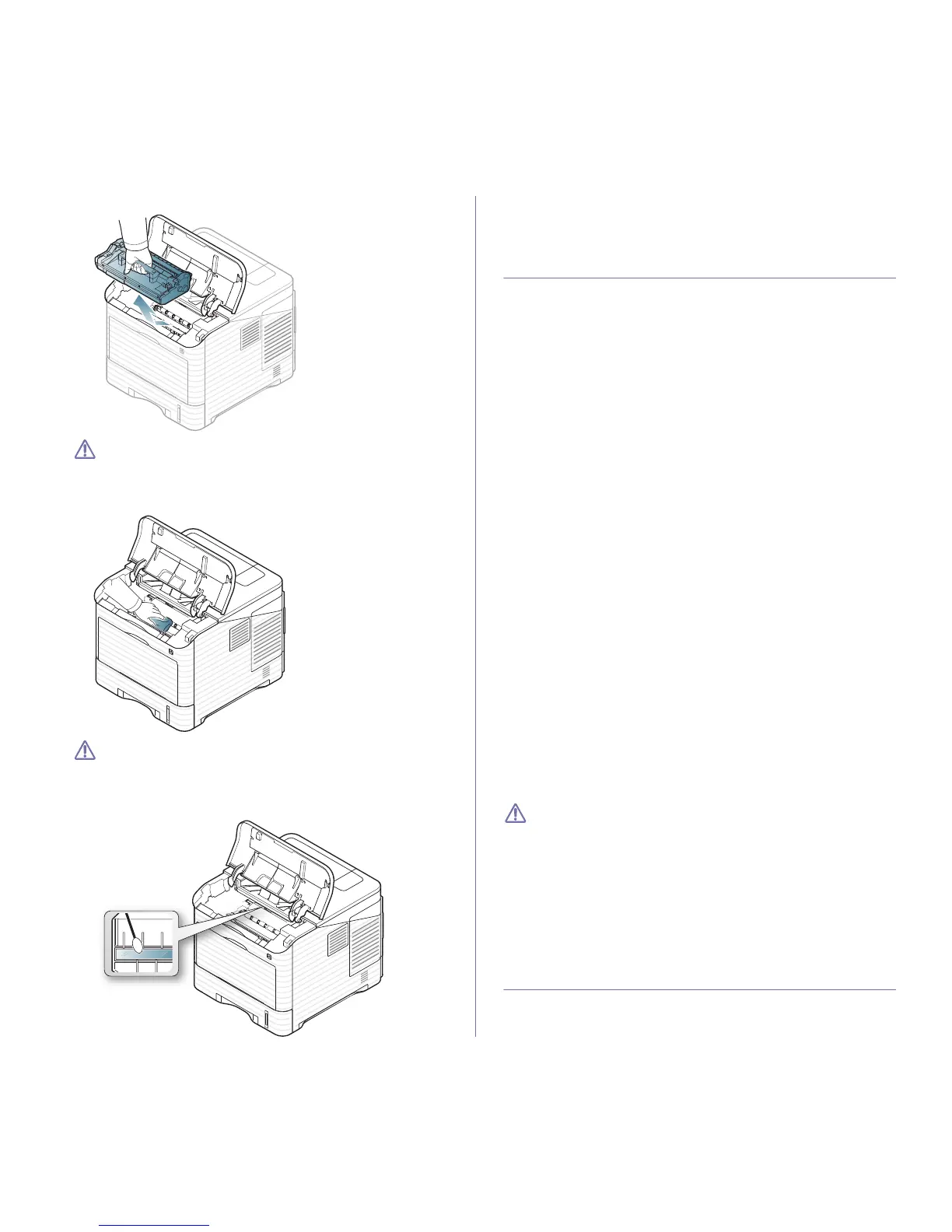
3. Pull the imaging unit out. Set it on a clean flat surface.
• Do not touch the green surface of the imaging unit.
• To
prevent damage to the imaging unit, do not expose it to light
for more than a few minutes. Cover it with a piece of paper, if
necessary.
4. With a dry lint-fre
e cloth, wipe away any dust and spilled toner.
• While cleaning the inside of the machine, be careful not to
touch the transfer roller, located underneath the toner car-
tridge. Oil from your fingers can cause print quality problems.
5. Locate an
d clean the long strip of glass (LSU) inside the machine and
using a cotton swab.
6. Reinsert the imaging unit and toner cartridge.
7. C
lose the top cover. Make sure that the cover is securely closed.
8. Pl
ug in the power cord and turn the machine on.
STORING THE TONER CARTRIDGE
Toner cartridges contain components that are sensitive to light, temperature
and humidity. Samsung suggests users follow the recommendations below
to ensure the optimum performance, highest quality and longest life from
your new Samsung toner cartridges.
Store this cartridge in the same environment as the printer it will be used in;
this should be in controlled office temperature and humidity conditions. The
toner cartridge should remain in its original, unopened package until instal-
lation – If original packaging is not available, cover the top opening of the
cartridg
e with paper and store in a dark cabinet.
Opening the cartridge package prior to use dra
matically shortens its useful
shelf and operating life. Do not store on the floor. If the toner cartridge is
removed from the printer, always store the cartridge:
• Insi
de the protective bag from the original package.
• Store lyin
g flat (not standing on end) with the same side facing up as if
they were installed in the machine.
• D
o not store consumables in;
- Temp
erature greater than 40°C (104°F).
- Humidi
ty range not less than 20% nor not greater than 80%.
- An environ
ment with extreme changes in humidity or temperature.
- Direct su
nlight or room light.
- Dusty pl
aces.
- A
car for a long period of time.
- An environ
ment where corrosive gases are present.
- An
environment with salty air.
Handling instructions
• Do not touch the surface of the photosensitive drum in the cartridge.
• D
o not expose the cartridge to unnecessary vibrations or shock.
• N
ever manually rotate the drum, especially in the reverse direction; this
can cause internal damage and toner spillage.
Use of non-Samsung and refilled toner cartridge
Samsung Electronics does not recommend or approve the use of non-Sam-
sung brand toner cartridges in your printer incl
uding generic, store brand,
refilled, or remanufactured toner cartridges.
Samsung’s printer warranty does not cover damage to the machine
caused by the use of a refilled, remanufactured, or non-Samsung
brand toner cartridge.
Estimated cartridge life
Estimated cartridge life (the life of the toner cartridge yield) depends on the
amount of toner that print jobs require. The actual print-out number may
vary depending on the print density of the pages you print on, operating
environment, printing interval, media type, and/or media size. For example,
if you print a lot of graphics, the consumption of the toner is high and you
may need to change the cartridge more often.
TIPS FOR MOVING & STORING YOUR MACHINE
• When moving the machine, do not tilt or turn it upside down. Otherwise,
the inside of the machine may be contaminated by toner, which can
cause damage to the machine or bad print quality.



 To Next Page