Machine status and advanced features_ 65
DIRECT USB
You can use USB memory with your machine (see "Using USB memory
device" on page 60).
JOB MANAGEMENT
This menu item is available when the optional memory or hard disk drive
(HDD) is installed (see "Printing with the optional memory or hard disk drive"
on page 102).
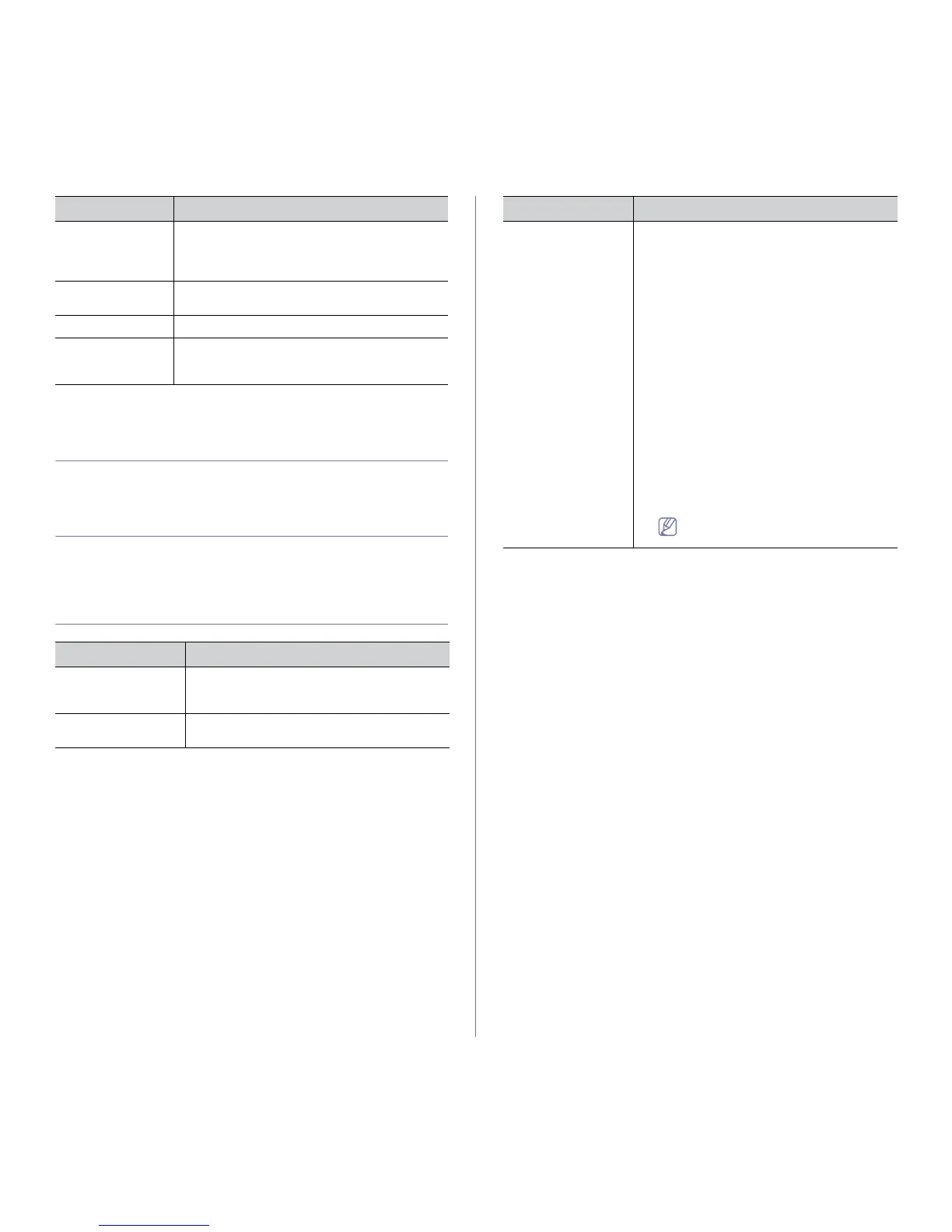
ADMIN SETUP
ITEM DESCRIPTION
Password Protect You can set the password to access the Admin
Setup menu. Select On to use this option and
enter the password
Change Password You can change the password for accessing the
Adm
in Setup.
Maintenance This menu allows you to maintain y
our machine.
• Cl
ean Fuser: Cleans the fuser by printing a
sheet. The printed sheet has toner debris on
it.
• CLR Empty Ms
g.: Prevents the TonerLow
Alert message from appearing on the dis-
play.
• Su
pplies Info.: This item allows you to
check how many pages are printed and how
much toner are left in the cartridge.
• To
nerLow Alert: If toner in the cartridge
has run out, a message informing user to
change the toner cartridge appears. You can
set the option for this message to appear or
not.
• Ram Disk: You can enable/disable RAM
disk to
manage jobs. Depending on the
installed optional memory size, you can set
the RAM disk size between 32 and 64 MB.
This option does not appear if you have
installed hard disk drive (HDD).
Reboot the machine to apply the
change.
Clear Settings This menu performs a simple reset and restores
the factory default settings for the network configu-
ration. This setting will only take effect after you
have reset the printer.
Network Configu-
ration
This menu allows you to print a page showing the
network parame
ters you set.
Net. Activate
You can set to use Ethernet on or off.
Http Activate You can set to use SyncThru™ Web Service or
not. If you set this option to “off”, users cannot
access SyncThru™ Web Service.
a.This menu only appears when an optional wireless network interface
has been installed.
ITEMS DESCRIPTION ITEM DESCRIPTION



 To Next Page