Supplies and accessories_ 95
12.supplies and accessories
This chapter provides information on purchasing supplies, accessories and maintenance parts available for your machine.
• How to purchase
• Available supplies
• Available accessories
• Maintenance parts
• Replacing the toner cartridge
• Replacing the imaging unit
• Necessary precautions to take when installing accessories
• Activating the added accessories in printer properties
• Installing a wireless network interface card
• Upgrading a memory module
• Installing a hard disk
• Printing with the optional memory or hard disk drive
• Replacing the stapler cartridge
Available accessories may differ from country to country. Contact your
sales representatives to obtain the list of available accessories.
HOW TO PURCHASE
To order Genuine Samsung supplies, accessories and, maintenance parts,
contact your local Samsung dealer or the authorized retailer where you pur-
chased your machine. You can also visit www.samsung.com/supplies,
select your country/region, and obtain information on calling for service.
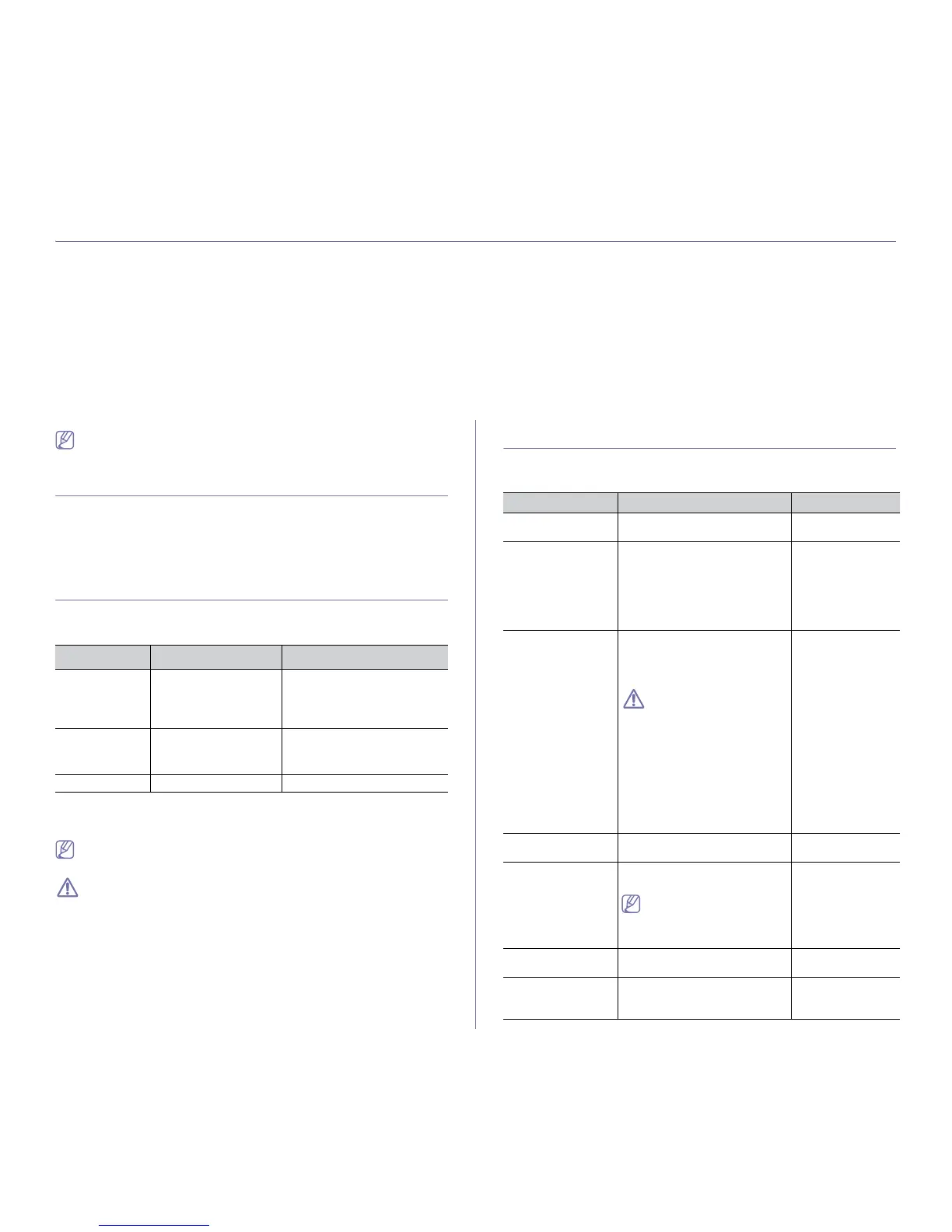
AVAILABLE SUPPLIES
When supplies reach their lifespan, you can order the following types of
supplies for your machine:
TYPE
AVERAGE YIELD
a
a.Declared yield value in accordance with ISO/IEC 19752.
Standard
capacity toner
ca
rtridge
Approx. 10,000 pages MLT-D309S
High capacity
toner cartridge
Approx. 30,000 pages MLT-D309L
Imaging Unit Approx. 80,000 pages MLT-R309
To replace a toner cartridge see "Replacing the toner cartridge" on page 96.
Depending on the options and percentage of image area, job mode
used, the toner cartridge’s lifespan may differ.
You must purchase supplies, including toner cartridges, in the same
country where you purchased your machine. Otherwise, supplies will
be incompatible with your machine since the system configurations
vary from country to country.
AVAILABLE ACCESSORIES
You can purchase and install accessories to enhance your machine’s per-
formance and capacity.
PART NAME
ACCESSORY FUNCTION PART NAME
Memory module Extend your machine’s mem-
ory capacity (512 MB).
ML-MEM170
Optional tray If you are experiencing paper
supply problems, you can
attach an additional trays. You
can print documents in various
sizes and types of print materi-
als.
• ML
-5510 6510
Series:
ML-S6510A
• ML
-5512 6512
Series:
ML-S6512A
High Capacity
F
eeder (HCF)
If you are frequently experienc-
ing paper supply problems, you
can attach an hi
gh capacity
tray.
When using the optional
High Capacity Feeder,
you must install the foot
as shown in the High
Capacity Feeder Installa-
tion Guide provided with
the optio
nal High Capac-
ity Feeder. Otherwise, the
machine can fall down
and break, causing injury
to human.
• ML-5510 6510
Series:
ML-H6510A
• ML
-5512 6512
Series:
ML-H6512A
Multbin Mailbox You can stack printouts in 4 dif-
ferent stacker.
ML-MBT65
Finisher (Stacker &
Stapler)
You can sort and staple print-
outs.
HDD needs be installed to
use some of the finisher
related options in the
printer driver.
ML-OCT65
Duplex unit Allows you to print on both
side
s of the paper.
ML-U5510A
Hard disk drive
(HDD
)
Allows you to enhance the
machine’s capability and print in
various ways.
ML-HDK470



 To Next Page