Printing_ 49
6.printing
This chapter explains common printing tasks.
This chapter includes:
• Printer driver features
• Basic printing
• Opening printing preferences
• Using help
• Using special print features
• Using direct printing utility
• Changing the default print settings
• Setting your machine as a default machine
• Printing to a file (PRN)
• Macintosh printing
• Linux printing
• UNIX printing
The procedures in this chapter are mainly based on Windows XP.
PRINTER DRIVER FEATURES
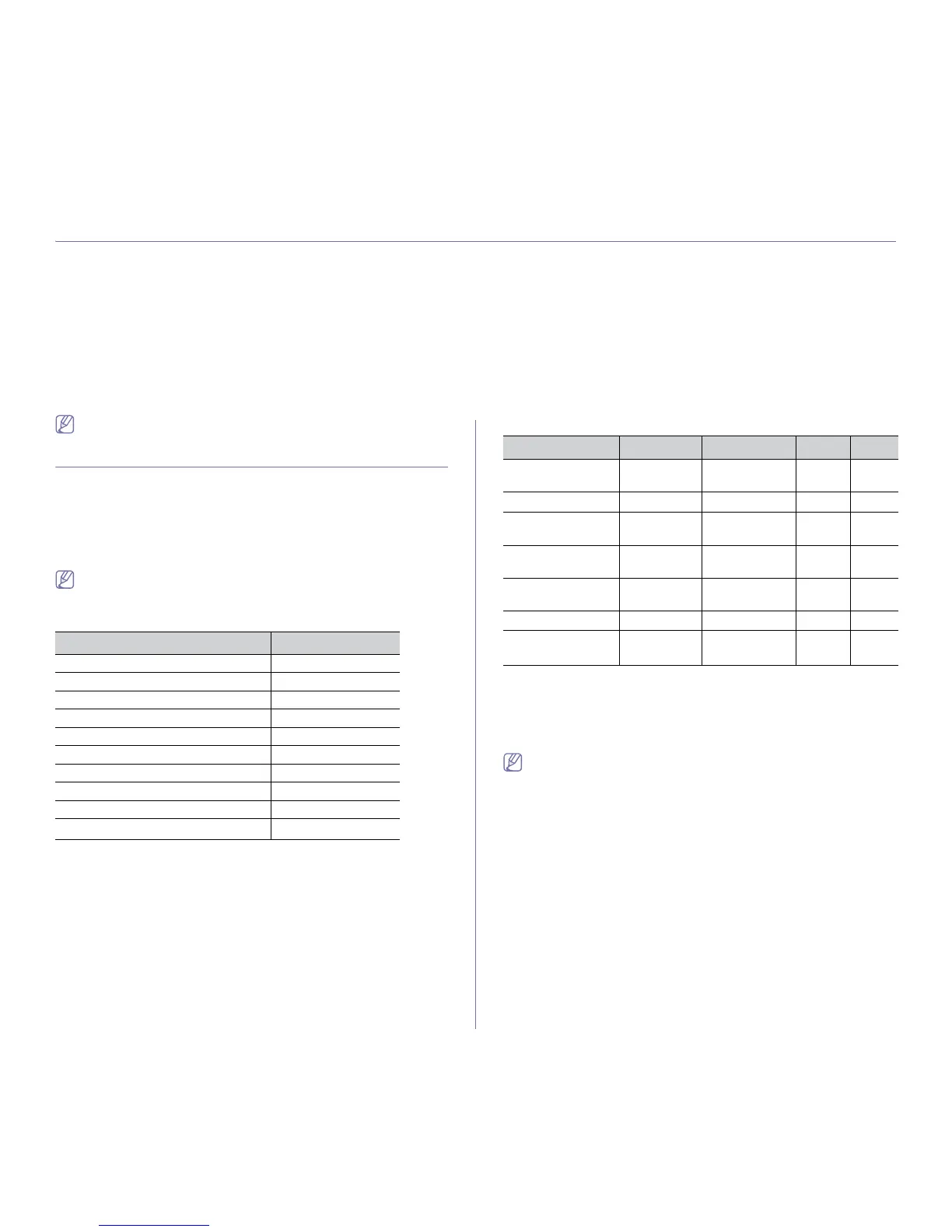
Your printer drivers support the following standard features:
• Paper orie
ntation, size, source and media type selection
• Number of co
pies
In addition, you can use various special printing features. The following
table shows a general overview of features supported by your printer driv-
ers:
Some models or operating system may not support the certain fea-
ture(s) in the following table.
PCL Printer driver
FEATURE WINDOWS
Print quality option ●
Booklet printing ●
Poster printing ●
Multiple pages per sheet ●
Fit to page printing ●
Reduce and enlarge printing ●
Different source for first page ●
Watermark ●
Overlay ●
Double-sided printing (duplex)
a
a.For some models, optional duplex unit needs to be installed
to use the duplex feature (see "Features by Models" on
page 23).
●
(●: Sup
ported, Blank: Not supported)
PostScript Printer driver
FEATURE WINDOWS MACINTOSH LINUX UNIX
Print quality
op
tion
● ● ● ●
Poster printing ●
Multiple pages
per
sheet
● ● ●
(2, 4)
●
(2, 4)
Fit to page print-
ing
● ● ● ●
Reduce and
enlar
ge printing
● ●
Watermark ●
Double-sided
printing (duplex)
a
a. For some models, optional duplex unit needs to be installed to use the
duplex feature (see "Features by Models" on page 23).
● ● ● ●
(●: Supp
orted, Blank: Not supported)
XPS Printer driver
• XPS printer driver can be installed only on Windows Vista OS or
higher.
• You can install the XPS printer driver when you insert the software
C
D into your CD-ROM drive. When the installation window
appears, select Advanced Installation > Custom Installation.
You can select the XPS printer driver in the Select Software and
Utilities to Install window.
• Install
optional memory when an XPS job does not print because
the printer is out of memory.



 To Next Page